Loading...
Loading...
Loading...
Loading...
Loading...
Loading...
Loading...
Loading...
Loading...
Loading...
Loading...
Loading...
Loading...
Loading...
Loading...
Loading...
Loading...
Loading...
Loading...
Loading...
Loading...
Loading...
Loading...
Loading...
Loading...
Loading...
Loading...
Loading...
Loading...
Loading...
Loading...
Loading...
Loading...
Loading...
Loading...
Loading...
Loading...
Loading...
Loading...
Loading...
Loading...
Loading...
Loading...
Loading...
Loading...
Loading...
Loading...
Loading...
Loading...
Loading...
Loading...
Loading...
Loading...
Authentication and authorization is done through OAuth 2.
To get access to the protected resources OAuth 2.0 uses Access Tokens. An Access Token is a string representing the granted permissions.
To access to Dataloy API, you must request an Access Token.
To obtain an access token you need to do a POST request, to the provided URL, passing the client id and client secret in the payload
Example of POST payload to token URL
If all goes well, you'll receive an HTTP 200 response with a payload containing access_token, token_type, and expires_in values:
To call an API endpoint you must pass the retrieved Access Token as a Bearer token in the Authorization header of your HTTP request.
curl https://{URL}/ws/rest/{Resource}-H "Authorization: Bearer eyJ.........qLbZQ"
When an endpoint is invoked with an expired token the server sends a HTTP 401 response with the following payload:
The client should not ask for a new token for each call but use the same token as long as it is valid.
The Dataloy VMS API documentation is intended as the main source of information and answers to queries and issues regarding integration with Dataloy VMS. It provides an overview of how integration with Dataloy VMS may be accomplished and detailed information about each type of integration.
High focus has been placed on quality of standard, substance and user-friendliness. The API knowledge base is kept continuously up-to-date. There is also a questions & answers section and a troubleshooting article section..
To search/navigate either click the links below or use the left-hand navigation panel to search by keyword, category or hierarchy.
API:
:
Questions & Answers, Troubleshooting Articles:
grant_type
Set this to "client_credentials".
client_id
Your M2M Client ID.
client_secret
Your M2M Client Secret.
audience
The audience for the token, which is your API. For production environments use "https://dataloy". For test and DEV environments use "https://dataloy.dev"
{
"access_token": "eyJ0eXAiOiJKV1QiLCJhbGciOiJSUzI1....................fXClgZe2pFQBxPqARz9xfWlrFnc1El34ZPyRLoGlLIJLiE0NvOA1JLWycXCNo9N7AenAKEbj-gb2eW4TnpAiidDRmMV3m36UCuRAxWdVcvsRaJxXcquf79wAgEoEKriJklCxwKOnOyngbTZ2vDNim0nrw6-W0NOjRARkkY_w-188dY829z_urjsWuCC7TOMwfrQDLL2h72L2UrqlyL0hHMGQesau6h8KUsGg3EIoWPQ-Pf6o2CNCtGyr7DNuuLpCw9HqXiz5v-RIvKLBoaRMAAJJqBeXvpPvOcyicBlalcTWB5NMCe6Ldi9xqFmwjhO1CAtIk9QUa8wsOcXxg",
"expires_in": 86400,
"token_type": "Bearer"
}{
"statusCode": 401,
"statusText": "Unauthorized",
"message": "Token expired.",
"date": "2019-11-13T06:26:01",
"statusFamily": "CLIENT_ERROR",
"method": "GET",
"uri": "http://platform-dev.dataloy.com/ws/rest/Cargo?filter=subCargos.freight%28GTE%292500000"{
"client_id":"G99j845dM4MtckQlKt8E6o......",
"client_secret":"-mMElVOMzvht2SyQPfVh-WIaPCbOxRdWN5YngBxtBKybQmli-....",
"audience":"https://dataloy.internal",
"grant_type":"client_credentials"
}Before setting up and testing a bunker transaction integration other integrations need to be in place.
When a bunker transaction is posted in Dataloy VMS, the document status is set to Ready-for-Posting. Set up a scheduled task and use the request under Data Transaction to extract bunker transactions that are ready for posting. When a bunker transaction is transferred to accounting, update the status to Posted.
Test data for bunker transactions can be generated in Booking and Operations > Bunkers-FO tab > Bunker Transactions.
To get bunker transactions that are ready for posting in the following subscription can be created:
Alternatively a scheduled job can be setup to use the following request:
Get bunker transactions that are ready for posting to accounting
Post Transaction
When an invoice is successfully transferred to the accounting system, the document status has to be updated to Posted in Dataloy VMS. This is done in a PUT request:
Update status to posted for a specific invoice
GET /Document?filter=invoicingStatus.statusTypeCode(EQ)RFP&filter=documentType.documentType(EQ)ACC
Accounting systems often require voyage related data before transferring accounting related transactions. Set up a scheduled task and use the request under Data Transaction to gather all voyages that has been modified since the last time a scheduled task was run.
Modify some existing voyages in the Booking and Operations module for testing, for example, changing a date in the schedule (note: changing dates will also affect the schedule for other voyages).
To get new voyages in Webhooks the following subscription can be created:
To get updated for all changes on a voyage the following webhook subscription can be created:
To extract all fixed voyages from Dataloy VMS that has been modified since a given date, use request below in conjunction with the base URL:
Get all fixed voyages modified since given date
No post transaction is required.
To insert an actual in Dataloy VMS:
An actual record should ONLY ever have one document line. Never more.
The document date should be the first day of the period month.
Client can choose to insert actuals one by one or group actuals by period, currency, voyage, account and company
Set a unique document number (documentNo).
Use request:
Updated for API version 2.0.0 using the new required date format yyyy-dd-MMThh:mi:ss to conform ISO 8601, (prior versions has date format: yyyy-dd-MM hh:mi:ss).
Post an actual to Dataloy
No post transaction is required.
{
"eventType":"U",
"user": the user code to be used in the subscription,
"objectType":"Document",
"expression": "dlpObject.getInvoicingStatus() != null && dlpObject.getInvoicingStatus().getStatusTypeCode().equals(\"RFP\") && (dlpObject.getDocumentType().getDocumentType().equals(\"ACC\"))",
"url":"your webhook url"
}PUT /Document/{key}
{
"invoicingStatus": "POS"
}{
"eventType": "U",
"user":
"objectType": "VoyageHeader",
"expression": "(oldDlpObject.getVoyageStatus() != null && oldDlpObject.getVoyageStatus().getStatusTypeCode().equals(\"EST\") && dlpObject.getVoyageStatus() != null && dlpObject.getVoyageStatus().getStatusTypeCode().equals(\"NOM\")) || (oldDlpObject.getReferenceNo() == null && dlpObject.getReferenceNo() != null && dlpObject.getVoyageStatus() != null && dlpObject.getVoyageStatus().getStatusTypeCode().equals(\"NOM\"))",
"url":
}{
"eventType": "U",
"user":
"objectType": "VoyageHeader",
"url":
}GET /VoyageHeader?filter=modifiedDate(GTE)2014-01-01T12:30:00POST /Document
{
"documentAmount": 10000.00,
"companyCurrencyAmount": 10000.00,
"sourceCurrencyAmount": 10000.00,
"documentDate": "2014-01-01T00:00:00",
"documentType": "ACC",
"documentNo": "111111187",
"company": "01",
"invoicingStatus": "POS",
"documentCurrency": "USD",
"documentText": "text here",
"glAccount": "1000",
"documentLines":
[
{
"documentAmount": 10000.00,
"companyCurrencyAmount": 10000.00,
"sourceCurrencyAmount": 10000.00,
"documentCurrency": "USD",
"exchangeRate": 1,
"invoicingStatus": "POS",
"documentLineText": "text here",
"voyage": "VOY100",
"glAccount": "1000"
}
]
}To return a defined number of objects for any Dataloy resource it has to be specified in the URL the page number, pageNumber parameter, and the number of objects that the page has to contain, limit parameter. For example:
/ws/rest/Document?pageNumber=1&limit=10&filter=documentAmount(GT)100000
it will return the first page containing at max 10 Document objects having the property documentAmount greater than 100000. In the response will be added an header parameter called totalObjectsNumber that indicates the total number of objects of the endpoint.
From API 5.18 is possible to avoid to get totalObjectsNumber sending the HTTP header parameter noCount = YES, this will allow a bit better performance.
Another example:
it will return the fourth page containing at max 10 Vessels objects having the countryCode property equals to EQ.
API 5.21 supports sub-queries during any API query.
The syntax is:
filter=attributeName(OPERATOR){ResourceName.attributeName[filter_1],[filter_2],[filter_n]}
en-capsuling sub-queries between {} and the filters inside the sub-queries as list inside [ ]
Here an example to get the ongoing cargoes of a list of business partners:
http://dataloy.com/ws/rest/Cargo?filter=charterer.businessPartnerCode(IN)(133105,105882,123125,136200)&filter=key(IN)({Cargo.key[cargoPorts.portCall.eventLogs.event.eventCode(EQ)ARR][cargoPorts.portCall.eventLogs.eventLogDate(GT)2020-06-18T17:02:21][cargoPorts.cargoPortSequence(EQ)1],[cargoPorts.reasonForCall.reasonForCall(EQ)D]})&filter=key(IN)({Cargo.key[cargoPorts.portCall.eventLogs.event.eventCode(EQ)DEP][cargoPorts.portCall.eventLogs.eventLogDate(LT)2020-06-18T17:02:21][cargoPorts.cargoPortSequence(EQ)1],[cargoPorts.reasonForCall.reasonForCall(EQ)L]})
][cargoPorts.portCall.eventLogs.eventLogDate(GT)2020-06-18T17:02:21][cargoPorts.cargoPortSequence(EQ)1],[cargoPorts.reasonForCall.reasonForCall(EQ)D]%7D)&filter=key(IN)(%7BCargo.key[cargoPorts.portCall.eventLogs.event.eventCode(EQ)DEP][cargoPorts.portCall.eventLogs.eventLogDate(LT)2020-06-18T17:02:21][cargoPorts.cargoPortSequence(EQ)1],[cargoPorts.reasonForCall.reasonForCall(EQ)L]%7D)
The character { must be encoded with %7B and } with %7D
It is possible to delete multiple objects, of a given resource, sending as URL parameters the list of keys:
DELETE: http://{host}/ws/rest/{Resource name}/delete?key={key 1}&key={key 2}&key={key 3}...
All the objects will be deleted in the same transaction
Furthermore, Bulk Delete supports object resequencing. This is useful in cases where the order of the objects is crucial and has to be precise, but also it's required to delete several objects at once. For instance, BunkerCategories on Vessel are following strict priority order, thus upon deletion, the order should be re-aligned.
Re-sequencing is active ONLY when at least a valid 'resequenceBy' string is passed.
DELETE: http://{host}/ws/rest/{ResourceName}/delete?resequenceBy={sequence field}&parentProperty={parent property}&key={key1}&key={key2}...
Sequence field - is a string identifying the 'sequence property'. For example, it would be portCallSequence for ResourceName = PortCall.
Parent property - Optionally filter by the parent group using a string specifying the parent field. For example, if ResourceName is PortCall, pass the field ownedByVoyage to re-sequence only PortCalls belonging to the same voyage.
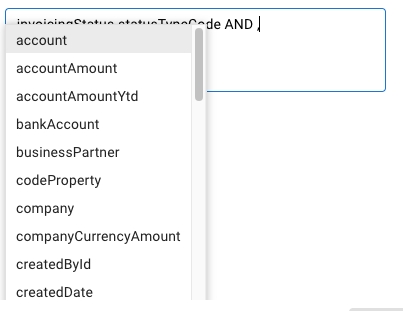
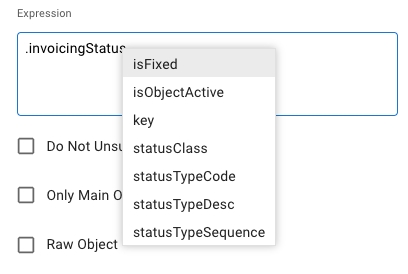
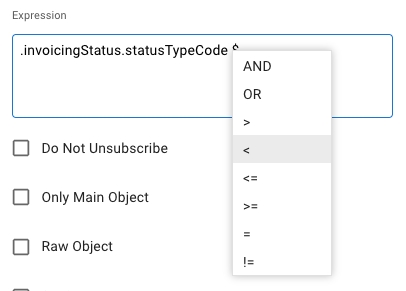
The user need not know the attribute names in order to use an expression and will have the possibility to select an attribute from the list of attributes on the given objectType in the subscription and can chose the operators from the list of operators.
This is achieved by the use of special characters as listed below-
using . (Dot) in the expression field will list all the sub objects for the given object type. The list of attributes will be filtered based on the characters typed
$(dollar) will list the operators that can be used
using old or ,(comma) will enable the use of oldDlpObject in the expression
For example, instead of using this in an expression
a simple of achieving this would be to use
The need for the user to create expressions with null checks for the objects is also removed and will be taken care by the platform. Expressions will work the same way if the object is checked for null or not. For example both of the below shall work the same.
Refer for more details about creating an expression subscription in vms
dlpObject.getInvoicingStatus() != null && dlpObject.getInvoicingStatus().getStatusTypeCode().equals(“RFP”) && (dlpObject.getDocumentType().getDocumentType().equals(“ACP”).invoicingStatus.statusTypeCode = RFP && .documentType.documentType = ACP OR .documentType.documentType = ACP .invoicingStatus.statusTypeCode = RFP && .documentType.documentType = ACP OR .documentType.documentType = ACP
.invoicingStatus != null && invoicingStatus.statusTypeCode = RFP && .documentType.documentType = ACP OR .documentType.documentType = ACP It is possible to create SecurityRole that remove the access to a set of fields of a given resource, both in read and write mode.
For example it is possible to create a role that remove the access to the voyageResult field of the Voyage resource
All the users that will have such role, in the response of the Voyage resource, the field voyageResult will be not present.
POST: http://dataloy.com/ws/rest/SecurityRole
{
"roleName": "VoyageResult",
"attributeForbiddens": [
{
"objectName": "Voyage",
"attributeName": "voyageResult",
"read": true,
"write": true
}
]
}API 5.24 offers support for XML transformations for any of the resource of the data model.
Using XSLT 3.0 is possible inject XSL strings to any GET request to translate the default JSON response in a XML string based on the XSL in input.
To achieve this the URLs to use are
/ws/rest/{ResourceName}/xml
/ws/rest/{ResourceName}/xml/{key}
the XSL must be set as HTTP header parameter with the name xsl.
Example of Cargo transformation:
XSL:
URL:
Output:
<?xml version="1.0" encoding="UTF-8"?>
<Cargo>
<CommodityName>FERTILIZER</CommodityName>
<LoadPort>AMSTERDAM</LoadPort>
<LoadPortArrival>2006-06-14T12:17:00</LoadPortArrival>
<DischargePort>LIDKOPING</DischargePort>
<DischargePortArrival>2006-06-17T19:53:00</DischargePortArrival>
<IsTc>false</IsTc>
<VesselCode>FETR</VesselCode>
<VesselName>FEHN TRADER</VesselName>
</Cargo><?xml version="1.0" encoding="UTF-8"?>
<xsl:stylesheet xmlns:xsl="http://www.w3.org/1999/XSL/Transform" version="3.0" xpath-default-namespace="http://www.w3.org/2005/xpath-functions">
<xsl:output indent="yes" />
<xsl:strip-space elements="*" />
<xsl:param name="json" />
<xsl:mode on-no-match="deep-skip" />
<xsl:template name="init">
<xsl:apply-templates select="json-to-xml($json)" />
</xsl:template>
<xsl:template match="/array">
<Cargos>
<xsl:apply-templates />
</Cargos>
</xsl:template>
<xsl:template match="/array/map | /map">
<Cargo>
<xsl:apply-templates />
</Cargo>
</xsl:template>
<xsl:template match="*[@key='voyage']">
<IsTc>
<xsl:value-of select="*[@key='isTc']" />
</IsTc>
<VesselCode>
<xsl:value-of select="*[@key='vessel']/*[@key='vesselCodes'][1]/*/*[@key='vesselCode']" />
</VesselCode>
<VesselName>
<xsl:value-of select="*[@key='vessel']/*[@key='vesselName']" />
</VesselName>
</xsl:template>
<xsl:template match="*[@key='commodity']">
<CommodityName>
<xsl:value-of select="*[@key='commodityName']" />
</CommodityName>
</xsl:template>
<xsl:template match="*[@key='cargoPorts']">
<xsl:apply-templates select="*/*" />
</xsl:template>
<xsl:template match="*[@key='portCall']">
<xsl:variable name="reasonForCall" select="*[@key='reasonForCall']/*[@key='reasonForCall']" />
<xsl:variable name="name" select="*[@key='port']/*[@key='portName']" />
<xsl:if test="$reasonForCall = 'L' ">
<LoadPort>
<xsl:value-of select="$name" />
</LoadPort>
<LoadPortArrival>
<xsl:apply-templates select="*/*" />
</LoadPortArrival>
</xsl:if>
<xsl:if test="$reasonForCall = 'D' ">
<DischargePort>
<xsl:value-of select="$name" />
</DischargePort>
<DischargePortArrival>
<xsl:apply-templates select="*/*" />
</DischargePortArrival>
</xsl:if>
</xsl:template>
<xsl:template match="*[@key='eventLogs']/*">
<xsl:variable name="code" select="*[@key='event']/*[@key='eventCode'][text() = 'ARR']" />
<xsl:if test="$code">
<xsl:value-of select="*[@key='eventLogDate']" />
</xsl:if>
</xsl:template>
</xsl:stylesheet>It is possible to adjust the number of fields that have to be returned from a resource. It's possible to both increase and decreases the number of fields from the default view. So if only field A and B from a resource is needed and the other X number of fields can be ignored, it can be specified in the header of the request. This will reduce the overhead of data transferred and improve performance. If more fields are needed in one request, to avoid making a second request to get all the data that is needed, this can also be done. So if fields A, B and C are returned in the default view, but also field D is needed, this can be specified in the header.
Retrieving data from a resource may provide more information than needed. Fields with data to be returned can be specified by first adding a header field and then specifying the fields to be returned in the header field value. The header field value is specified as a JSON message following the same structure as the resource structure that is used when making the request. This enables fields to be specified in main- and sub-objects.
The examples listed illustrate how it is used for a business partner. The procedure is, however, the same for all resources. The key and self attribute will always be returned, but the number of displayed/hidden fields can be customized.
Business Partner without any field restriction will result in ( view example):
Examples
1. Return Business Partner name only:
fields: {"businessPartnerName":"*"}
2. Return address1 only:
fields: {"addresses": {"address1":"*"}}
Note that addresses is an array, but for the fields value it should be treated as a field, so do not include [ ]
3. Return Business Partner name and address1:
fields: {"businessPartnerName":"*", "addresses":{"address1":"*"}}
{
"businessPartnerName": "Big Customer",
"self": "https://dev.dataloy.com/ws/rest/BusinessPartner/1045574",
"key": 1045574
}{
"addresses": [
{
"address1": "Halfdan Kjerulfs gate 4",
"key": 5993125,
"self": "https://dev.dataloy.com/ws/rest/Address/5993125"
}
],
"self": "https://dev.dataloy.com/ws/rest/BusinessPartner/1045574",
"key": 1045574
}{
"businessPartnerName": "Big Customer",
"businessPartnerSort": "BIG.",
"businessPartnerCode": "45999",
"codeProperty": "businessPartnerCode",
"bankAccounts": [],
"individuals": [],
"user": null,
"createdDate": "2014-01-27T18:38:52",
"changedById": 3689599,
"createdById": 1045293,
"externalObjectKey": null,
"modifiedDate": "2024-09-29T10:59:34",
"portAgentType": null,
"bankAccount": null,
"paymentTerms": {
"key": 1004281,
"self": "https://dev.dataloy.com/ws/rest/PaymentTerms/1004281"
},
"businessUnit": {
"key": 1000576,
"self": "https://dev.dataloy.com/ws/rest/BusinessUnit/1000576"
},
"baselineTerm": {
"key": 1004265,
"self": "https://dev.dataloy.com/ws/rest/BaselineTerm/1004265"
},
"contactInfo": [
{
"key": 5987711,
"self": "https://dev.dataloy.com/ws/rest/ContactInfo/5987711"
}
],
"businessPartnerName2": null,
"companyRegistrationNo": "987987987",
"isInterCompany": false,
"isTotalCommissionPayable": false,
"maxAdvancePaymentPercent": 100,
"rating": null,
"ratingExpiryDate": null,
"vatNumber": null,
"addresses": [
{
"key": 5993125,
"self": "https://dev.dataloy.com/ws/rest/Address/5993125"
}
],
"businessPartnerLink": {
"key": 1004433,
"self": "https://dev.dataloy.com/ws/rest/BusinessPartner/1004433"
},
"businessPartnerType": {
"key": 1000032,
"self": "https://dev.dataloy.com/ws/rest/BusinessPartnerType/1000032"
},
"companyBankAccount": null,
"www": [
{
"key": 5987713,
"self": "https://dev.dataloy.com/ws/rest/Www/5987713"
}
],
"payee": {
"key": 1004433,
"self": "https://dev.dataloy.com/ws/rest/BusinessPartner/1004433"
},
"remarks": [],
"isObjectActive": true,
"key": 1045574,
"self": "https://dev.dataloy.com/ws/rest/BusinessPartner/1045574"
}
{
"businessPartnerName": "Big Customer",
"addresses": [
{
"address1": "Halfdan Kjerulfs gate 4",
"key": 5993125,
"self": "https://dev.dataloy.com/ws/rest/Address/5993125"
}
],
"self": "https://dev.dataloy.com/ws/rest/BusinessPartner/1045574",
"key": 1045574
}Through DataControl objects is possible control the access to data of the logged user for a given object connected to the target.
For instance if we want to give access only to voyages connected with the business units that the user belong to, a DataControl object like this has to be posted:
{
"matcherTarget": "BusinessUnit",
"matcherAttributeTarget": "users.key",
"objectName": "Voyage",
"attribute": "voyageHeader.businessUnit"
}matcherTarget defines the Dataloy object that has to be used as target object
matherAttributeTarget defines the attribute in the object target that links the object with the user
objectName the Dataloy object that has to be applied the access control
attribute the attribute name that link the Dataloy object with the target object
Dataloy REST API uses a generic search/filtering functionality. In general, all resources supports filtering on all properties of that resource and linked resources (for exceptions, see Limitations).
The filter query parameter has the following format:
<Base URL>/<Resource>?filter=<json property>(OPERATOR)<value>
Example that will return currency information for USD:
For more information see
<Resource>
Can be any of the available in the Dataloy API.
<json property>
Can be any json property of the (for exceptions, see ).
The operator is always:
surrounded by parenthesis
is always upper case
Numeric Values are straight forward. Can be integers or decimal numbers using a dot as decimal point.
Dates must be specified in the format: yyyy-MM-ddTHH:mm:ss
Strings can be surrounded by double quotes, but it is generally not necessary. Even if the string has spaces.
The filter URL parameter can be added multiple times to filter on multiple properties in one request. To do so, add a new filter parameter to the end of the URL
Example:
Filters can be used for sub objects by using a "dot path". Example of a sub object is commodity on Cargo:
To search for cargoes with commodity steel:
The following properties are currently not possible for filtering:
self
remarks
A few other properties are unsupported, these are documented for each resource.
Cargo
Get Cargo with freight more than 1000000 and freightCurrency USD or EUR:
Document
Get Documents with documentType "INV" and invoicingStatus "PEN"
Voyage
Get Voyages for the vessel with vessel code ABRA
Get Voyage with reference number VES100
Get Voyage with start date > 01.01.2016 and operator is user with userCode "BAK"
Get Voyages that are operational for vessel ABRA
Get all Voyages that has Oslo as Load Port in 2015
Through the DataControl object it is possible to control data access for a target user(s) for a given object connected to the target by checking if the user(s) belongs to a given role.
For example, if we want to limit access for the captain of a vessel to only be able to view voyages of their vessel, a DataControl object like this has to be posted:
matcherTarget defines the Dataloy object that has to be used as target object
matcherAttributeTarget defines the attribute in the matcherTarget object that has to be used against the attribute of the object (objectName)
Get all Voyages modified since 2014-01-01 00:00:00, not including 2014-01-01 00:00:00: Voyage?filter=modifiedDate(GT)2014-01-01T00:00:00
(GTE)
Greater Than or Equal
ONLY numeric and date values
Get all Voyages modified since 2014-01-01 00:00:00, including 2014-01-01 00:00:00: Voyage?filter=modifiedDate(GTE)2014-01-01T00:00:00
(LT)
Lesser Than
ONLY numeric and date values
Get all Documents that has document amount less than 100000: Document?filter=documentAmount(LT)100000
(LTE)
Lesser Than or Equal
ONLY numeric and date values
Get all Documents that has document amount less than 100000, including 100000: Document?filter=documentAmount(LT)100000
(IN)
Equals One of the Elements in a Given List
Get all Documents that are ready for posting and has status type INI, INO, CRI or CRO: Document?filter=invoicingStatus.statusTypeCode(EQ)RFP&filter=invoicingStatus.statusTypeCode(IN)(INI,INO,CRI,CRO)
(NULL)
Filter for NULL values
2.10
Get all Documents without business partner: Document?filter=businessPartner(NULL)
(NOTNULL)
Filter for NOT NULL values
2.10
Get all Voyages with vessel: Voyage?filter=vessel(NOTNULL)
(LK)
Like operator
3.3
Get all BunkerOrder with externalReferenceNo containing the string "test" case sensitive: BunkerOrder?filter=externalReferenceNo(LK)test
(LKIC)
Like ignore case operator
3.3
Get all BunkerOrder with externalReferenceNo containing the string "test" case insensitive: BunkerOrder?filter=externalReferenceNo(LKIC)test
(NLK)
Not like
8.5
Get all BunkerOrder with externalReferenceNo not containing the string "test" case sensitive: BunkerOrder?filter=externalReferenceNo(NLK)test
(NLKIC)
Not like ignore case
8.5
Get all BunkerOrder with externalReferenceNo not containing the string "test" case insensitive: BunkerOrder?filter=externalReferenceNo(NLK)test
Boolean must be specified with 0 for false and 1 for true.
localhost/ws/rest/Currency?filter=currencyCode(EQ)USD
(EQ)
Equals Exact Value, case sensitive
Get a Document with document number 2707374: Document?filter=documentNo(EQ)2707374
(NE)
Not Equal
Get all Documents not in company 1000: Document?filter=company.companyCode(NE)1000
(GT)
<Base URL>/<Resource>?filter=<json property>(OPERATOR)<value>&filter=<json property 2>(OPERATOR)<value>
<Base URL>/Document?filter=invoicingStatus.statusTypeCode(EQ)RFP&filter=invoicingStatus.statusTypeCode(IN)(INI,INO,CRI,CRO) Invoices ready to be transferred to accounting will be returned.
<Base URL>/Cargo?filter=commodity.commodityCode(EQ)10000
/Cargo?filter=freight(GT)1000000&filter=freightCurrency.currencyCode(IN)USD,EUR
/Document?filter=documentType.documentType(EQ)INV&filter=invoicingStatus.statusTypeCode(EQ)PEN
/Voyage?filter=voyageHeader.vesselCode.vesselCode(EQ)ABRA
/Voyage?filter=voyageHeader.referenceNo(EQ)VES100
/Voyage?filter=voyageHeader.voyageStartDate(GT)2016-01-01T00:00:00&voyageHeader.operator.userCode(EQ)BAK
/Voyage?filter=voyageHeader.voyageStatus.statusTypeCode(EQ)OPR&filter=voyageHeader.vesselCode.vesselCode(EQ)ABRA
/Voyage?filter=portCalls.reasonForCall.reasonForCall(EQ)L&filter=portCalls.port.portName(EQ)OSLO&filter=voyageHeader.voyageStartYear(EQ)2015
Greater Than
ONLY numeric and date values
objectName the Dataloy object that has to be applied the access control
attribute the attribute name that links the Dataloy object with the target object
dataControlRoleValues list of SecurityRole that the DataControl will be applied
In the above example if an User that belong to the SecurityRole "MATER_ONLINE_VESSEL" make a query to the endpoint Voyage, the server will return only the voyages that has voyageHeader.vesselCodes.masterUser = {the user that made the query}
{
"matcherTarget": "User",
"matcherAttributeTarget": "key",
"objectName": "Voyage",
"attribute": "voyageHeader.vesselCodes.masterUser",
"dataControlRoleValues":[
{"role": "MASTER_ONLINE_VESSEL"}
]
}Part of the Cargo resource as an example:
{
"cargoReference": 12345,
"freight": 20000,
"cargoQuantity":100000,
"commodity": {
"commodityName": "Steel",
"commodityCode": "10000",
"key": 1069734,
"self": "http://localhost:8080/ws/rest/Commodity/1069734"
}
}The objective of the Service Order integration is to trigger the ordering of port related services and receive updates on estimated, revised and actual cost from parties handling the orders. The costs are internally assigned to the correct port call, vessel and voyage and processed further inside the VMS.
Note: Recommended before proceeding - read: Getting Started with Dataloy REST API.
The endpoints for the Port Service Order process are:
ServiceOrder objects are created by Dataloy VMS with the status Draft, status code DFT.
The integration should use Webhooks to be notified when a new ServiceOrder object is created.
POST.WebhookSubscription:
The JSON sent, when a service order is created, will have this structure:
It is possible to be notified only by the raw object, in this case the WebhookSubscription has to have the following property:
In this case the JSON sent will be like this:
The fields property to customize the messages must be encoded with Base64 and set in attribute json of the WebhookSubscription
If the integration want to be notified also when there are changes to the PortCall connected with the ServiceOrder, a WebhookSubscription like this should be POST:
where “dataloyObject“: 3644213 is the PortCall key.
The integration can change an existing Service Order through HTTP PUT, see ServiceOrder, ServiceOrderLine.
To add a new line to a a order:
PUT:https://url/ws/rest/ServiceOrder/{ServiceOrder_key}
Auto Posting of Invoices
Auto posting of service order invoices is supported for integrations with external agency systems. This feature allows invoices to be automatically posted when service orders are updated via the API.
A key prerequisite is configuring the Auto Post Service Order system setting. This setting determines the service order status from which auto posting is enabled and includes invoicing properties such as Default Payment Term and Default Baseline Term.
Once configured, it's essential to include the autoPost = true HTTP header in all PUT requests to service orders and/or service order lines. This will trigger the automatic posting of the invoices based on the updated data.
Important Note
Manual Changes Will Not Trigger Auto Posting
Changes made via the VMS client UI (manually by users) will NOT trigger auto posting. This feature is exclusive to API-based integrations.
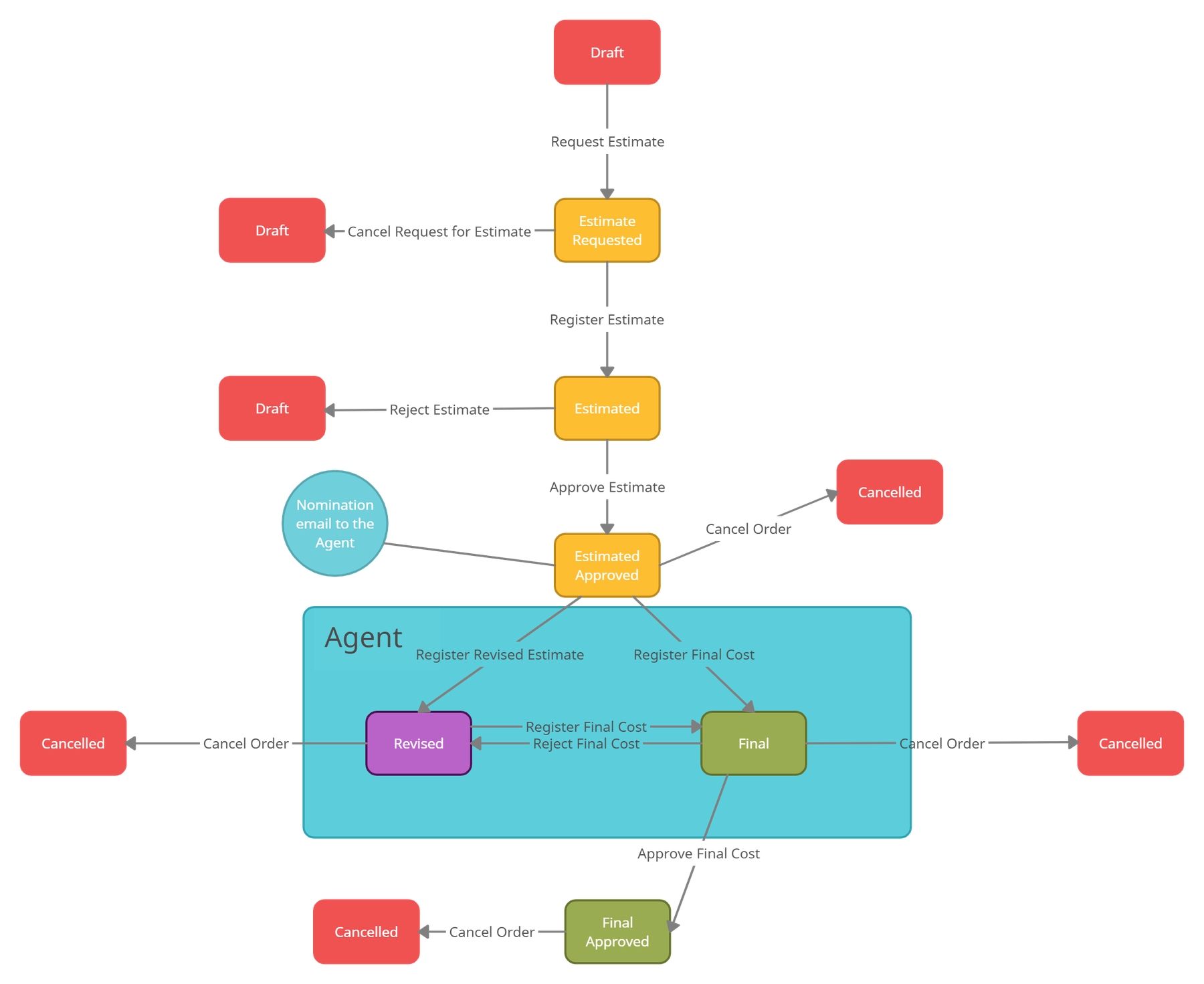
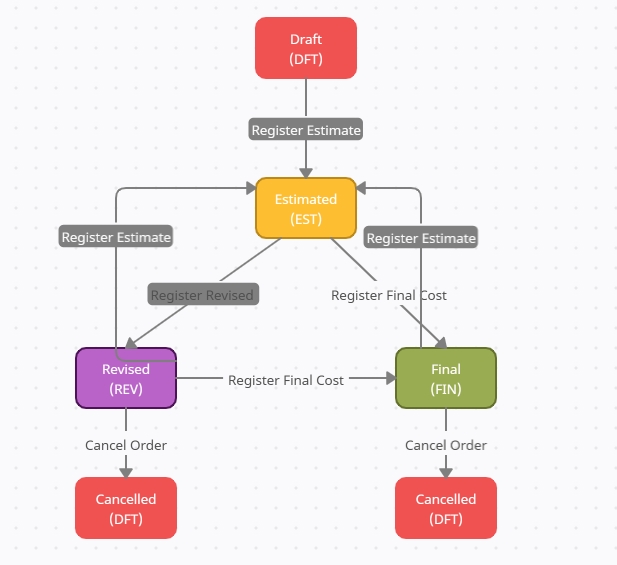
Service Order statues
Draft, DFT
Estimated, EST
Revised, REV
Final, FIN
Cancel, CAN
Service Order status transitions
Service Order status transitions when Agent nomination is enabled
Webhooks is moved out from Setup to Alerts Menu Item on VMS web
Alert menu item has two inclusions - Webhooks and Notifications
Webhooks - shows the list of subscriptions made by the user if the user is a non-administrative role and shows all the subscriptions in the system for an administrator user
Notifications - shows the list of Notifications for all the subscriptions visible for the user.
Clicking one of the rows in webhooks, opens the webhook subscription drawer with three tabs - Overview, Notifications and Comments
While Overview has some new additions to it, Comments remain the same from before.
Notifications tab in the subscription drawer includes the list of notifications filtered for the selected subscription. From 6.10.0, this list is updated to be similar to the other lists on VMS web with enabled filters and sorting.
Further clicking on one of the rows in the notifications list on subscription drawer, we can see the details of the Notification Msg sent for the subscription along with the error msg if the msg sending failed.
Holds the list of notifications for those subscriptions which the user has access to.
Administrator can access all the notifications for all the subscriptions available in the system, while non admin users can access only the subscriptions for the given logged in user. For example,
The possibility for the user to define a message template that should be used when sending notifications for a webhook subscription is introduced.
In order to use this, the user when creating a webhook subscription should provide the necessary input to the field/attribute “templateMsg". Make sure the placeholders are indicated by a '?' followed by the field/attribute directly accessible from the root object type on which the subscription is being made.
For example, when creating a subscription on Bank object , the user can use template_msg like ‘Bank with Name ?bankName is changed by ?changedById’ .
This would result in the below notification for the user (example data, for reference only)
When inserting data that in the end will result in an account payable, you might want to post the invoice directly. This can be done with a couple of API calls.
To generate invoice lines you need to know the key of the voyage that your data relates to. If you dont have the voyage key already you need to get it from the API either by getting it at an earlier stage in your integration or with a separate call in this stage. If you for instance already have the port call key you can get the voyage key by doing a GET request on PortCall.
To generate invoice lines post the below request, where key is the voyage key. For multiple voyages, add multiple keys.
Then get the new invoice lines, called document lines in the API
{
"user": 12345679,
"channelInfo": {
"url": "https://push.here.com",
"channelType": "HTTP"
},
"eventType": "C",
"objectType": "ServiceOrder"
}{
"id":"0:ffff7f000001:-1c943d78:678f500d:42f06",
"eventTime":"2025-01-22T07:41:46",
"eventType":"C",
"objectType":"ServiceOrder",
"dataloyObject":69801182,
"dataloyObjectSelf":"https://dev.dataloy.com/ws/rest/ServiceOrder/69801182",
"subscription":{
"key":69801122,
"self":"https://dev.dataloy.com/ws/rest/WebhookSubscription/69801122"
},
"resource":{
"key":69801182,
"self":"https://dev.dataloy.com/ws/rest/ServiceOrder/69801182",
"currency":{
"key":400132,
"self":"https://dev.dataloy.com/ws/rest/Currency/400132"
},
"status":{
"key":51969046,
"self":"https://dev.dataloy.com/ws/rest/StatusType/51969046"
},
"orderDate":"2024-05-18T20:22:00",
"exchangeRate":1.0,
"portAgentType":null,
"portCall":{
"key":69276170,
"self":"https://dev.dataloy.com/ws/rest/PortCall/69276170"
},
"serviceOrderLines":[
],
"amount":0.0,
"amountAdvanced":0.0,
"amountHandlingCost":0.0,
"amountHandlingCostVoyageCurrency":0.0,
"amountPortCost":0.0,
"amountPortCostVoyageCurrency":0.0,
"amountVariousCost":0.0,
"amountVariousCostVoyageCurrency":0.0,
"amountVoyageCurrency":0.0,
"emailSentDate":null,
"amountAdvancedCurrency":{
"key":400132,
"self":"https://dev.dataloy.com/ws/rest/Currency/400132"
},
"businessPartner":{
"key":1318806,
"self":"https://dev.dataloy.com/ws/rest/BusinessPartner/1318806"
},
"nominationEmail":null,
"externalReferenceNo":"1737531705924",
"createdById":66007605,
"createdDate":"2025-01-22T07:41:45",
"externalObjectKey":null,
"modifiedDate":null,
"changedById":66007605,
"remarks":[
],
"isObjectActive":true
}
}"rawObject" : true{
"key":69801182,
"self":"https://dev.dataloy.com/ws/rest/ServiceOrder/69801182",
"currency":{
"key":400132,
"self":"https://dev.dataloy.com/ws/rest/Currency/400132"
},
"status":{
"key":51969046,
"self":"https://dev.dataloy.com/ws/rest/StatusType/51969046"
},
"orderDate":"2024-05-18T20:22:00",
"exchangeRate":1.0,
"portAgentType":null,
"portCall":{
"key":69276170,
"self":"https://dev.dataloy.com/ws/rest/PortCall/69276170"
},
"serviceOrderLines":[
],
"amount":0.0,
"amountAdvanced":0.0,
"amountHandlingCost":0.0,
"amountHandlingCostVoyageCurrency":0.0,
"amountPortCost":0.0,
"amountPortCostVoyageCurrency":0.0,
"amountVariousCost":0.0,
"amountVariousCostVoyageCurrency":0.0,
"amountVoyageCurrency":0.0,
"emailSentDate":null,
"amountAdvancedCurrency":{
"key":400132,
"self":"https://dev.dataloy.com/ws/rest/Currency/400132"
},
"businessPartner":{
"key":1318806,
"self":"https://dev.dataloy.com/ws/rest/BusinessPartner/1318806"
},
"nominationEmail":null,
"externalReferenceNo":"1737531705924",
"createdById":66007605,
"createdDate":"2025-01-22T07:41:45",
"externalObjectKey":null,
"modifiedDate":null,
"changedById":66007605,
"remarks":[
],
"isObjectActive":true
} {
"user": 12345679,
"channelInfo": {
"url": "https://push.here.com",
"channelType": "HTTP"
},
"eventType": "U",
"objectType": "PortCall",
"dataloyObject": 36344213
}{
"serviceOrderLines": [
{
"amountEstimate": 200,
"description": "first line",
"isCharterersCost": false,
"isOwnersCost": false,
"serviceCode": "PRC"
}
]
}
PUT /ws/rest/ServiceOrder/6420123 HTTP/1.1
Host: localhost:8080
autoPost: true
Content-Type: application/json
Authorization: Bearer eyJhbGciOiJSUzI1NiIsInR5cCI6IkpXVCIsImtpZCI6IkVJWjlvcFlVZWZaLXVsbTk5SUpCTyJ9.eyJpc3MiOiJodHRwczovL2ludGVybmFsLmV1LmF1dGgwLmNvbS8iLCJzdWIiOiJhdXRoMHw2NGY5ODE4MzU5OGI3YTg2ZjllZDUzMTAiLCJhdWQiOlsiaHR0cHM6Ly9kYXRhbG95LmludGVybmFsIiwiaHR0cHM6Ly9pbnRlcm5hbC5ldS5hdXRoMC5jb20vdXNlcmluZm8iXSwiaWF0IjoxNzEyMDU2MjIwLCJleHAiOjE3MTIwNjM0MjAsInNjb3BlIjoib3BlbmlkIHByb2ZpbGUgZW1haWwiLCJhenAiOiJadGZXVTdYZEJmaGtQb0pSNHhCelVGQlpKU1htbzlJdCJ9.ZU
Content-Length: 190
{"serviceOrderLines":[{"key":6420124,"amountEstimate":12501,"amountFinal":0,
"amountRevised":0,"description":null,"isCharterersCost":true,
"isOwnersCost":false,"serviceCode":{"key":6003979}}]}The below endpoint will give you data that can be used when assembling the invoice. Like bank account, issuing company and so on. If you already have the data you can skip this step.
Assemble the invoice with this request
Mandatory fields: documentText, documentDate, issuingCompany, bankAccount, baseLineDate, baseLineTerms, dueDate, paymentTerms and percentage.
If payment terms percentage is 100%, there should only be one entry in documentPaymentTerms
BaseLineTerm is customer specific and needs to be agreed with customer. The baseline terms can be found at /ws/rest/BaselineTerm
PaymentTerms is customer specific and needs to be agreed with customer. The payment terms can be found at /ws/rest/PaymentTerms
The request will return the new invoice, called Document in the API. Keep the Document key to post the document in next step.
The final request will set the status to ready for posting which will cause accounting integrations to pick up the invoice and transfer it to accounting. The Document key is returned the assemble response in previous step.
POST /ws/rest/Document/refreshDocumentLines?key=123&key=456&isAccountsPayable=true
Body: empty
To locate the voyage key for Service Order and Bunker Order:
Service Order:
GET /ws/rest/ServiceOrder/{key}
Http header:
fields: {"portCall": {"voyage": {"key":"*"}}}
Bunker Order:
GET /ws/rest/BunkerOrder/{key}
Http header:
fields: {"portCall": {"voyage": {"key":"*"}}}Service Orders:
GET /ws/rest/DocumentLine?filter=voyage(IN)(123,456)&filter=document(NULL)
&filter=invoicingStatus.statusTypeCode(EQ)PEN&filter=portCall.key(EQ)118616134&filter=portCost.portAgent.daReference(EQ)DA-123
Bunker Orders:
GET /ws/rest/DocumentLine?filter=voyage(IN)(7173894)&filter=document(NULL)
&filter=invoicingStatus.statusTypeCode(EQ)PEN&filter=portCall.key(EQ)7173995
&filter=bunkerOrderLine.bunkerOrder.key(EQ)8366819POST /ws/rest/Document/invoiceDefaults
Header: disablebl = true (only for jvms customers)
Body:
{"documentLines":[{"key":111},{"key":222}], "invoicingStatus": "PEN"}POST /ws/rest/Document/assemble
Header: disablebl = true (only for jvms customers)
{
"bankAccount": "bankAccountNo",
"businessPartner": "businessPartnerCode",
"documentCurrency": "USD",
"documentDate": "2022-02-23T00:00:00",
"documentLines": [{ "key": 111 }, { "key": 222 }],
"documentPaymentTerms": [
{
"baselineDate": "2022-02-23T00:00:00",
"baselineTerm": "baselineTermCode",
"dueDate": "2022-03-02T00:00:00",
"paymentTerms": "paymentTermsCode",
"percentage": 100
}
],
"documentText": "A document text",
"exchangeRate": 1,
"exchangeRateDate": "2022-02-23T09:28:26",
"externalDocumentNo": "1234",
"issuingCompany": "companyCode",
"invoicingStatus" : "INV"
}PUT /ws/rest/Document/789
Header: disablebl = true (only for jvms customers)
{"invoicingStatus":"RFP"}Integration Set-Up
When a payment is registered in the accounting system, it should be transferred as applicable to the Posted sections of either the Accounts Payable or the Accounts Receivable modules (where the matching invoice/s can be found) in Dataloy VMS.
Since a payment in accounting systems may cover multiple Dataloy VMS payments/receipts, extracting payments from accounting means extracting invoices matching to a payment. Only payments/receipts records with a matching invoice in the applicable accounting system and with a required reference to a Dataloy invoice are to be extracted.
In Dataloy VMS all payments must match with the referenced invoice. To insert a payment/receipt in Dataloy VMS use the request under Data Transaction (below).
Data Transaction
A payment record should ONLY ever have one document line. Never more.
Amount Prefix
This matrix is showing which prefix the payment amount should have for the various cases.
To Post a Payment/Receipt to Dataloy VMS:
The Dataloy REST API allows for the retrieval, updating and entry of all data in Dataloy VMS.
As the Dataloy API is based on REST principles it is easy to write and simple to use when testing applications.
A typical company uses many applications, of which many or most are not designed to work with one another. Integrating separate, but related, applications help organizations achieve greater levels of operational consistency, efficiency and quality. Integration can be considered if a system generates/consumes data relevant to Dataloy VMS and/or can share data with the VMS.
Accounts Payable and Hire Payable
Accounts Receivable
Receipt (PMI)
Positive Amount
Negative amount
Payment (PMO)
Negative Amount
Positive Amount
{
"documentAmount": 10000.00,
"companyCurrencyAmount": 10000.00,
"sourceCurrencyAmount": 10000.00,
"documentCurrency": "USD",
"documentDate": "2014-01-01T00:00:00",
"documentType": "PMO",
"documentNo": "111111199",
"externalDocumentNo": "50300",
"company": "01",
"businessPartner": "60526",
"invoicingStatus": "POS",
"documentText": "text here",
"documentLines":
[
{
"documentAmount": 10000.00,
"companyCurrencyAmount": 10000.00,
"sourceCurrencyAmount": 10000.00,
"documentCurrency": "USD",
"invoicingStatus": "POS",
"documentLineText": "text here",
"businessPartner": "BPCODE",
"isAccountsPayable": true,
"refDocument": "71800125"
}
]
}
From version 2.10 it is possible to have multiple versions of Dataloy API deployed on an application server. New API functionalities can be utilized for certain clients while at the same time continue to use older API versions for other clients. This usage of the system can remain until all clients are tested and working with the latest Dataloy API version. The API version is specified in the URL.
Latest Version
The latest version of Dataly API deployed at a customer's application server remains available at:
http://[ip]:[port]/ws/rest
Older versions can be located at ws/rest/version-number. For example, if version 2.10.0 is deployed it will be found at:
Since API 3.3 Remark has a new attribute attachments that contains a list of Attachment objects. The Attachment resource has an attribute called file where can be stored the content of the file encoded in Base64.
The attribute fileName is mandatory, the attribute "filesize" is not mandatory but the client should pass it.
The two resources can be manipulated exactly as all other resources.
When a new Remark is posted with attachments in the JSON the source field must be before the attachments field.
When getting an attachment, data can be encoded in base64, but also unencoded. Attachments added from the API will be encoded and attachment added from the Java VMS client may be unencoded.
Some examples
Create a new remark with a file attached:
It is possible copy any object of any resource with the following endpoint:
POST: key}
It will create a new object in the data model, copying also the sub-objects, and will return it as response.
It is possible override attributes passing a JSON in the body (passing an attribute with null value will have no effect. Only simple types in the first level of the JSON will be used to override).
It is possible copy multiple objects, of a give resource, sending as URL parameters the list of keys:
http://[ip]:[port]/ws/rest/6.38.0
POST: http://{host}/ws/rest/{Resource name}/copy?key={key 1}&key={key 2}&key={key 3}...
it will create a new object for all the specified keys and returns am array of the created objects.
Get updates for nominated and operational voyages in Master scenario:
{
"eventType":"U",
"user": "your user code",
"objectType":"Voyage",
"expression": "dlpObject.getVoyageHeader() != null && (dlpObject.getVoyageHeader().getVoyageStatus().getStatusTypeCode().equals(\"NOM\") || dlpObject.getVoyageHeader().getVoyageStatus().getStatusTypeCode().equals(\"OPR\")) && dlpObject.getVoyageHeader().getIsBudget().equals(false) && dlpObject.getVoyageHeader().getIsTemplate().equals(false) &&dlpObject.getVoyageHeader().getIsEstimate().equals(false) && dlpObject.getVoyageHeader().getIsUnallocated().equals(false) && dlpObject.getScenarios() != null && dlpObject.getScenarios().size() > 0 && dlpObject.getScenarios().get(0).getScenarioCode().equals(\"MASTER\")",
"onlyMainObject": true,
"url": "",
"webhookUsername": "",
"webhookPassword": ""
}Get notification when an invoice is posted and ready to be transferred to accounting. Set the status to Posted when it's transferred to accounting. For more information about accounting integration see: https://dataloy-cloud.atlassian.net/wiki/spaces/VMSINT/pages/923414837
{
"eventType":"U",
"user": the user code to be used in the subscription,
"objectType":"Document",
"expression": "dlpObject.getInvoicingStatus() != null && dlpObject.getInvoicingStatus().getStatusTypeCode().equals(\"RFP\") && (dlpObject.getDocumentType().getDocumentType().equals(\"INO\") || dlpObject.getDocumentType().getDocumentType().equals(\"INI\") || dlpObject.getDocumentType().getDocumentType().equals(\"CRI\") || dlpObject.getDocumentType().getDocumentType().equals(\"CRO\"))",
"onlyMainObject": true,
"url": "your webhook url"
}Get notified when accruals are posted and and ready to be transferred to accounting. Set the status to Posted when it's transferred to accounting. For more information about accounting integration see: https://dataloy-cloud.atlassian.net/wiki/spaces/VMSINT/pages/923414837
Attach an Attachment to an existing Remark
PUT: http://{URL}/ws/rest/Remark/244324058 BODY:
{
"remarkTitle": "test 1",
"source": 19637583,
"attachments": [
{
"file":"small file 1",
"fileName":"test1.txt"
}
]
}{
"attachments": [
{
"file":"small file 2",
"fileName":"test2.txt"
}
]
}{
"eventType":"U",
"user": the user code to be used in the subscription,
"objectType":"Document",
"expression": "dlpObject.getInvoicingStatus() != null && dlpObject.getInvoicingStatus().getStatusTypeCode().equals(\"RFP\") && (dlpObject.getDocumentType().getDocumentType().equals(\"ACR\") || dlpObject.getDocumentType().getDocumentType().equals(\"ACP\"))",
"onlyMainObject": true,
"url":"your webhook url"
}Fog
Medium-Level Cloud
Low-Level Cloud
Light Rain Shower
Drizzle
Light Rain
Heavy Rain Shower
Heavy Rain
Sleet Shower
Sleet
Hail Shower
Hail
Light Snow Shower
Light Snow
Heavy Snow Shower
Heavy Snow
Thundery Shower
Thunder Storm
Tropical Storm
Haze
South
East
West
North/East
North/West
South/East
South/West
Various
North/North/East
East/North/East
East/South/East
South/South/East
South/South/West
West/South/West
West/North/West
North/North/West
East/by/North
East/by/South
North/by/East
North/by/West
NE/by/East
NE/by/north
NW/by/North
NW/by/West
SE/by/East
SE/by/South
SW/by/South
SW/by/West
South/by/East
South/by/West
West/by/North
West/by/South
Weather ID
Weather Description
Clear Sky
Sunny Day
Partly Cloudy
Sunny Intervals
Dust
Mist
Is possible to use both OR and AND operators in API queries. The two new operators syntax are:
(OR)
(AND)
Set of filters can be separated by OR and AND operators, the filters within a single set of filter will be put in AND.
Some examples:
Cargo?filter=charterer.businessPartnerType.businessPartnerType(EQ)&filter=(OR)&filter=weight(GT)400000
CargoPort?filter=cargo.charterer.key(EQ)1001845&filter=cargo.voyage.voyageStatus(EQ)%20&filter=port.portName(IN)(OSLO)&filter=reasonForCall.reasonForCall(EQ)L&filter=(OR)&filter=cargo.voyage.voyageStatus(EQ)%20&filter=port.portName(IN)(GAETA)&filter=reasonForCall.reasonForCall(EQ)D&filter=(OR)&filter=reasonForCall.reasonForCall(EQ)E
Limitations:
It is not possible use calculated fields with AND and/or OR.
Parenthesis are not supported
The default behavior when an API query is executed is to put in right join the relationship between objects. From DLP 4.0.0 is possible specify in the filters of the API URL query to use left join instead of the right join.
For instance the following API query:
generates the following SQL query:
That will not return cargoes with voyages null.
Instead if the following query is executed:
encoded (+ become %2B):
generates the following SQL query:
911638911639911640911641911642911643913753913902913903913904913905913906913907913908913909916765916766916767916768916769916770916771916772916773916774916775916776916777916778916779916780950926950927950928950929950930950931911636911637The same concept is used with sort:
Executing this query:
the following SQL query is executed:
Instead running the following query:
the following SQL query is executed:
SELECT t0.CARGO_ID AS c0
FROM TBL_CARGO t0 JOIN TBL_VOYAGE t1 ON (t0.VOYAGE_ID = t1.VOYAGE_ID) JOIN TBL_VOYAGE_HEADER t2 ON (t1.VOYAGE_ID = t2.VOYAGE_ID)
WHERE ((t2.IS_BUDGET = 0) OR (t0.VOYAGE_ID IS NULL))950932950933950934950935950936950937950938950939950940950941950942950943950944950945950946950947950948950949950950950951SELECT t0.CARGO_ID AS c0
FROM TBL_CARGO t0 LEFT JOIN TBL_VOYAGE t1 ON (t0.VOYAGE_ID = t1.VOYAGE_ID) LEFT JOIN TBL_VOYAGE_HEADER t2 ON (t1.VOYAGE_ID = t2.VOYAGE_ID)
WHERE ((t2.IS_BUDGET = 0) OR (t0.VOYAGE_ID IS NULL))
SELECT t0.CARGO_ID FROM TBL_CARGO t0
JOIN TBL_VOYAGE t2
ON (t0.VOYAGE_ID = t2.VOYAGE_ID)
JOIN TBL_VOYAGE_HEADER t3
ON (t2.VOYAGE_ID = t3.VOYAGE_ID)
ORDER BY t3.REFERENCE_NOSELECT t0.CARGO_ID FROM TBL_CARGO t0
LEFT JOIN TBL_VOYAGE t2
ON (t0.VOYAGE_ID = t2.VOYAGE_ID)
LEFT JOIN TBL_VOYAGE_HEADER t3
ON (t2.VOYAGE_ID = t3.VOYAGE_ID)
ORDER BY t3.REFERENCE_NOGetting Started with Dataloy REST API (Application Programming Interface) provides an introduction to the Dataloy API directed towards developers and IT-personnel. Basics, such as how to obtain, submit and modify data, are explained.
Dataloy’s API uses a REST interface over HTTP/HTTPS. The currently supported payload is application/JSON.
Follow the below steps - they will return USD currency from Dataloy VMS (illustrating that the API works properly):
For POST and PUT requests, the payload must be JSON and the Content-Type be set to application/JSON.
Base URL
The base URL is customer-specific. To obtain the IP-address and port for the specific API installation, please contact Dataloy.
IMPORTANT: All URLs in this documentation is relative to the root URL stated below. The HTTP method will be written in front of the relative URL: Note: The root URL should NOT be hardcoded in your application to allow it to run against multiple servers. The "/ws/rest" part may also change in the future.
Example: When the documentation refers to /Cargo, the full URL is https://[ip]:[port]/ws/rest/Cargo.
Resources (for example: Voyage, Document, ExchnangeRate), have a similar general URL structure. Example: In the table below "/Entity" represents the name of an entity type like "/Cargo" or "/Voyage".
Relative URL
Methods
Description
GET, POST
Represents the collection of entities of the given type.
GET will return a filterable array of entities of that type.
These entities will be "minimized" and sometimes contain only the "key" and "self" properties.
GET, PUT, DELETE
Represents a single entity of the given type, identified by "key".
GET will return the full representation of that entity.
PUT will update the given entity. A PUT request may contain only the changed properties, and will return the full object after the change. From API version 3, PUT will also update Sub-objects, previous versions are limited to object by object updating. For API versions prior to version 3, Sub-objects should NOT be included in PUT requests.
Dataloy's API return HTTP status codes in the HTTP header and provides additional information in the body in JSON format.
Information is retrieved by using a GET request on a URL. Each resource has it’s own URL. The API also supports searching resource specific parameters.
GET request on a URL:
Example: The following GET request on example URL will return the document with ID 2729538.
https://server.com/ws/rest/Document/2729538
Dataloy API is equipped with a strong generic filtering functionality. It is able to filter on almost any field visible in the API and filtering any resources returning an array of objects (see Filtering).
Use PUT to modify data through the API. Specify the URL of a resource and send the content to be modified in the body of the HTTP call. A successful PUT will return the same body as a GET on that resource. Excluded properties will be ignored. Excluded array elements will be removed. From API version 3, PUT will also update Sub-objects, previous versions are limited to object by object updating. For API versions prior to version 3, Sub-objects should NOT be included in PUT requests.
Examples:
Updating properties for a main object. In this case VoyageHeader
Updating properties for a sub-object. In this case, Voyage is the main object and Cargo is the sub-object
Insert an array element
Update an array element by including the key for the array element. The key is generated by the API when inserting a new element.
Insert a second array element by including the key for the first array element. Then add a second array element without a key.
Remove an array element. When having two elements in an array, you can remove one of them by removing the element in the PUT body
Inserting (POST) or updating (PUT) references to sub-objects can be done in different ways: (All the examples below is using VoyageHeader as a main object and the specified company will be linked to the VoyageHeader.)
Specify the key to an existing sub-object
All existing objects has a key that is created by Dataloy API. This can be used for linking an existing object to another object.
Specify the code to an existing sub-object
A lot of the objects in Dataloy API has an unique code that can be used for identifying an object. This code can also be used for linking an existing object to another object.
Specify the sub-object
Another option for linking a sub-object is to provide the object to be linked.
Create a new object
The last option is to create a new sub-object and link it to a object in the same request. When excluding the key property a new object will be created.
Send a POST request to a base resource URL with a body conforming with the minimum requirements of that resource.
Example: POST request URL:
https://ip:port/ws/rest/Document
Body of Document HTTP POST
The following fields exist for all Dataloy VMS API resources:
Field Name
Description
key
The ID of the entity. This can be used to:
request that entity at a URL of the form /Entitytype/{key}
or to represent the entity in a POST or PUT request
The full URL of the entity.
modifiedDate
Last Modified Date
Object Changed by User or Recalculated by System
createdDate
Date for Object Creation
Defines the code property of a resource. The value is the name of another property which can be used to identify the resource and is, in many cases, functionally equivalent to the "key" propery.
Note: Not all resources have a codeProperty.
Example:
When setting a currency either an invoice the key (ID) of that currency or the currencyCode (i.e. the codeProperty of Currency) can be used.
From version 2.0.0 the date format has been changed to conform ISO 8601:
yyyy-MM-ddThh:mm:ss Example: 2014-01-01T00:00:00
Versions prior to 2.0.0:
Date format for JSON messages: yyyy-MM-dd hh:mm:ss Example: 2014-01-01 00:00:00 Date format for filtering: yyyy-MM-ddThh:mm:ss Example: 2014-01-01T00:00:00
A quick introduction to REST is available at http://www.infoq.com/articles/rest-introduction.
JSON is a text format that is natively supported by Javascript. It is less verbose than XML and is easier for users to read. JSON is not written in order, so fields might change position between calls. A quick introduction: http://www.json.org/
Several tools are available to aid the testing of the API. This enables a payload to be sent to a URL with a specific type of request, for example, GET, PUT, POST.
Examples of available tools (but NOT limited to):
Chrome:
Advanced REST client: https://chrome.google.com/webstore/search/advanced%20rest%20client
Firefox:
Note: Dataloy recommends tools like JSONView to Chrome (to browse the API more conveniently when developing).
Documentation of API resources is currently in progress. Presently the reference documentation is manually updated. (More Information: Accounting Integration API).
It is possible to activate and deactivate any Master Data object. A new property has been added for this purpose, isObjectActive.
To deactivate an object the following JSON has to be used in the PUT method:
To activate an object the following JSON has to be used in the PUT method:
Master Data objects has to be deactivated before they can be deleted.
https://[ip]:[port]/ws/rest/Currency?filter=currencyCode(EQ)USDhttps://[ip]:[port]/ws/restGET /Cargo/123456{
"statusCode": 400,
"statusText": "Bad Request",
"message": "Missing field(s) in json body. All fields are required.",
"date": "2013-02-05T09:49:52",
"statusFamily": null,
"method": null,
"uri": null
}{
"doProfitLoss": 1.1,
"tradeVoyageNo": 2345,
"isBudget": true,
"voyageStartDate": "2017-03-01T01:58:00",
"referenceNo": "12341"
}{
"cargos": [
{
"bookedQuantity": 10000
}
]
}{
"remarks": [
{
"remarkTitle": "A Test remark title 1"
}
]
}{
"remarks": [
{
"key": 234581088,
"remarkTitle": "A Test remark title 1 Updated"
}
]
}{
"remarks": [
{
"key": 234581088,
"remarkTitle": "A Test remark title 1 Updated"
},
{
"remarkTitle": "A Test remark title 2"
}
]
}{
"remarks": [
{
"key": 234581088
}
]
}{ "company":4601029}{ "company": "09"}{ "company": { "key": 163348582 }}{
"company": {
"companyCode": "1234",
"companyName": "Test Company"
}
}{
"documentAmount": 0.0,
"companyCurrencyAmount": 0.0,
"sourceCurrencyAmount": 0.0,
"documentDate": "2013-04-04T00:00:00",
"documentType": "PMI",
"invoicingStatus": "POS",
"documentNo": "XXXXXX",
"company": 10001,
"documentCurrency": "USD",
"documentText": "text here",
"businessPartner": 20002,
"documentLinesFromDocument":
[
{
"documentAmount": 0.0,
"companyCurrencyAmount": 0.0,
"sourceCurrencyAmount": 0.0,
"sourceCurrency": "USD",
"refDocument": "52011962",
"documentLineText": "text here",
"isAccountsPayable": "true",
"businessPartner": "16959"
}
]
}DELETE will return 200 OK and an empty body when successful. Not all entities can be be deleted.
createdById
User key of the Dataloy VMS user that created the resource instnce initially.
changedById
User key of the Dataloy VMS user that updated the resource instance.
remarks[]
Array of remarks connected to the resouce instance
Via Direct Access: Individual deactivated objects remain accessible by their unique key, regardless of activation status.
{
"isObjectActive": false
}{
"isObjectActive": true
}// Standard query - returns only active business partners
GET /BusinessPartner
// Query deactivated business partners
GET /BusinessPartner?filter=isObjectActive(EQ)false
// Retrieving specific deactivated business partner by key
GET /BusinessPartner/{objectKey}Each voyage is linked to one VoyageBunker object for each bunker category that is used during the voyage. VoyageBunker stores the following information/fields:
bunkerCategory: the BunkerCategory connected to the VoyageBunker object
consumption: total consumption of the bunker during the voyage
cost: total bunker cost during the voyage
price: average bunker price during the voyage
The following request fetches all VoyageBunker objects for a given voyage:
https://BASE_URL/ws/rest/VoyageBunker?filter=voyage.key(EQ)20012412
Alternatively, a request can be sent against /Voyage/20012412 with voyageBunkers defined in the header fields. The JSON below is an example response of above requests. Two different bunkers are used during this voyage, FO and LS MGO.
Rob = remaining on board. Rob objects stores bunker related numbers for a single leg on the Voyage. A Rob is connected to a PortCall through EventLogs. Each EventLog contains an underlying Event with an eventCode attribute, and there are four eventCodes relevant for Robs - 'ARR', 'BRT', 'UBRT', and 'DEP', corresponding to Arrival, Berth, Unberth, and Departure, respectively.
As an example, the following request can be used to fetch all Robs for a given EventLog:
https://BASE_URL/ws/rest/EventLog/20027578
Assuming this EventLog is linked to the arrival event, the returned Robs contains at-sea consumption from previous port call, and fuel remaining upon arrival (for each bunker). Below is an example JSON response:
Note! To get the same response, the following header fields must be specified: {"event":{"eventCode":"*"},"robs": {"consumption":"*","robFixed":"*","rob": "*","bunkerCategory":{"bunkerCategoryCode":"*"}}}
To retrieve a list of Robs for a given EventLog, use the "robs" field. The number of Robs returned corresponds to the number of BunkerCategories in the system.
Attributes breakdown:
bunkerCategory - the BunkerCategory connected to the Rob
eventLog - the EventLog connected to the Rob
rob - remaining fuel onboard
consumption - the bunker consumption between previous event and the connected event
To get total consumption for a Port Call, Robs for all EventLogs on the PortCalls must be acquired.
The list of all EventLogs can be referenced directly from a PortCall:
Header fields: {"eventLogs": {"event":{"eventCode":"*"},"robs": {"consumption":"*","robFixed":"*","rob": "*","bunkerCategory":{"bunkerCategoryCode":"*"}}}}
Response:
The output will consist of four EventLog objects, each containing four robs, making a total of sixteen robs (calculated by multiplying the number of event logs by four bunker categories). By adding up all the consumption attributes, you can get the total consumption per leg
Create a Voyage with a Loading and Discharging PortCall with one Cargo with a Loading and Discharging CargoPort.
The created voyage will get the status Estimated (code EST).
Creating a new Cargo with a Loading and Discharging CargoPort and PortCall. The PortCall objects have EventLogDates that specify Arrival, Berthing, Un-berthing, and Departure dates.
Adding to a Cargo a new Loading or Discharging CargoPort and PortCall
PUT /Cargo/{KEY}
{
"cargoPorts": [
{
"key": 18739785
},
{
"key": 18739786
},
{
"port": 103991,
"reasonForCall": "D",
"cargoPortSequence": 2,
"portCall": {
"portCallSequence": 6,
"reasonForCall": "D",
"port": 103991,
"voyage": 18739534,
"ownedByVoyage": 18739534
}
}
]
}
Fixing the date on an EventLog object. Note, only EventLogs with EventLog.EventLogDate from the past can be fixed, otherwise, the returned value of isDateFixed will be false.
PUT /EventLog/{KEY}
{
"isDateFixed":true
}To nominate a voyage of a given vessel first you need to get the last sequence for the vessel in the fleet plan:
sending the HTTP Header property fileds withi this value:
{"fleetPlanVoyages":{"sequence":"*"}}
Then you can nominate the voyage making a PUT sending this payload:
incrementing the sequence by 1.
With expressions is possible to use logical syntax, like we do in SQL, to filter any resource response.
One easy example could be (assuming that we are querying Voyage endpoint):
voyageResult > 1000 and voyageHeader.voyageStatus.statusTypeCode= 'FIN'
Bit more complex one could be:
vessel.vesselName ='Borg 1' and (voyageHeader.operator = 999999 or voyageHeader.charteringResponsible = 999999 or voyageHeader.accountantResponsible= 999999)
That introduce a completely new possibility, the usage of parenthesis.
It is possible to have any level of nested parenthesis:
(voyageHeader.operator != 999999 and ((voyageResult > 10000 and voyageHeader.voyageStatus.statusTypeCode= 'FIN') or (voyageResult < 10000 and voyageHeader.voyageStatus.statusTypeCode= 'NOM')))
Support for between operator:
voyageResult between 1000 and 2000
The dates in the expression must be preceded by the character $
voyageHeader.voyageStartDate > $2020-12-29T17:02:21
To get all the voyages of the master scenario:
(voyageHeader.voyageStartDate>=$2021-01-14T17:02:21 and fleetPlanVoyages.fleetPlan.fleetPlanCode='MASTER') or (scenarios.scenarioCode='MASTER' and voyageHeader.voyageStatus.statusTypeCode= 'SCU')
Supported Operators (all the operator are case sensitive):
The expressions can be used in any resource of the data model.
The expression can be passed or through the URL query parameter called expression (remember to encode):
ws/rest/Voyage?expression=vessel.vesselName='Borg 1' or voyageResult between 10 and 10000
or through the HTTP header parameter called expression.
The expression can be used in combination with sorting and pagination through URL query parameters.
Calculated fields cannot be used within the expressions.
Is possible restrict access to any endpoint.
In order for a user to get access to a given API Endpoint, the user must belong to a SecurityRole that has a SecurityPermission for the API Endpoint.
he endpoint access control is done also against the objects requested using the fields JSON in the HTTP Header. So for instance if the endpoint Vessel.GET is present and the user does not belong to a SecurityRole that has a SecurityPermission for the Vessel.GET endpoint, requesting the Voyage resource specifying the following JSON in the fields parameter will get unauthorized (HTTP 401):
{
"vessel":{
"vesselName":"*",
"auxEngine":"*"
}
}If the same user requests with the following JSON, it will get access because vesselName attribute is part of the minimal view of Vessel resource:
{
"vessel":{
"vesselName":"*"
}
}The same access control is performed when a WebhookSubscription is requested. If the user tries to subscribe for an object that has an Endpoint in the system, the subscription will be created only if the user can access to the Endpoint, otherwise Bad request (HTTP 400) exception will be thrown.
To create a new Endpoint it has to be used the endpoint /ws/rest/Endpoint posting a JSON like this:
To create a new SecurityPermission it has to be used the endpoint /ws/rest/SecurityPermission posting a JSON like this:
To create a new SecurityRole. Post the following JSON to /ws/rest/SecurityRole:
To add a SecurityPermission to a SecurityRole. Post the following JSON to /ws/rest/SecurityRole:
To add a SecurityRole to a User. Post the following JSON to /ws/rest/SecurityRole:
The objective of accounting integration is to automate the creation and flow of transactions between the Dataloy VMS and an accounting system. The advantage is, for example, reduced risk of errors as several transactions handled by the Dataloy VMS system generates transactions to be entered in a client accounting system. An integration also allows for synchronizing the basic data entities (or , i.e. several of the same being stored and maintained in both systems) between systems. Some , for example, Business Partners, must be synchronized for the integration to work.
Accounting Integration Transactions
Transactions from Dataloy VMS to Accounting:
Sales and purchase invoices are transferred whenever an invoice/invoices is/are posted in the VMS.
POST /Cargo
{
"cargoMeasurement": "MT",
"cargoPorts": [
{
"cargoPortSequence": 1,
"cargoQuantity": 1234,
"laytimeTermsMeasurement": "H",
"port": {
"key": 102381
},
"portCall": {
"portCallSequence": 3,
"reasonForCall": "L",
"port": 102381,
"voyage": 6136896
},
"reasonForCall": "L"
},
{
"cargoPortSequence": 1,
"cargoQuantity": 1234,
"freightRate": 1210,
"laytimeTermsMeasurement": "H",
"port": {
"key": 101486
},
"portCall": {
"portCallSequence": 4,
"reasonForCall": "D",
"port": 101486,
"voyage": 6136896
},
"reasonForCall": "D"
}
],
"charterer": {
"key": 1004307
},
"commodity": {
"key": 1675975
},
"freightCurrency": "USD",
"voyage": {
"key": 6136896
}
}Bunker transactions are transferred whenever a bunker transaction is posted in the VMS.
Vessel/Voyage information is sometimes required by Accounting before invoices and/or bunker transactions are transferred. A scheduled task for transferring this type of information to Accounting can be set up (contact Dataloy for more information).
Accruals will be transferred by users when performing period-end-closing (more information: Accruals page and the Period-End-Closing process).
Transactions from Accounting to Dataloy VMS:
Receipts and payments being transferred from Accounting to Dataloy VMS. The transaction to collect and payments and send to the VMS is either triggered by Accounting or by a scheduled task (set up by Dataloy Systems).
Exchange rates will be transferred from Accounting to Dataloy VMS. This transaction is either triggered by Accounting or by a scheduled task (set up by Dataloy Systems) to collect and retrieve the rates.
Actuals is part of the Period-End-Closing process and is usually transferred from Accounting to Dataloy VMS.
<
less than
<=
less than equal to
between
between
not between
not between
in
in
not in
not in
like
like
% must be encode with %25
not like
not like
likeIgnoreCase
like ignore case
not likeIgnoreCase
not like ignore case
!
negation
on Vessel resource: ! (hasGrabsOnboard = false and iceClass = null)
Operator
=
equal to
!=
not equal to
>
greater than
>=
greater than equal to
priceVoyageStart: average bunker price at voyage start
priceVoyageEnd: average bunker price at voyage end
profitLoss: the charterer's total bunker profit/loss
profitLossTcIn: the owner's total bunker profit/loss
robDelivery: bunker ROB at delivery port
robRedelivery: bunker ROB at redelivery port
robVoyageStart: bunker ROB at voyage start
voyage: the Voyage connected to the VoyageBunker
robFixed - identifies whether the rob value is fixed or not
GET https://dev.dataloy.com/ws/rest/Voyage?filter=vessel(EQ)1609791&fleetPlanVoyages.fleetPlan.fleetPlanCode(EQ)MASTER&filter=voyageHeader.voyageStatus.statusTypeCode(NE)EST&sort=fleetPlanVoyages.sequence(DS){
"key":76409955,
"voyageHeader":{
"key":76409960,
"voyageStatus":"NOM",
"isVoyageStartFixed":false,
"isEstimate":false,
"isUnallocated":false
},
"fleetPlanVoyages":[
{
"fleetPlan":"MASTER",
"voyage":76409955,
"sequence":11,
"vessel":1609791
}
]
}Through DataControl and DataControlRoleValue is possible to give access only to some specific objects.
For instance if we want that the users that belong to the security role with key 59552772 can have access only to the documents connected with the business partner with key 20867070 and 22210381, a DataContol object like this has to be posted:
{
"objectName": "Document",
"attribute": "businessPartner.key",
"dataControlRoleValues": [
{
"role": 59552772
"valueType": "Long",
"value": "20867070"
},
{
"role": 59552772,
"valueType": "Long",
"value": "22210381"
}
]
}objectName the Dataloy object that has to be applied the access control
attribute the attribute name to be used to restrict the access
role the security role that will use the access control (use the key, as role names containing spaces might not work)
value the value to use as filter to restrict data
valueType the type of the value (Integer, String)
Set up a task for extracting exchange rates from either an accounting system or from a source delivering exchange rates service. Then insert the exchange rate into Dataloy VMS using the request under Data Transaction (below).
To insert an exchange rate in Dataloy VMS (fields required):
Updated for API version 2.0.0 using the new required date format yyyy-dd-MMThh:mi:ss to conform ISO 8601, (prior versions has date format: yyyy-dd-MM hh:mi:ss)
Post an exchange rate to Dataloy
Post Transaction
No post transaction is required.
[
{
"key": 20027578,
"self": "https://BASE_URL/ws/rest/VoyageBunker/20027578",
"bunkerCategory": {
"key": 13575292,
"self": "https://BASE_URL/ws/rest/BunkerCategory/13575292",
"bunkerCategoryName": "FO",
},
"consumption": 530.0,
"cost": 359340.0,
"price": 678.0,
"priceVoyageStart": 678.0,
"priceVoyageEnd": 678.0,
"profitLoss": 0.0,
"profitLossTcIn": 0.0,
"robDelivery": 0.0,
"robRedelivery": 0.0,
"robVoyageStart": 600.0,
"voyage": {
"key": 20012412,
"self": "https://BASE_URL/ws/rest/Voyage/20012412",
}
},
{
"key": 20027579,
"self": "https://BASE_URL/ws/rest/VoyageBunker/20027579",
"bunkerCategory": {
"key": 13575293,
"self": "https://BASE_URL/ws/rest/BunkerCategory/13575293",
"bunkerCategoryName": "LS MGO",
},
"consumption": 120.0,
"cost": 93240.0,
"price": 777.0,
"priceVoyageStart": 777.0,
"priceVoyageEnd": 777.0,
"profitLoss": 0.0,
"profitLossTcIn": 0.0,
"robDelivery": 0.0,
"robRedelivery": 0.0,
"robVoyageStart": 200.0,
"voyage": {
"key": 20012412,
"self": "https://BASE_URL/ws/rest/Voyage/20012412",
}
}
]{
"key": 20027578,
"self": "https://BASE_URL/ws/rest/EventLog/20027578",
"event": {
"key": 13575292,
"self": "https://BASE_URL/ws/rest/Event/13575292",
"eventCode": "UBRT"
},
"robs": [
{
"key": 20027642,
"self": "https://BASE_URL/ws/rest/Rob/20027642",
"bunkerCategory": {
"key": 916944,
"self": "https://BASE_URL/ws/rest/BunkerCategory/916944",
"bunkerCategoryCode": "FO"
},
"robFixed": false,
"rob": 0.0,
"consumption": 0.0
},
{
"key": 20027649,
"self": "https://BASE_URL/ws/rest/Rob/20027649",
"bunkerCategory": {
"key": 916947,
"self": "https://BASE_URL/ws/rest/BunkerCategory/916947",
"bunkerCategoryCode": "DL"
},
"robFixed": false,
"rob": -4.61125655636663,
"consumption": 0.0
},
{
"key": 20027651,
"self": "https://BASE_URL/ws/rest/Rob/20027651",
"bunkerCategory": {
"key": 916945,
"self": "https://BASE_URL/ws/rest/BunkerCategory/916945",
"bunkerCategoryCode": "FL"
},
"robFixed": false,
"rob": 0.0,
"consumption": 0.0
},
{
"key": 20027663,
"self": "https://BASE_URL/ws/rest/Rob/20027663",
"bunkerCategory": {
"key": 916946,
"self": "https://BASE_URL/ws/rest/BunkerCategory/916946",
"bunkerCategoryCode": "DO"
},
"robFixed": false,
"rob": 0.0,
"consumption": 0.0
}
]
}{
"eventLog": {},
"robFixed": true,
"bunkerCategory": {},
"rob": -1.7976931348623157e+308,
"consumption": -1.7976931348623157e+308
}{
"key": 20027590,
"self": "https://BASE_URL/ws/rest/PortCall/20027590",
"eventLogs": [
{
"key": 20027578,
"self": "https://BASE_URL/ws/rest/EventLog/20027578",
"event": {
"key": 13575292,
"self": "https://BASE_URL/ws/rest/Event/13575292",
"eventCode": "UBRT"
},
"robs": [
{
"key": 20027642,
"self": "https://BASE_URL/ws/rest/Rob/20027642",
"bunkerCategory": {
"key": 916944,
"self": "https://BASE_URL/ws/rest/BunkerCategory/916944",
"bunkerCategoryCode": "FO"
},
"robFixed": false,
"rob": 0.0,
"consumption": 0.0
},
{
"key": 20027649,
"self": "https://BASE_URL/ws/rest/Rob/20027649",
"bunkerCategory": {
"key": 916947,
"self": "https://BASE_URL/ws/rest/BunkerCategory/916947",
"bunkerCategoryCode": "DL"
},
"robFixed": false,
"rob": -4.61125655636663,
"consumption": 0.0
},
{
"key": 20027651,
"self": "https://BASE_URL/ws/rest/Rob/20027651",
"bunkerCategory": {
"key": 916945,
"self": "https://BASE_URL/ws/rest/BunkerCategory/916945",
"bunkerCategoryCode": "FL"
},
"robFixed": false,
"rob": 0.0,
"consumption": 0.0
},
{
"key": 20027663,
"self": "https://BASE_URL/ws/rest/Rob/20027663",
"bunkerCategory": {
"key": 916946,
"self": "https://BASE_URL/ws/rest/BunkerCategory/916946",
"bunkerCategoryCode": "DO"
},
"robFixed": false,
"rob": 0.0,
"consumption": 0.0
}
]
},
{
"key": 20027584,
"self": "https://BASE_URL/ws/rest/EventLog/20027584",
"event": {
"key": 1000051,
"self": "https://BASE_URL/ws/rest/Event/1000051",
"eventCode": "BRT"
},
"robs": [
{
...POST /Voyage
{
"ballastPort":102546,
"vessel":1609791,
"cargos":[
{
"cargoMeasurement":"MT",
"cargoType":"SPOT",
"cargoPorts":[
{
"cargoPortSequence":1,
"port":105219,
"reasonForCall":"L"
},
{
"cargoPortSequence":1,
"port":101770,
"reasonForCall":"D"
}
]
}
],
"portCallsFromVoyage":[
{
"port":105219,
"portCallSequence":1,
"reasonForCall":"L",
"currency":"EUR"
},
{
"port":101770,
"portCallSequence":2,
"reasonForCall":"D",
"currency":"EUR"
}
]
}POST /ExchangeRate
{
"currency": "EUR",
"fromCurrency": "USD",
"exchangeRate": 0.74042,
"exchangeRateDate": "2014-01-01T00:00:00"
}Our standard filtering functionality can be used to filter data before applying aggregate functions.
The request body must contain a JSON object with a functions array that specifies which aggregate functions to perform on which fields.
Supported Aggregate Function Types
avg
Calculates the average value
Numeric fields only
sum
Calculates the sum of all values
Numeric fields only
min
Finds the minimum value
Numeric fields only
max
Finds the maximum value
Special Field Values
For count function, you can use * as the field value to count all records.
The API returns a JSON object with a results array containing the computed aggregate values.
The value field will contain:
A numeric value for avg, sum, min, max, and count functions
An array of values for the list function
Request:
Request Body:
Response:
Request:
Request Body:
Response:
Request:
Request Body:
Response:
The API validates the request and returns appropriate error messages:
If an invalid function type is specified, the API returns HTTP 400.
If an invalid field is specified, the API returns HTTP 400.
If an incompatible function type is used with a field (e.g., "avg" on a text field), the API returns HTTP 400.
Date aggregation functions (min/max) are not supported and will return a 400 error.
Text fields cannot be used with numeric aggregate functions (avg, sum, min, max) and will return a 400 error.
All fields must exist in the data model, or the request will be rejected.
{
"resourceName": "Vessel",
"path": ".",
"httpMethodType": "GET"
}{
"endpoint": 335928937,
"permissionName": "Bank.GET",
"permissionType": 335343886
}
{
"roleName":"testRole"
}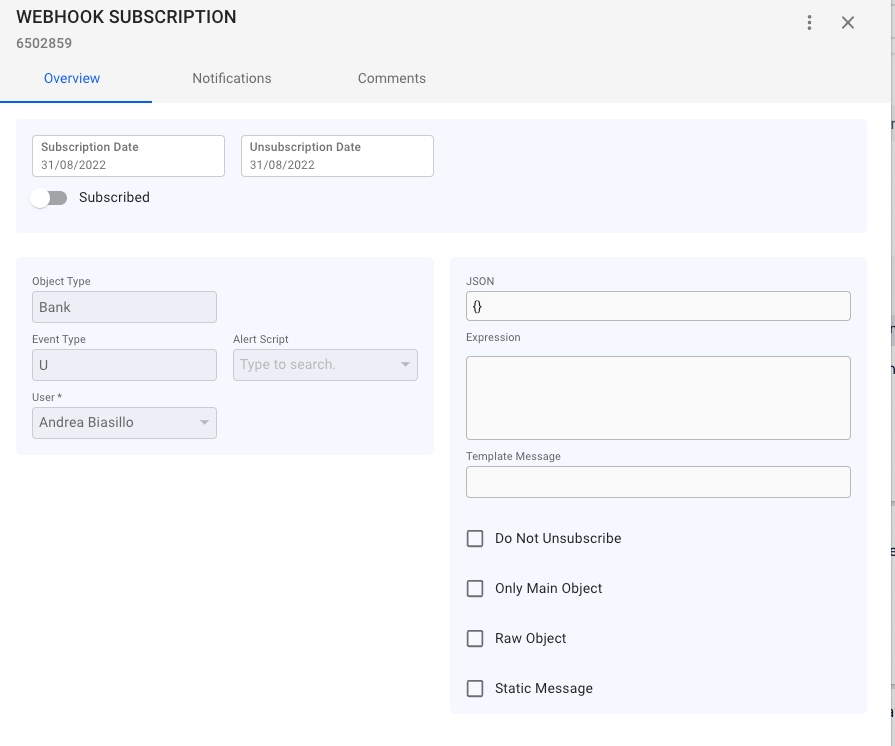
The endpoint AuditLog () can be used to get all changes of any object in the data model.
To get the changes of a given object with key KEY_X:
{BASE_URL}/ws/rest/AuditLog?filter=source(EQ)KEY_X
In the same request send the HTTP Header parameter fields with this JSON
The response will be an array of AuditLog objects:
The endpoint AuditLog can be used to know all the objects that have been deleted:
It is possible sort the result of any search. The following type of sorting are supported:
ASCENDING (ascending order, case - or database sensitive)
ASCENDING INSENSITIVE (ascending order, case-insensitive)
DESCENDING (descending order, case - or database - sensitive)
POST /ws/rest/{Resource}/aggregate{
"functions": [
{
"type": "string", // Aggregate function type
"field": "string" // Field to aggregate
}
]
}{
"results": [
{
"type": "string", // The aggregate function type
"field": "string", // The field that was aggregated
"value": any // The result of the aggregate function
}
]
}POST /ws/rest/VoyageHeader/aggregate{
"functions": [
{
"type": "avg",
"field": "doRobVoyageStart"
}
]
}{
"results": [
{
"type": "avg",
"field": "doRobVoyageStart",
"value": 125.4
}
]
}POST /ws/rest/VoyageHeader/aggregate?filter=voyage.isTc(EQ)true{
"functions": [
{
"type": "sum",
"field": "foRobVoyageStart"
},
{
"type": "min",
"field": "foPriceVoyageStart"
},
{
"type": "list",
"field": "referenceNo"
}
]
}{
"results": [
{
"type": "sum",
"field": "foRobVoyageStart",
"value": 1250.6
},
{
"type": "min",
"field": "foPriceVoyageStart",
"value": 450.75
},
{
"type": "list",
"field": "referenceNo",
"value": ["V2023-001", "V2023-002", "V2023-003"]
}
]
}POST /ws/rest/VoyageHeader/aggregate{
"functions": [
{
"type": "count",
"field": "*"
}
]
}{
"results": [
{
"type": "count",
"field": "*",
"value": 123
}
]
}{
"statusCode": 400,
"message": "Cannot apply 'avg' function to field 'testText'. Only numeric fields are supported for this operation."
}
{
"securityPermissions": [
{
"key":335928939
}
]
}
{
"securityRoles": [
{
"key":335927922
}
]
}DESCENDING INSENSITIVE (descending order, case-insensitive)
ASCENDING
ASCENDING INSENSITIVE
DESCENDING
DESCENDING INSENSITIVE
It is possible use sorting in combination with any filter and pagination:
Numeric fields only
count
Counts the number of non-null values
Any field
list
Returns a list of all unique values
Any field
in combitation with other filters and the HTTP Header parameter fields with this value:
{"entryText":"*","user":"*","actionTime":"*"}
return a response like this one:
where in the field entryText there is the object type and object key that has been deleted-
{"objectName":"*","attributeName":"*","actionTime":"*","entryText":"*","source":"*","newValue":"*","oldValue":"*","isChangedByUser":"*","action":{"actionName":"*"},"user":{"userName":"*"}}[
{
"key": 8345668,
"self": "https://dev.dataloy.com/ws/rest/AuditLog/8345668",
"objectName": "Voyage",
"attributeName": "ladenConsumption",
"source": 8336217,
"user": {
"key": 3689599,
"self": "https://dev.dataloy.com/ws/rest/User/3689599",
"userName": "Andrea Biasillo"
},
"actionTime": "2023-03-03T19:23:00",
"entryText": "Field update: ladenConsumption",
"isChangedByUser": true,
"newValue": "83.29555785678073",
"oldValue": "67.03034584820784",
"action": {
"key": 1000009,
"self": "https://dev.dataloy.com/ws/rest/Action/1000009",
"actionName": "EDIT"
}
},
{
"key": 8345669,
"self": "https://dev.dataloy.com/ws/rest/AuditLog/8345669",
"objectName": "Voyage",
"attributeName": "co2Laden",
"source": 8336217,
"user": {
"key": 3689599,
"self": "https://dev.dataloy.com/ws/rest/User/3689599",
"userName": "Andrea Biasillo"
},
"actionTime": "2023-03-03T19:23:00",
"entryText": "Field update: co2Laden",
"isChangedByUser": true,
"newValue": "267.045558488839",
"oldValue": "214.89928878935433",
"action": {
"key": 1000009,
"self": "https://dev.dataloy.com/ws/rest/Action/1000009",
"actionName": "EDIT"
}
},
{
"key": 8345670,
"self": "https://dev.dataloy.com/ws/rest/AuditLog/8345670",
"objectName": "Voyage",
"attributeName": "tcResultDay",
"source": 8336217,
"user": {
"key": 3689599,
"self": "https://dev.dataloy.com/ws/rest/User/3689599",
"userName": "Andrea Biasillo"
},
"actionTime": "2023-03-03T19:23:00",
"entryText": "Field update: tcResultDay",
"isChangedByUser": true,
"newValue": "4877.341669917246",
"oldValue": "6227.220974136807",
"action": {
"key": 1000009,
"self": "https://dev.dataloy.com/ws/rest/Action/1000009",
"actionName": "EDIT"
}
},
{
"key": 8345671,
"self": "https://dev.dataloy.com/ws/rest/AuditLog/8345671",
"objectName": "Voyage",
"attributeName": "ballastConsumption",
"source": 8336217,
"user": {
"key": 3689599,
"self": "https://dev.dataloy.com/ws/rest/User/3689599",
"userName": "Andrea Biasillo"
},
"actionTime": "2023-03-03T19:23:00",
"entryText": "Field update: ballastConsumption",
"isChangedByUser": true,
"newValue": "42.7633723560667",
"oldValue": "42.90031887514484",
"action": {
"key": 1000009,
"self": "https://dev.dataloy.com/ws/rest/Action/1000009",
"actionName": "EDIT"
}
][
{
"key": 18475755,
"self": "https://dev.dataloy.com/ws/rest/AuditLog/18475755",
"user": {
"key": 2527205,
"self": "https://dev.dataloy.com/ws/rest/User/2527205"
},
"actionTime": "2024-02-02T08:37:34",
"entryText": "Deleted LaytimeTimeSheetItem #14707386"
},
{
"key": 18475756,
"self": "https://dev.dataloy.com/ws/rest/AuditLog/18475756",
"user": {
"key": 2527205,
"self": "https://dev.dataloy.com/ws/rest/User/2527205"
},
"actionTime": "2024-02-02T08:37:34",
"entryText": "Deleted LaytimeTimeSheetItem #14707388"
},
{
"key": 18475757,
"self": "https://dev.dataloy.com/ws/rest/AuditLog/18475757",
"user": {
"key": 2527205,
"self": "https://dev.dataloy.com/ws/rest/User/2527205"
},
"actionTime": "2024-02-02T08:37:34",
"entryText": "Deleted LaytimeTimeSheetItem #14707389"
},
{
"key": 18475758,
"self": "https://dev.dataloy.com/ws/rest/AuditLog/18475758",
"user": {
"key": 2527205,
"self": "https://dev.dataloy.com/ws/rest/User/2527205"
},
"actionTime": "2024-02-02T08:37:34",
"entryText": "Deleted LaytimeTimeSheetItem #14707387"
},
{
"key": 18475783,
"self": "https://dev.dataloy.com/ws/rest/AuditLog/18475783",
"user": {
"key": 2527205,
"self": "https://dev.dataloy.com/ws/rest/User/2527205"
},
"actionTime": "2024-02-02T08:37:57",
"entryText": "Deleted LaytimeTimeSheetItem #18475759"
},
{
"key": 18475784,
"self": "https://dev.dataloy.com/ws/rest/AuditLog/18475784",
"user": {
"key": 2527205,
"self": "https://dev.dataloy.com/ws/rest/User/2527205"
},
"actionTime": "2024-02-02T08:37:57",
"entryText": "Deleted LaytimeTimeSheetItem #18475760"
},
{
"key": 18475785,
"self": "https://dev.dataloy.com/ws/rest/AuditLog/18475785",
"user": {
"key": 2527205,
"self": "https://dev.dataloy.com/ws/rest/User/2527205"
},
"actionTime": "2024-02-02T08:37:57",
"entryText": "Deleted LaytimeTimeSheetItem #18475761"
},
{
"key": 18475802,
"self": "https://dev.dataloy.com/ws/rest/AuditLog/18475802",
"user": {
"key": 2527205,
"self": "https://dev.dataloy.com/ws/rest/User/2527205"
},
"actionTime": "2024-02-02T08:38:04",
"entryText": "Deleted LaytimeTimeSheetItem #18475780"
},
{
"key": 18475803,
"self": "https://dev.dataloy.com/ws/rest/AuditLog/18475803",
"user": {
"key": 2527205,
"self": "https://dev.dataloy.com/ws/rest/User/2527205"
},
"actionTime": "2024-02-02T08:38:04",
"entryText": "Deleted LaytimeTimeSheetItem #18475781"
},
{
"key": 18475804,
"self": "https://dev.dataloy.com/ws/rest/AuditLog/18475804",
"user": {
"key": 2527205,
"self": "https://dev.dataloy.com/ws/rest/User/2527205"
},
"actionTime": "2024-02-02T08:38:04",
"entryText": "Deleted LaytimeTimeSheetItem #18475782"
}
]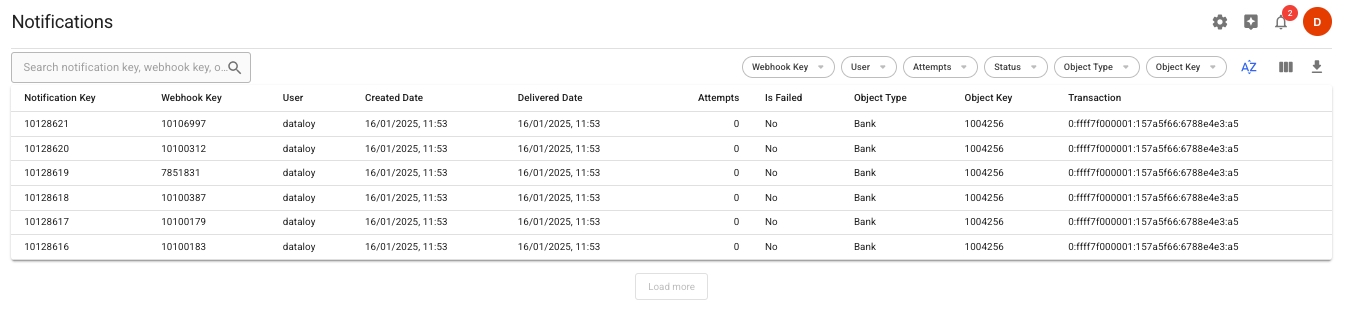
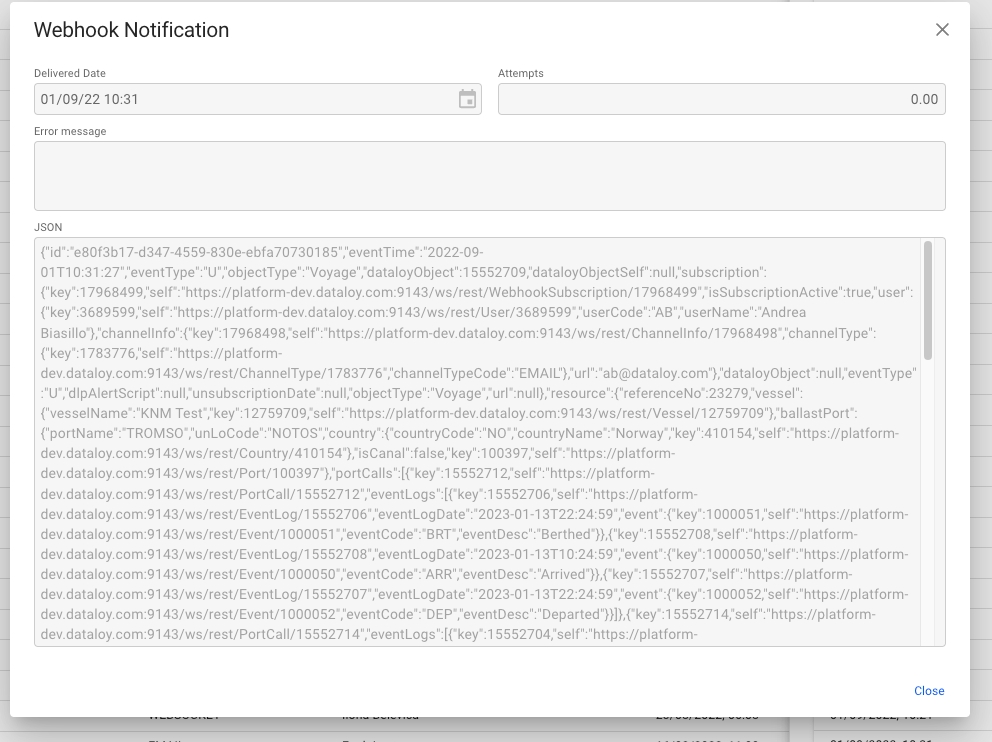
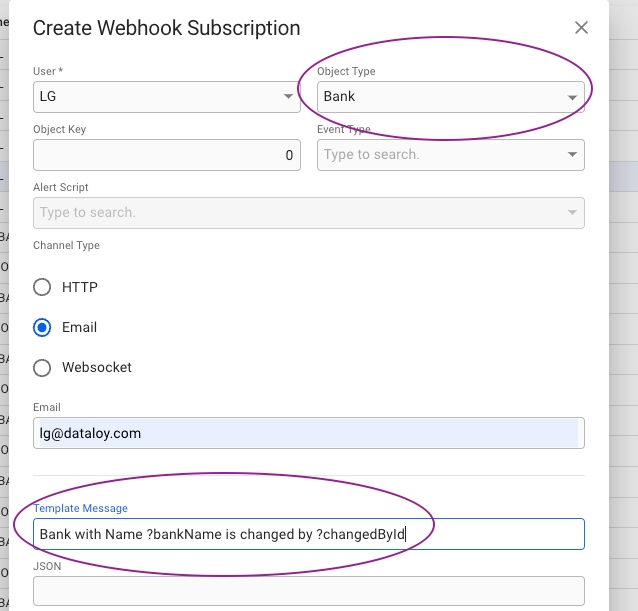
Bulk Update Increment allows you to update multiple fields on multiple objects at once. With this endpoint multiple objects values can be set individually in bulk.
Use this endpoint to update multiple objects in one call by sending a JSON array of object keys and their new field values.
The endpoint to use is:
http://{host}/ws/rest/{ResourceName}/bulkUpdateIncrementPassing, to the specified resource, a JSON array of entries, each containing:
key: the primary key of the object
one or more field names with the new value to set
Example payload:
Object 77441913 will have its foBallast field set to 10 and its foLoaded field set to 15.
CommentShare feedback on the editorObject 77443840 will have its foBallast field set to 12 and its foLoaded field set to 20.
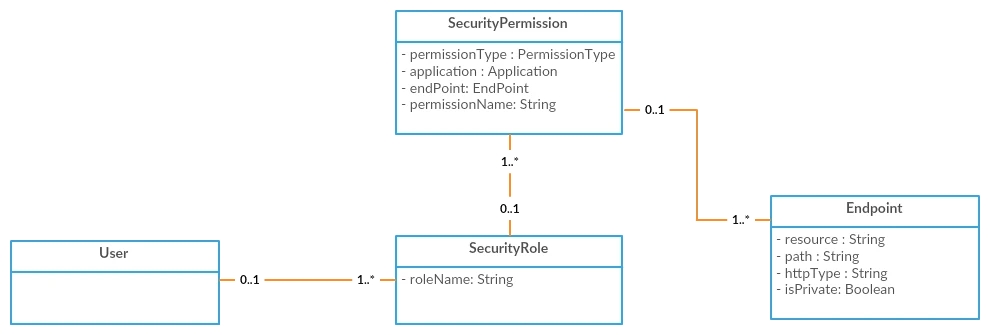
[
{
"key": 77441913,
"foBallast": 10, "foLoaded": 15
},
{
"key": 77443840,
"foBallast": 12, "foLoaded": 20
}
]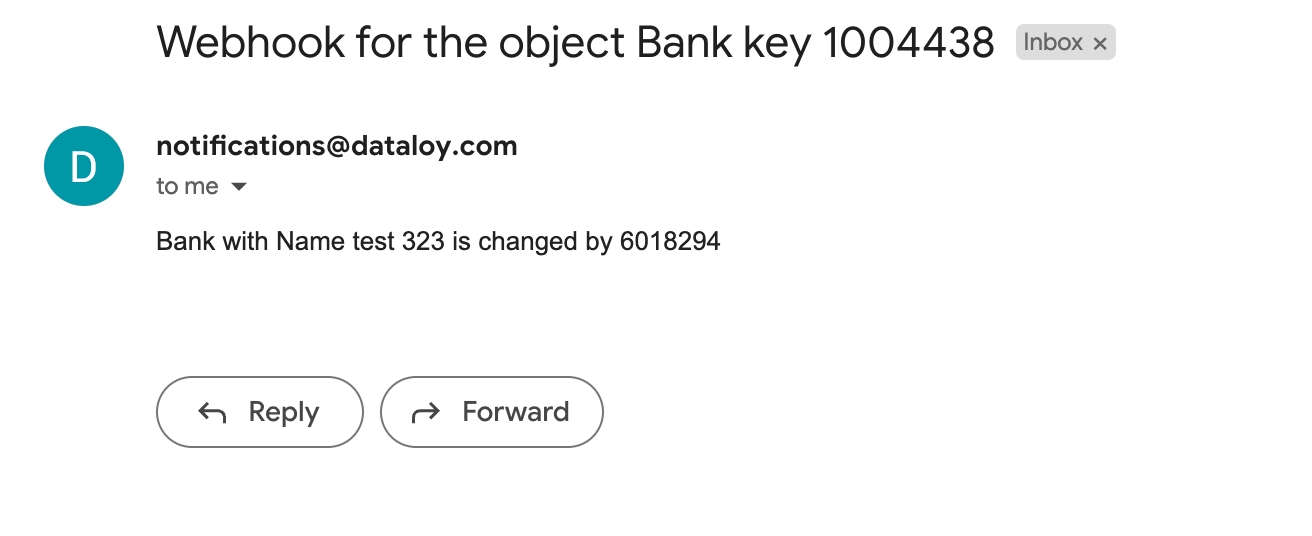
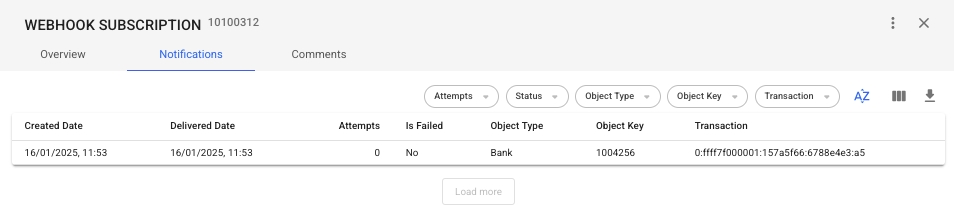
Build interactive HTML 5 application using Dataloy Websockets.
It is possible to open a Websocket to get notified when there are changes in Dataloy data model.
The concept is very similar to Webhooks, it is possible open a socket to be notified for Creation, Update and Deletion of any of object type of the data model.
The endpoint syntax is:
ws://{url}/ws/rest/WebSocketObjectSubscription/{objectType}/{eventType}/{key}/{token}
The JSON pushed will have the same structure of the one pushed by Webhooks.
It is possible to customize the JSON sent from the Server to the Client using Adjust Number of Fields to be Returned from a Request.
(The JSON fields can be sent through the open Websocket by the Client to the Server)
(To get back to the standard fields list a empty JSON ( {} ) can be sent from the client to the server)
It is possible to open a Websocket linked to an Alert Script to be notified when the script is fired and returns true.
The endpoint to use is:
ws://{url}/ws/rest/WebSocketAlertScript/{scriptCode}/{token}
Passing the script code.
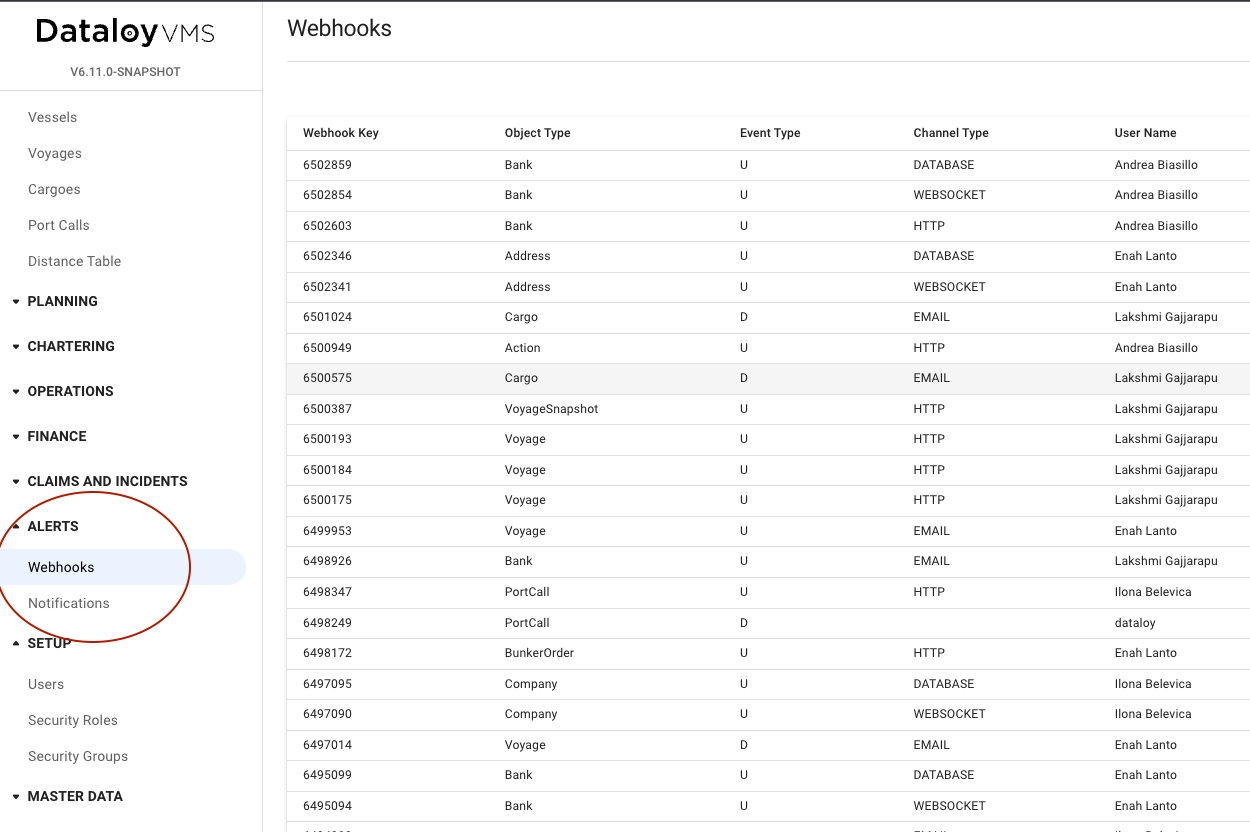
Transfer of voyage related data to the accounting system.
Synchronization of business partners between Dataloy VMS and the accounting system.
Exchange rate transfer to Dataloy VMS.
Map accounts between Dataloy VMS and the accounting system.
When invoices are posted in Dataloy VMS, the document status is automatically set to Ready-for-Posting. Set up a scheduled task and use the request under Data Transaction to extract invoices and credit notes that are ready for posting. When an invoice is transferred to accounting, update the status to Posted.
To reverse a posted invoice you need the document key and POST as in the example below
To dissolve an assembled invoice you need the document key and POST as in the example below
To get invoices that are ready for posting in Webhooks the following subscription can be created:
Alternatively, a scheduled job can be set-up to use the following request:
GET /Document?filter=invoicingStatus.statusTypeCode(EQ)RFP&filter=documentType.documentType(IN)(INI,INO,CRI,CRO)
There will be only one Document object in the API despite two payment terms for an invoice (for example 95/5 percent). However, the Document will have two documentPaymentTerms objects in the Document.documentPaymentTerms list.
To create two documents when integrating:
Loop on paymentTerms and create one document for each payment term.
Calculate the following values:
dueDate: document.documentPaymentTerms.dueDate
documentAmount: document.documentAmount * document.documentPaymentTerms.percentage / 100
companyCurrencyAmount: document.companyCurrencyAmount * document.documentPaymentTerms.percentage / 100
sourceCurrencyAmount: document.sourceCurrencyAmount * document.documentPaymentTerms.percentage / 100
Test data for invoicing integration can be generated in the Dataloy VMS post fixture modules (Accounts Receivable, Accounts Payable and Hire Payable).
When an invoice is successfully transferred to an accounting system, the document status must be updated to Posted in Dataloy VMS. This is done in a PUT request:
POST /Document/{document key}/reversePOST /Document/{document key}/dissolve{
"eventType":"U",
"user": the user code to be used in the subscription,
"objectType":"Document",
"expression": "dlpObject.getInvoicingStatus() != null && dlpObject.getInvoicingStatus().getStatusTypeCode().equals(\"RFP\") && (dlpObject.getDocumentType().getDocumentType().equals(\"INO\") || dlpObject.getDocumentType().getDocumentType().equals(\"INI\") || dlpObject.getDocumentType().getDocumentType().equals(\"CRI\") || dlpObject.getDocumentType().getDocumentType().equals(\"CRO\"))",
"url": "your webhook url"
}PUT request on /Document/{key}
{
"invoicingStatus": "POS"
}It is possible to create scripts, written in pseudo Java, that can be injected at runtime and used by Webhooks and Websockets.
An Alert Script can be very simple or very complex, their scope is to evaluate conditions and return true or false. If the script returns true the message is sent.
Alerts can be created and installed at run-time into the system. These are the predefined alerts available:
import com.dataloy.ds.*;
import com.dataloy.*;
import java.math.*;
BunkerOrderLine bunkerOrderLineOld= null;
BunkerOrderLine bunkerOrderLineNew= null;
if(dlpObject instanceof BunkerOrderLine)
bunkerOrderLineNew= dlpObject;
if(oldDlpObject instanceof BunkerOrderLine)
bunkerOrderLineOld= oldDlpObject;
if( bunkerOrderLineOld!=null && bunkerOrderLineNew!=null && ((bunkerOrderLineOld.getUnitPrice()==null && bunkerOrderLineNew.getUnitPrice()!=null) || (bunkerOrderLineOld.getUnitPrice()!=null && bunkerOrderLineNew.getUnitPrice()==null) || !bunkerOrderLineNew.getUnitPrice().equals(bunkerOrderLineOld.getUnitPrice()))){
mapResultsForMessage.put("?1",bunkerOrderLineNew.getBunkerType().getBunkerTypeDesc());
mapResultsForMessage.put("?2",bunkerOrderLineNew.getBunkerOrder().getPortCall().getVoyage().getVessel().getVesselName());
if(bunkerOrderLineNew.getBunkerOrder().getPortCall().getVoyage().getVoyageHeader()!= null && bunkerOrderLineNew.getBunkerOrder().getPortCall().getVoyage().getVoyageHeader().getReferenceNo()!=null)
mapResultsForMessage.put("?3",bunkerOrderLineNew.getBunkerOrder().getPortCall().getVoyage().getVoyageHeader().getReferenceNo());
else
mapResultsForMessage.put("?3",bunkerOrderLineNew.getBunkerOrder().getPortCall().getVoyage().getKey());
mapResultsForMessage.put("?4",bunkerOrderLineNew.getBunkerOrder().getPortCall().getPort().getPortName());
Double value1= new BigDecimal(bunkerOrderLineNew.getUnitPrice()).setScale(2, RoundingMode.HALF_UP).doubleValue();
Double value2= new BigDecimal(bunkerOrderLineOld.getUnitPrice()).setScale(2, RoundingMode.HALF_UP).doubleValue();
String strValue1= value1.toString();
String appValue1= strValue1.substring(strValue1.indexOf(".")+1, strValue1.length());
while(appValue1.length()<2)
appValue1= appValue1 +0;
String finalValue1= strValue1.substring(0,strValue1.indexOf(".")+1)+appValue1;
String strValue2= value2.toString();
String appValue2= strValue2.substring(strValue2.indexOf(".")+1, strValue2.length());
while(appValue2.length()<2)
appValue2= appValue2 +0;
String finalValue2= strValue2.substring(0,strValue2.indexOf(".")+1)+appValue2;
mapResultsForMessage.put("?5",finalValue1 );
mapResultsForMessage.put("?6",finalValue2 );
return true;
}
else{
return false;
}import com.dataloy.ds.*;
import com.dataloy.*;
import java.math.*;
BunkerOrderLine bunkerOrderLineOld= null;
BunkerOrderLine bunkerOrderLineNew= null;
if(dlpObject instanceof BunkerOrderLine)
bunkerOrderLineNew= dlpObject;
if(oldDlpObject instanceof BunkerOrderLine)
bunkerOrderLineOld= oldDlpObject;
if( bunkerOrderLineOld!=null && bunkerOrderLineNew!=null && ((bunkerOrderLineOld.getBunkeredQuantity()==null && bunkerOrderLineNew.getBunkeredQuantity()!=null) || (bunkerOrderLineOld.getBunkeredQuantity()!=null && bunkerOrderLineNew.getBunkeredQuantity()==null) || !bunkerOrderLineNew.getBunkeredQuantity().equals(bunkerOrderLineOld.getBunkeredQuantity()))){
mapResultsForMessage.put("?1",bunkerOrderLineNew.getBunkerType().getBunkerTypeDesc());
mapResultsForMessage.put("?2",bunkerOrderLineNew.getBunkerOrder().getPortCall().getVoyage().getVessel().getVesselName());
if(bunkerOrderLineNew.getBunkerOrder().getPortCall().getVoyage().getVoyageHeader()!= null && bunkerOrderLineNew.getBunkerOrder().getPortCall().getVoyage().getVoyageHeader().getReferenceNo()!=null)
mapResultsForMessage.put("?3",bunkerOrderLineNew.getBunkerOrder().getPortCall().getVoyage().getVoyageHeader().getReferenceNo());
else
mapResultsForMessage.put("?3",bunkerOrderLineNew.getBunkerOrder().getPortCall().getVoyage().getKey());
mapResultsForMessage.put("?4",bunkerOrderLineNew.getBunkerOrder().getPortCall().getPort().getPortName());
Double value1= new BigDecimal(bunkerOrderLineNew.getBunkeredQuantity()).setScale(3, RoundingMode.HALF_UP).doubleValue();
Double value2= new BigDecimal(bunkerOrderLineOld.getBunkeredQuantity()).setScale(3, RoundingMode.HALF_UP).doubleValue();
String strValue1= value1.toString();
String appValue1= strValue1.substring(strValue1.indexOf(".")+1, strValue1.length());
while(appValue1.length()<3)
appValue1= appValue1 +0;
String finalValue1= strValue1.substring(0,strValue1.indexOf(".")+1)+appValue1;
String strValue2= value2.toString();
String appValue2= strValue2.substring(strValue2.indexOf(".")+1, strValue2.length());
while(appValue2.length()<3)
appValue2= appValue2 +0;
String finalValue2= strValue2.substring(0,strValue2.indexOf(".")+1)+appValue2;
mapResultsForMessage.put("?5",finalValue1 );
mapResultsForMessage.put("?6",finalValue2 );
return true;
}
else{
return false;
}import com.dataloy.ds.*;
import com.dataloy.*;
import java.text.*;
BunkerOrder bunkerOrderOld= null;
BunkerOrder bunkerOrderNew= null;
if(dlpObject instanceof BunkerOrder)
bunkerOrderNew= dlpObject;
if(oldDlpObject instanceof BunkerOrder)
bunkerOrderOld= oldDlpObject;
if( bunkerOrderOld!=null && bunkerOrderNew!=null && ((bunkerOrderOld.getBunkeredDate()==null && bunkerOrderNew.getBunkeredDate()!=null) || (bunkerOrderOld.getBunkeredDate()!=null && bunkerOrderNew.getBunkeredDate()==null) || !bunkerOrderNew.getBunkeredDate().equals(bunkerOrderOld.getBunkeredDate()))){
mapResultsForMessage.put("?1",bunkerOrderNew.getKey());
mapResultsForMessage.put("?2",bunkerOrderNew.getPortCall().getVoyage().getVessel().getVesselName());
if(bunkerOrderNew.getPortCall().getVoyage().getVoyageHeader()!= null && bunkerOrderNew.getPortCall().getVoyage().getVoyageHeader().getReferenceNo()!=null)
mapResultsForMessage.put("?3",bunkerOrderNew.getPortCall().getVoyage().getVoyageHeader().getReferenceNo());
else
mapResultsForMessage.put("?3",bunkerOrderNew.getPortCall().getVoyage().getKey());
mapResultsForMessage.put("?4",bunkerOrderNew.getPortCall().getPort().getPortName());
SimpleDateFormat DATE_FORMAT = new SimpleDateFormat("dd.MM.yyyy hh:mm");
String date1 = DATE_FORMAT.format(bunkerOrderNew.getBunkeredDate());
String date2 = DATE_FORMAT.format(bunkerOrderOld.getBunkeredDate());
mapResultsForMessage.put("?5",date1);
mapResultsForMessage.put("?6",date2);
return true;
}
else{
return false;
}import com.dataloy.ds.*;
import com.dataloy.*;
import java.math.*;
import java.util.*;
Offhire offhireInput= null;
Voyage voyage= null;
VoyageHeader voyageHeader= null;
java.lang.System.out.println("---- offhire");
if(dlpObject instanceof Voyage)
voyage= dlpObject;
if(dlpObject instanceof VoyageHeader)
voyageHeader= dlpObject;
if(dlpObject instanceof Offhire)
offhireInput= dlpObject;
List offhires= new ArrayList();
if(offhireInput!=null) {
offhires.add(offhireInput);
}
if(voyageHeader!=null){
offhires= voyageHeader.getOffhires();
}
if(voyage!=null && voyage.getVoyageHeader()!=null){
offhires= voyage.getVoyageHeader().getOffhires();
}
if(offhires!=null && !offhires.isEmpty()){
for (Offhire offhire : offhires) {
if(offhire!=null && offhire.getVoyageHeader()!=null){
java.lang.System.out.println("---- offhire="+offhire);
if(offhire.getOffhireStartDate() == null || offhire.getOffhireEndDate() == null || offhire.getVoyageHeader().getVoyageStartDate() == null){
return false;
}
int hcons = 60 * 60 * 1000;
int dcons = hcons * 24;
java.lang.System.out.println("---- offhire offhire.getTimezoneOffset()="+offhire.getTimezoneOffset());
java.lang.System.out.println("---- offhire offhire.getOffhireStartDate()="+offhire.getOffhireStartDate().getTime());
Double offStart = offhire.getOffhireStartDate().getTime() - offhire.getTimezoneOffset() * hcons;
java.lang.System.out.println("---- offhire offStart="+offStart);
Calendar triggerStart = Calendar.getInstance();
triggerStart.add(Calendar.YEAR, -1);
if(offStart < triggerStart.getTimeInMillis()){
return false;
}
Double offEnd = offhire.getOffhireEndDate().getTime() - offhire.getTimezoneOffset() * hcons;
Double voyStart = offhire.getVoyageHeader().getVoyageStartDate().getTime() -( offhire.getVoyageHeader().getTimezoneOffset() * hcons);
Double voyEnd = voyStart + offhire.getVoyageHeader().getVoyage().getDaysTotal() * dcons;
if(offStart < voyStart || offEnd > voyEnd){
mapResultsForMessage.put("?1",offhire.getVoyageHeader().getVoyage().getVessel().getVesselName());
mapResultsForMessage.put("?2",offhire.getVoyageHeader().getReferenceNo());
mapResultsForMessage.put("?3",offhire.getOffhireStartDate());
mapResultsForMessage.put("?4",offhire.getOffhireEndDate());
return true;
}
}
}
}
else
return false;import com.dataloy.ds.*;
import com.dataloy.*;
import java.math.*;
import java.util.*;
PortCall portCall= null;
PortCall portCallOld= null;
if(dlpObject instanceof PortCall)
portCall= dlpObject;
if(oldDlpObject instanceof PortCall)
portCallOld= oldDlpObject;
if(portCall!=null && portCallOld!=null ) {
java.lang.System.out.println("---- daysInPort IF");
try{
double diff= portCall.getDaysInPort() - portCallOld.getDaysInPort();
if((diff < -1 || diff > 1)) {
mapResultsForMessage.put("?1",portCall.getPort().getPortName());
mapResultsForMessage.put("?2",portCall.getVoyage().getVessel().getVesselName());
mapResultsForMessage.put("?3",portCall.getVoyage().getVoyageHeader().getReferenceNo());
mapResultsForMessage.put("?4",portCall.getDaysInPort());
return true;
}
}
catch(Exception e){
java.lang.System.out.println("---- daysInPort Exception");
}
}
return false;import com.dataloy.ds.*;
import com.dataloy.*;
import java.math.*;
Cargo cargoOld= null;
Cargo cargoNew= null;
if(dlpObject instanceof Cargo)
cargoNew= dlpObject;
if(oldDlpObject instanceof Cargo)
cargoOld= oldDlpObject;
if( cargoOld!=null && cargoNew!=null && ((cargoOld.getLaycanMissedBy()==null && cargoNew.getLaycanMissedBy()!=null) || (cargoOld.getLaycanMissedBy()!=null && cargoNew.getLaycanMissedBy()==null) || !cargoNew.getLaycanMissedBy().equals(cargoOld.getLaycanMissedBy()))){
String early = null;
if(cargoNew.getLaycanMissedBy()==0){
return false;
}
if(cargoNew.getLaycanMissedBy()<0){
early = "early";
}
if(cargoNew.getLaycanMissedBy()>0){
early = "late";
}
mapResultsForMessage.put("?1",cargoNew.getVoyage().getVessel().getVesselName());
if(cargoNew.getVoyage().getVoyageHeader()!= null && cargoNew.getVoyage().getVoyageHeader().getReferenceNo()!=null)
mapResultsForMessage.put("?4",cargoNew.getVoyage().getVoyageHeader().getReferenceNo());
else
mapResultsForMessage.put("?4",cargoNew.getVoyage().getKey());
mapResultsForMessage.put("?2",early);
mapResultsForMessage.put("?3",cargoNew.getCargoReference());
Double value1= new BigDecimal(cargoNew.getLaycanMissedBy()).setScale(2, RoundingMode.HALF_UP).doubleValue();
String strValue1= value1.toString();
String appValue1= strValue1.substring(strValue1.indexOf(".")+1, strValue1.length());
while(appValue1.length()<3)
appValue1= appValue1 +0;
String finalValue1= strValue1.substring(0,strValue1.indexOf(".")+1)+appValue1;
mapResultsForMessage.put("?5",finalValue1 );
return true;
}
else{
return false;
}Webhooks are user-defined HTTP callbacks that receive events for the subscribed event types. Webhook notifications are asynchronous, the order is not guaranteed.
Events are categorised into event types. Events occur due to changes in the state of a resource, such as when a voyage is updated. When an event occurs, the registered applications are notified via HTTP POST. The POST contains the event details, including the event type that caused the event.
When an application receives the event, it must respond with a 200-level HTTP status code.
When a webhook subscription is made, through the resource WebhookSubscription, for a Dataloy object, BunkerOrder for instance, the subscribed webhook will be pushed with all the changes that occurred to the subscribed object and its object hierarchy. So if a PortCall of the subscribed BunkerOrder is updated the webhook will be notified.
The Remarks are not part of the webhook process. It is not possible to get notifications of changes in Remarks.
The Dataloy webhook event type is a concatenation of the following attributes:
Resource name (Document, Voyage, ..)
Operation type (C,U, D create, update, delete)
Object key
The user can subscribe to a webhook for a given event, for example:
Automatic Deactivation of subscription
If the subscribing system is unavailable or takes too long to respond, the server will deactivate the subscription after attempting 5 times (once a minute). The number of attempts and the interval between each attempt can be configured.
Deactivated subscriptions cannot be reactivated, a new subscription must be created if needed.
Email alert when a subscription is de-activated:
The message sent to the subscribed endpoint is set in the body of the POST method. The message is a JSON object and has the following structure:
The attributes have the following meaning:
With API 3.9 the following new functionalities have been introduced:
Possibility to be notified of changes via email
Possibility to customize the JSON pushed as
Possibility to filter changes that have to be pushed via expressions
Possibility to filter changes that have to be pushed via scripts
To be notified via email in the WebhookSubscription must be specified the channelInfo property with channelType EMAIL and the URL with the email address:
channelType can be EMAIL or HTTP if HTTP is set the URL attribute must contain the endpoint where to push notifications.
Through the attribute JSON of WebhookSubscription is possible to specify which attributes of the object must be pushed (see ). The value of JSON must be encoded with Base64.
For instance, if the subscription is for the object BunkerOrderLine a possible value for the JSON attribute could be:
that encoded will be
In this way the sub-object in the attribute resource will be smaller:
Through the attribute expression of WebhookSubscription is possible to write a Java expression against the object changed. At runtime If the expression return true the notification will be sent, otherwise no.
For instance, if the subscription is done for the object BunkerOrderLine a possible expression could be:
that for any changes at any BunkerOrderLine object will check if the unit price is not null and its value is between 10 and 100, if yes the notification will be sent.
In the expression must be used the variable dlpObject to refer to the changed object, the object will contain the new values. If the expression needs to check also the previous values of the object, the variable oldDlpObject can be used.
For instance:
that will check if the new extra cost of a BunkerOrder is greater than the previous one.
If you want to be notified when an attribute change value from null to not null:
The old values will be accessible only for those Dataloy object changed via Dataloy API.
Contact Dataloy to have info regarding scripts.
In version 3.16 (and later) it is possible to decide if a webhook subscription should only be notified on changes to the object subscribed. So for instance making a subscription for the Voyage object, the changes that will occur to linked objects, like PortCall, Cargo, etc, will be not notified. To achieve this behaviour a new boolean attribute called onlyMainObject in WebhookSubscription has been added, setting it to true only the changes for the subscribed will be sent.
A new endpoint in WebhookSubscription POST:sendFailedNotifications has been added to resend manually the failed webhook notification.
In version 5.23 (and later) it is possible to decide if a webhook subscription should only be notified with the raw object, without the envelope payload. To achieve this behavior a new boolean attribute called rawObject in WebhookSubscription has been added, setting it to true the raw object will be sent.
A new attribute xsl has been added which allows you to store an XSL stylesheet to transform the subscribed object to XML. The value of the field must be encoded with Base64. This is part only of Enterprise API.
In order to not get notified by the changes done by the user of the subscription the attribute notSendMyChanges can be set to true.
GET /WebhookSubscription
Get a list of WebhookSubscription objects. Filter to avoid huge amounts of data (see documentation for examples).
GET /WebhookSubscription/{key}
Get a single WebhookSubscription object.
Example GET Return Body
since API 3.9:
POST /WebhookSubscription
Create a new WebhookSubscription.
Examples
Create a subscription to get notifications when the BunkerOrder with primary key 243896793 is updated:
Create a subscription to get notifications when any BunkerOrder is updated:
Create a subscription to get notifications when a BunkerOrder is created:
Create a subscription to get notifications when the BunkerOrder with primary key 243896793 is deleted:
Create a subscription to get notifications when any BunkerOrder is deleted:
Create a subscription to get notifications when any BunkerOrder is updated via email, since API 3.9:
Create a subscription to get notifications only when a Voyage object is changed, since API 3.16:
PUT /WebhookSubscription/{key}
Only the following attributes can be updated:
unsubscribed
url
webhookUsername
webhookPassword
Since API 3.9 is possible to change also these other attributes:
channelInfo
json
expression
dlpAlertScript
To unsubscribe a subscription the following JSON must be sent. It is not possible to update the subscription if it has been unsubscribed:
DELETE /WebhookSubscription/{key}
To delete a WebhookSubscription first it has to be unsubscribed. It is not possible to delete WebhookSubscription that got Webhook notifications, regardless that it has been unsubscribed or not.
Before setting up and testing an invoice integration other integrations need to be in place:
When accruals have been verified and posted in Dataloy VMS, the document status is set to Ready-for-Posting.
More information, go to and .
To get accruals that are ready for posting in the following subscription can be created:
Alternatively, a scheduled job can be setup to use the following request:
Get accruals and accrual reversals that are ready for posting to accounting
Test data for accruals integration can be generated in the module in Dataloy VMS. Generate and batch post the accruals.
When an accrual is successfully transferred to an accounting system, the accrual status must to be updated to Posted in Dataloy VMS. This is done in a PUT request:
Update status to posted for a specific invoice
Bank Fields List
Subscription data:
resource
The JSON of the DataloyObject that the subscription refers to
scriptParameterValues
useMsg
Cargo.C
Notifies when a Cargo is created
Document.D
Notifies when a Document is deleted.
Voyage.U
Notifies when a Voyage is updated.
Voyage.U.793628
Will notify when voyage, having voyage.key = 793628, is updated.
id
Unique identifier of the notification
eventTime
The time when the event occurred
objectType
Name of the changed Dataloy object
dataloyObject
The primary key of the changed Dataloy object (it can be different from the subscribed object, it can be an object in the hierarchy of the subscribed object )
eventType
C for creation, U for update, D for deletion
dataloyObjectSelf
the Dataloy URL of the changed object
dlpObject.getUnitPrice()!=null && ( dlpObject.getUnitPrice()>10 || dlpObject.getUnitPrice()<100)
oldDlpObject.getExtraCost()!=null && dlpObject.getExtraCost()!=null && dlpObject.getExtraCost()> oldDlpObject.getExtraCost()
oldDlpObject.getReferenceNo() == null && dlpObject.getReferenceNo() != null
subscription
{
"id": "1573335-244070007",
"eventTime": "2016-09-14T13:37:26",
"objectType": "PortCall",
"eventType": "U",
"dataloyObject":189126972,
"dataloyObjectSelf":"http://localhost:8080/ws/rest/PortCall/7823672"
"subscription":{
"key":243885046,
"self":"http://localhost:8080/ws/rest/WebhookSubscription/243885046"
"objectType":"BunkerOrder",
"dataloyObject":244070007,
"eventType": "U",
"url":"http://test1.dataloy.com:8080/webhook/"
}
"resource":{
"key":244070007,
"self":"http://localhost:8080/ws/rest/BunkerOrder/244070007",
"vessel":{
"vesselName":"VESSEL1",
"key":188616815,
"self":"http://localhost:8080/ws/rest/Vessel/188616815"
},
"currency":{
"currencyCode":"USD",
"currencyName":"U.S. DOLLAR",
"key":400132,
"self":"http://localhost:8080/ws/rest/Currency/400132"
},
"exchangeRate":3.0,
"modifiedDate":"2016-09-21T06:38:29",
"portCall":{
"key":189126972,
"self":"http://localhost:8080/ws/rest/PortCall/189126972",
"eventLogs":[
{
"key":189126978,
"self":"http://localhost:8080/ws/rest/EventLog/189126978",
"event":{
"key":1000052,
"self":"http://localhost:8080/ws/rest/Event/1000052",
"eventCode":"DEP",
"eventDesc":"Departed"
},
"eventLogDate":"2015-02-13T17:18:00"
},
{
"key":189126974,
"self":"http://localhost:8080/ws/rest/EventLog/189126974",
"event":{
"key":1000050,
"self":"http://localhost:8080/ws/rest/Event/1000050",
"eventCode":"ARR",
"eventDesc":"Arrived"
},
"eventLogDate":"2015-02-06T20:18:00"
},
{
"key":189126976,
"self":"http://localhost:8080/ws/rest/EventLog/189126976",
"event":{
"key":1000051,
"self":"http://localhost:8080/ws/rest/Event/1000051",
"eventCode":"BRT",
"eventDesc":"Berthed"
},
"eventLogDate":"2015-02-07T10:06:00"
}
]
},
"extraCost":0.0,
"bunkeredDate":"2016-01-01T00:00:00",
"orderDate":"2016-09-06T10:16:36",
"bunkerPaidBy":null,
"createdDate":"2016-09-21T06:12:42",
"createdById":999999,
"bunkerOrderStatus":{
"key":243093653,
"self":"http://localhost:8080/ws/rest/StatusType/243093653",
"statusTypeDesc":"Requirement",
"statusTypeCode":"REQBO"
},
"externalReferenceNo":null,
"bunkerOrderLines":[
{
"key":244070009,
"self":"http://localhost:8080/ws/rest/BunkerOrderLine/244070009",
"minQuantity":50.0,
"maxQuantity":100.0,
"extraCost":0.0,
"bunkeredQuantity":111.0,
"unitPrice":100.0,
"bunkerType":{
"key":73564540,
"self":"http://localhost:8080/ws/rest/BunkerType/73564540",
"isoCode":null,
"isoYear":null,
"bunkerTypeCode":"FO",
"bunkerTypeDesc":"FO",
"sulphurPercent":null
}
}
],
"company":null,
"bunkerBroker":{
"businessPartnerName":"BUSINESS PARTNER 1",
"businessPartnerSort":"BUSINESS PARTNER 1",
"businessPartnerCode":"1111",
"businessPartnerType":{
"businessPartnerType":"BS",
"businessPartnerTypeDesc":"Bunker Supplier",
"key":1000034,
"self":"http://localhost:8080/ws/rest/BusinessPartnerType/1000034"
},
"key":39697371,
"self":"http://localhost:8080/ws/rest/BusinessPartner/39697371"
},
"bunkerAccountOf":null,
"bunkerSupplier":{
"businessPartnerName":"BUSINESS PARTNER 2",
"businessPartnerSort":"BUSINESS PARTNER 2",
"businessPartnerCode":"22222",
"businessPartnerType":{
"businessPartnerType":"BS",
"businessPartnerTypeDesc":"Bunker Supplier",
"key":1000034,
"self":"http://localhost:8080/ws/rest/BusinessPartnerType/1000034"
},
"key":39697206,
"self":"http://localhost:8080/ws/rest/BusinessPartner/39697206"
},
"remarks":[
]
}
}{
"channelInfo": {
"url": "[email protected]",
"channelType": "EMAIL"
}
}{"extraCost":"*"}"json": "ew0KCSJleHRyYUNvc3QiOiIqIg0KfQ=="{
"id":"245-320996749",
"eventTime":"2018-01-30T10:42:11",
"eventType":"U",
"objectType":"BunkerOrderLine",
"dataloyObject":320996749,
"dataloyObjectSelf":"http://platform-dev.dataloy.com:80/ws/rest/BunkerOrderLine/320996749",
"subscription":{
"key":332501529,
"self":"http://platform-dev.dataloy.com:80/ws/rest/WebhookSubscription/332501529",
"isSubscriptionActive":true,
"user":{
"key":999999,
"self":"http://platform-dev.dataloy.com:80/ws/rest/User/999999",
"userCode":"DATALOY",
"userName":"dataloy"
},
"objectType":null,
"dataloyObject":null,
"url":null,
"dlpAlertScript":{
"key":318269643,
"self":"http://platform-dev.dataloy.com:80/ws/rest/DlpAlertScript/318269643",
"scriptCode":"BUP",
"scriptName":"Bunkered Unit Price updated"
},
"eventType":null,
"unsubscriptionDate":null,
"channelInfo":{
"key":332501528,
"self":"http://platform-dev.dataloy.com:80/ws/rest/ChannelInfo/332501528",
"channelType":{
"key":311504704,
"self":"http://platform-dev.dataloy.com:80/ws/rest/ChannelType/311504704",
"channelTypeCode":"EMAIL"
},
"url":"[email protected]"
}
},
"resource":{
"key":320996749,
"self":"http://platform-dev.dataloy.com:80/ws/rest/BunkerOrderLine/320996749",
"extraCost":0.0
}
}{
"key": 243907762,
"self": "http://localhost:8080/ws/rest/WebhookSubscription/243907762",
"isSubscriptionActive": true,
"unsubscribed": false,
"eventType": "U",
"dataloyObject": 243896793,
"createdDate": "2016-09-16T08:35:46",
"modifiedDate": "2016-09-16T08:35:46",
"createdById": 999999,
"objectType": "BunkerOrder",
"user": {
"key": 999999,
"self": "http://localhost:8080/ws/rest/User/999999",
"userName": "dataloy",
"userCode": "DATALOY"
},
"url": "http://test1.dataloy.com:8080/webhook/",
"unsubscriptionDate": null,
"webhookUsername": null,
"webhookPassword": null,
"remarks": []
}{
"key": 320298564,
"self": "http://platform-dev.dataloy.com:80/ws/rest/WebhookSubscription/320298564",
"isSubscriptionActive": true,
"unsubscribed": false,
"user": {
"key": 999999,
"self": "http://platform-dev.dataloy.com:80/ws/rest/User/999999",
"userCode": "DATALOY",
"userName": "dataloy"
},
"objectType": "BunkerOrder",
"createdDate": "2018-01-11T10:53:14",
"url": "http://platform-dev.dataloy.com/ws/rest/dataloy/sendJson",
"modifiedDate": "2018-01-11T10:53:14",
"createdById": 999999,
"dataloyObject": null,
"expression": null,
"dlpAlertScript": null,
"eventType": "U",
"unsubscriptionDate": null,
"scriptParameterValues": [],
"useMsg": false,
"json": "{}",
"webhookPassword": "XXX",
"webhookUsername": "dataloy",
"channelInfo": null,
"remarks": []
}{
"eventType":"U",
"user":999999,
"objectType":"BunkerOrder",
"dataloyObject":243896793,
"url":"http://test1.dataloy.com:8080/webhook/"
}{
"eventType":"U",
"user":999999,
"objectType":"BunkerOrder",
"url":"http://test1.dataloy.com:8080/webhook/"
}{
"eventType":"C",
"user":999999,
"objectType":"BunkerOrder",
"url":"http://test1.dataloy.com:8080/webhook/"
}{
"eventType":"D",
"user":999999,
"objectType":"BunkerOrder",
"dataloyObject":243896793,
"url":"http://test1.dataloy.com:8080/webhook/"
}
{
"eventType":"D",
"user":999999,
"objectType":"BunkerOrder",
"url":"http://test1.dataloy.com:8080/webhook/"
}{
"eventType":"U",
"user":999999,
"objectType":"BunkerOrder",
"channelInfo":{
"url": "[email protected]",
"channelType": "EMAIL"
}
}{
"eventType":"U",
"user":999999,
"objectType":"Voyage",
"channelInfo":{
"url": "[email protected]",
"channelType": "EMAIL"
},
"onlyMainObject": true
}{
"unsubscribed": true
}Invoice is in Posted section of either (AP), (AR) or (HP) in Dataloy VMS and has been transferred to an accounting system.
sourceCurrencyCode
Currency code for sourceCurrencyAmount. More information see sourceCurrencyAmount
exchangeRate
Exchange Rate between documentAmount and sourceCurrencyAmount
exchangeRateDate
Exchange Rate Date
glAccount
General Ledger Account
X
quantity
Has Different Meaning Depending on Document Type:
Accruals - Onhire Days Within Accrual Period
Bunkers - Bunker Quantity
Freight - Cargo Quantity
unitPrice
Unit Price. Quantity * Unit Price = Document Amount
invoicingStatus.statusTypeCode
Status Code, see
documentLineText
Document Line Text/Description
businessPartner
Business Partner Object. (Value: businessPartnerCode or businessPartner Key).
Invoice and Payment/Receipt:
Outgoing invoice:
document.company is the company in Dataloy VMS issuing the invoice.
document.businessPartner is the business partner receiving the invoice.
isAccountsPayable
false = Accounts Receivable, true = Accounts Payable Inserting Payment/Receipt: For payments referring to invoices set value to 0. For payments referring to invoice set value to 1. This value should always have the same value as for the referring invoice.
refDocument
Referring Document for Reversals, Payments and Receipts. To set refDocument use Document Number or Key.
Payment/Receipts: Setting refDocument for payment receipts, documentLine.voyage will be set equal to the documentLine.voyage of the referring invoice.
vatRate.vatRate
VAT Rate
vatRate.vat.vatCode
VAT Code
freightRate
Freight Rate Object
portCall
portCall Object
handlingCost
handlingCost Object
businessUnit
businessUnit Object
account
Account Object, use glAccount instead
handlingCostCode
handlingCostCode Object, use glAccount instead
billOfLading
billOfLading Object
claim
Claim Object
offhire
Offhire Object
voyage
Voyage Object
chip
Chip ID
abaNumber
ABA Code
Address
X
Contact Info
X
GET /Document?filter=invoicingStatus.statusTypeCode(EQ)RFP&filter=documentType.documentType(IN)ACP,ACR
Document Status Code
Document Status Description
Description
PEN
Pending
Invoice is in the Pending section of either Accounts Payable (AP), Accounts Receivable (AR) or Hire Payable (HP) in Dataloy VMS.
INV
Approval
Invoice is in the Assembled section of either Accounts Payable (AP), Accounts Receivable (AR) or Hire Payable (HP) in Dataloy VMS.
RFP
Ready-For-Posting
Invoice is in the Posted section section of either Accounts Payable (AP), Accounts Receivable (AR) or Hire Payable (HP) in Dataloy VMS, but has not yet been transferred to an accounting system.
POS
Field Name
Description
Not possible to user in filters
documentAmount
For /DocumentTypes INO, INI, CRI, CRO: Amount in order currency/sales currency. The original currency.
For /DocumentTypes PMI, PMO: Amount in Invoice Currency.
For /DocumentTypes ACR, ACP: Amount in Voyage Currency.
For /DocumentTypes APR: Amount in Advance Currency
For /DocumentTypes ACC: Amount in Invoice Currency (use Voyage currency if Invoice Currency is not present)
companyCurrencyAmount
For all /DocumentTypes : Amount in Company Currency for the Document.Company.
sourceCurrencyAmount
For /DocumentTypes INO, INI, CRI, CRO: Amount in order currency/sales currency. The original currency.
For /DocumentTypes PMI, PMO: Amount in Original Payment Currency.
For /DocumentTypes ACR, ACP: Amount in Voyage Currency.
For /DocumentTypes APR: Amount in Advance Currency
For /DocumentTypes ACC: Amount in Voyage Currency
documentCurrency.currencyCode
Field Name
Description
Required
Unique
Not Possible to Set in Filters
bankName
Bank Name
Yes
swiftAddress
SWIFT Code
Yes
Yes
Posted
Currency Code for documentAmount. More information, see documentAmount
{
"eventType":"U",
"user": the user code to be used in the subscription,
"objectType":"Document",
"expression": "dlpObject.getInvoicingStatus() != null && dlpObject.getInvoicingStatus().getStatusTypeCode().equals(\"RFP\") && (dlpObject.getDocumentType().getDocumentType().equals(\"ACR\") || dlpObject.getDocumentType().getDocumentType().equals(\"ACP\"))",
"url":"your webhook url"
}PUT /Document/{key}
{
"invoicingStatus": "POS"
}Charter Hire - Days
Meals and Cables - Days
VAT - VAT Amount is Quantity * vatRate
Various, Days - Voyage Days
Various, Rate - Cargo Quantity
Offhire - Offhire Days
Deadfreight - Deadfreight Quantity
Demurrage/Despatch - Days
On the referring payment, document.company is receiving the payment.
Incoming invoice:
document.businessPartner is issuing the invoice.
document.company is receiving the invoice.
On the referring payment document.company is the one paying the invoice.
PositionReport is used to update the status of an ongoing voyage's port calls.
Position reports update a port call's sailing, arrival, in port, and departure status. Most fields in the PositionReport object will only provide information, while a few affect the port call's results.
The following fields will affect the port call's results:
eventLogs
An captures port events along with their dates and times. The port events include ARRIVAL, BERTHED, UNBERTHED, and DEPARTURE. To record the arrival date of a port call, an event log entry should include the ARRIVAL event along with the corresponding date.
A records the remaining bunkers on board for a specific bunker category
Fields impacting the port call's results will have Major Change Factor marked as yes, along with a description, on the .
PositionReport can be one of these types:
Noon Report
logs the ship's status at sea, updating the estimated arrival date and ROB info
Arrival Report
logs when the ship arrives in the port, fixing the arrival date and ROB info
In order to include a on the position report, a separate API request must be made after the report is created. See for an example.
Berth Report
logs when the ship has berthed in the port, fixing the berthed date and ROB info
Unberth Report
logs when the ship has unberthed in the port, fixing the unberthed date and ROB info
In Port Report
logs supplementary information such as hours in service, weather, wind direction and average wind direction when the ship is docked.
Departure Report
logs when the ship leaves the port, fixing the departure date and ROB info
Date and time of creation of the report
yes
String
should be in this format: "YYYY-MM-DDTHH:mm:ss"
Port Call
portCall
Port to update
yes
Long
key of the port call
Latitude
latitude
Current position
yes
Double
Longitude
longitude
Current position
yes
Double
Estimated Time of Arrival
eventLogs
Date and time of estimated time of arrival
yes
yes, updates PortCall's arrival date
should be the key of the port call's arrival event log
date should be in this format: "YYYY-MM-DDTHH:mm:ss"
Remaining bunkers on board
"positionReportBunkers": [{"bunkerCategory": "FO", "rob":100}]
Remaining bunkers on board at the time of reporting for the given bunker category
yes, updates PortCall's arrival rob
one PositionReportBunker object for each bunker category
Wind Direction
windDirection
Determines current wind direction
Average Wind Force
averageWindForce
General wind conditions
Double
Sea Direction
seaDirection
Current sea direction
Average Sea State
averageSeaState
General sea conditions
Double
Weather
weather
Determines current weather
Distance Sailed
distanceSailed
Distance sailed
Double
Hours in Service
hoursInService
Number of hours in operation
Double
Main Engine RPM
rpmFromLastPort
RPM recorded from previous port
Double
Port to update
yes
Long
key of the port call
Arrival Date
eventLogs
Date and time of arrival on port
yes
yes, updates and fixes PortCall's arrival date
should be the key of the port call's arrival event log
date should be in this format: "YYYY-MM-DDTHH:mm:ss"
Arrival Report Date
reportDateLocal
Date and time of creation of the report
String
should be in this format: "YYYY-MM-DDTHH:mm:ss"
Actual Distance Sailed Since Departure
distanceSailed
Distance in nm sailed from previous port
yes, updates the PortCall's actual distance sailed
Double
Remaining bunkers on board
"positionReportBunkers": [{"bunkerCategory": "FO", "rob":98}]
Remaining bunkers at the time of arrival for the given bunker category
yes, updates and fixes PortCall's arrival ROB
one PositionReportBunker object for each bunker category
Hours Stoppage
hoursStoppages
Number of hours in stoppage of operation
Double
Hours In Service
hoursInService
Number of hours in operation
Double
Speed Made Good
speedMadeGood
Net speed when sailing to the port
Double
Draft Aft
draftAft
Vessel's draft aft
Double
Draft Forward
draftForward
Vessel's draft forward
Double
Port to update
yes
Long
key of the port call
Berth date
eventLogs
Date and time of berthing on port
yes
yes, updates and fixes PortCall's berthed date
should be the key of the port call's berth event log
date should be in this format: "YYYY-MM-DDTHH:mm:ss"
Berth Report Date
reportDateLocal
Date and time of creation of the report
String
should be in this format: "YYYY-MM-DDTHH:mm:ss"
Remaining bunkers on board
"positionReportBunkers": [{"bunkerCategory": "FO", "rob":95}]
Remaining bunkers at the time of berthing for the given bunker category
yes, updates and fixes PortCall's berthing ROB
one PositionReportBunker object for each bunker category
Port to update
yes
Long
key of the port call
Unberth date
eventLogs
Date and time of berthing on port
yes
yes, updates and fixes PortCall's berthed date
should be the key of the port call's unberth event log
date should be in this format: "YYYY-MM-DDTHH:mm:ss"
Unberth Report Date
reportDateLocal
Date and time of creation of the report
String
should be in this format: "YYYY-MM-DDTHH:mm:ss"
Remaining bunkers on board
"positionReportBunkers": [{"bunkerCategory": "FO", "rob":95}]
Remaining bunkers at the time of unberthing for the given bunker category
yes, updates and fixes PortCall's unberthing ROB
one PositionReportBunker object for each bunker category
Port to update
yes
Long
key of the port call
In Port Report Date
reportDateLocal
Date and time of creation of the report
String
should be in this format: "YYYY-MM-DDTHH:mm:ss"
Hours In Service
hoursInService
Number of hours in operation
Double
Weather
weather
Current weather
Wind Direction
windDirection
Current wind direction
Average Wind Force
averageWindForce
General wind conditions
Double
Port to update
yes
Long
key of the port call
Departure date
eventLogs
Date and time of departure from port
yes
yes, updates and fixes PortCall's departure date
should be the key of the port call's departure event log
date should be in this format: "YYYY-MM-DDTHH:mm:ss"
Departure Report Date
reportDateLocal
Date and time of creation of the report
String
should be in this format: "YYYY-MM-DDTHH:mm:ss"
Remaining bunkers on board
"positionReportBunkers": [{"bunkerCategory": "FO", "rob":90}]
Remaining bunkers at the time of departure for the given bunker category
yes, updates and fixes PortCall's departure ROB
one PositionReportBunker object for each bunker category
Distance to next port
distanceToNextPort
Distance in nm to next port
Double
Draft Aft
draftAft
Vessel's draft aft
Double
Draft Forward
draftForward
Vessel's draft forward
Double
Report Type
vesselReportType
Determines the type of vessel report
yes
String
"NOON"
Noon Report Date
Vessel Report Type
vesselReportType
Determines the type of vessel report
yes
String
"ARR"
Port Call
Vessel Report Type
vesselReportType
Determines the type of vessel report
yes
String
"BRT"
Port Call
Vessel Report Type
vesselReportType
Determines the type of vessel report
yes
String
"UBRT"
Port Call
Vessel Report Type
vesselReportType
Determines the type of vessel report
yes
String
"PORT"
Port Call
Vessel Report Type
vesselReportType
Determines the type of vessel report
yes
String
"DEP"
Port Call
reportDateLocal
portCall
portCall
portCall
portCall
portCall
GET /ws/rest/PortCall?filter=voyage.key(EQ)123456&portCallSequence(EQ)2=null HTTP/1.1
Host: BASEURL
fields: {"eventLogs": {"event": {"eventCode":"*"}, "robs": {"bunkerCategory": {"bunkerCategoryCode":"*"}, "rob": "*"}}}
Authorization: Bearer ....POST /ws/rest/PositionReport HTTP/1.1
Host: BASEURL
Content-Type: application/json
Authorization: Bearer ....{
"vesselReportType": "NOON",
"reportDateLocal": "2024-08-01T19:00:00",
"portCall": 123456, //key from the response of the PortCall query
"latitude": 60.2139,
"longitude": 4.5300,
"eventLogs": [
{
"key": 123456, //arrival event log key
"eventLogDate": "2024-08-02T02:36:00"
}
],
"positionReportBunkers": [
{
"bunkerCategory": 123456, //bunker category key
"rob": 555
},
{
"bunkerCategory": 654321, //bunker category key
"rob": 7777
}
],
"windDirection": 911643,
"weather": 950928,
"distanceSailed": 3150.00
}GET /ws/rest/PortCall?filter=voyage.key(EQ)123456&portCallSequence(EQ)2=null HTTP/1.1
Host: BASEURL
fields: {"eventLogs": {"event": {"eventCode":"*"}, "robs": {"bunkerCategory": {"bunkerCategoryCode":"*"}, "rob": "*"}}}
Authorization: Bearer ....POST /ws/rest/PositionReport HTTP/1.1
Host: BASEURL
Content-Type: application/json
Authorization: Bearer ....{
"vesselReportType": "ARR",
"reportDateLocal": "2024-08-01T19:00:00",
"portCall": 123456, //key from the response of the PortCall query
"latitude": 60.2139,
"longitude": 4.5300,
"eventLogs": [
{
"key": 123456, //arrival event log key
"eventLogDate": "2024-08-02T03:00:00"
}
],
"positionReportBunkers": [
{
"bunkerCategory": 123456, //bunker category key
"rob": 235
},
{
"bunkerCategory": 654321, //bunker category key
"rob": 225.85
}
]
}GET /ws/rest/PortCall?filter=voyage.key(EQ)123456&portCallSequence(EQ)2=null HTTP/1.1
Host: BASEURL
fields: {"eventLogs": {"event": {"eventCode":"*"}, "robs": {"bunkerCategory": {"bunkerCategoryCode":"*"}, "rob": "*"}}}
Authorization: Bearer ....POST /ws/rest/PositionReport HTTP/1.1
Host: BASEURL
Content-Type: application/json
Authorization: Bearer ....{
"vesselReportType": "BRT",
"reportDateLocal": "2024-08-03T10:36:00",
"portCall": 123456, //key from the response of the PortCall query
"eventLogs": [
{
"key": 123456, //berth event log key
"eventLogDate": "2024-08-03T10:36:00"
}
],
"positionReportBunkers": [
{
"bunkerCategory": 123456, //bunker category key
"rob": 220
},
{
"bunkerCategory": 654321, //bunker category key
"rob": 225
}
]
}GET /ws/rest/PortCall?filter=voyage.key(EQ)123456&portCallSequence(EQ)2=null HTTP/1.1
Host: BASEURL
fields: {"eventLogs": {"event": {"eventCode":"*"}, "robs": {"bunkerCategory": {"bunkerCategoryCode":"*"}, "rob": "*"}}}
Authorization: Bearer ....POST /ws/rest/PositionReport HTTP/1.1
Host: BASEURL
Content-Type: application/json
Authorization: Bearer ....{
"vesselReportType": "UBRT",
"reportDateLocal": "2024-08-05T08:00:00",
"portCall": 123456, //key from the response of the PortCall query
"eventLogs": [
{
"key": 123456, //unberth event log key
"eventLogDate": "2024-08-05T08:00:00"
}
],
"positionReportBunkers": [
{
"bunkerCategory": 123456, //bunker category key
"rob": 218.5
},
{
"bunkerCategory": 654321, //bunker category key
"rob": 225
}
]
}GET /ws/rest/PortCall?filter=voyage.key(EQ)123456&portCallSequence(EQ)2=null HTTP/1.1
Host: BASEURL
fields: {"eventLogs": {"event": {"eventCode":"*"}, "robs": {"bunkerCategory": {"bunkerCategoryCode":"*"}, "rob": "*"}}}
Authorization: Bearer ....POST /ws/rest/PositionReport HTTP/1.1
Host: BASEURL
Content-Type: application/json
Authorization: Bearer ....{
"vesselReportType": "PORT",
"reportDateLocal": "2024-08-03T18:00:00",
"portCall": 123456, //key from the response of the PortCall request
"hoursInService": 225.85,
"weather": 950927,
"windDirection": 911638,
"averageWindForce": 1
}GET /ws/rest/PortCall?filter=voyage.key(EQ)123456&portCallSequence(EQ)2=null HTTP/1.1
Host: BASEURL
fields: {"eventLogs": {"event": {"eventCode":"*"}, "robs": {"bunkerCategory": {"bunkerCategoryCode":"*"}, "rob": "*"}}}
Authorization: Bearer ....POST /ws/rest/PositionReport HTTP/1.1
Host: BASEURL
Content-Type: application/json
Authorization: Bearer ....{
"vesselReportType": "DEP",
"reportDateLocal": "2024-08-05T08:30:00",
"portCall": 123456, //key from the response of the PortCall query
"eventLogs": [
{
"key": 123456, //departure event log key
"eventLogDate": "2024-08-05T08:30:00"
}
],
"positionReportBunkers": [
{
"bunkerCategory": 123456, //bunker category key
"rob": 218.5
},
{
"bunkerCategory": 654321, //bunker category key
"rob": 225
}
]
}[
{
"key": 6130402,
"eventLogs": [
{
"key": 6130391,
"event": {
"key": 1000051,
"eventCode": "BRT"
},
"robs": [
{
"key": 6130447,
"rob": 0.0,
"bunkerCategory": {
"key": 916946,
"bunkerCategoryCode": "DO"
}
},
{
"key": 6130450,
"rob": 0.0,
"bunkerCategory": {
"key": 916944,
"bunkerCategoryCode": "FO"
}
},
{
"key": 6130462,
"rob": 0.0,
"bunkerCategory": {
"key": 916945,
"bunkerCategoryCode": "FL"
}
},
{
"key": 6130464,
"rob": 249.75,
"bunkerCategory": {
"key": 916947,
"bunkerCategoryCode": "DL"
}
}
]
},
{
"key": 6130396,
"event": {
"key": 6088041,
"eventCode": "UBRT"
},
"robs": [
{
"key": 6130444,
"rob": 249.75,
"bunkerCategory": {
"key": 916947,
"bunkerCategoryCode": "DL"
}
},
{
"key": 6130452,
"rob": 0.0,
"bunkerCategory": {
"key": 916945,
"bunkerCategoryCode": "FL"
}
},
{
"key": 6130459,
"rob": 0.0,
"bunkerCategory": {
"key": 916946,
"bunkerCategoryCode": "DO"
}
},
{
"key": 6130470,
"rob": 0.0,
"bunkerCategory": {
"key": 916944,
"bunkerCategoryCode": "FO"
}
}
]
},
{
"key": 6130392,
"event": {
"key": 1000052,
"eventCode": "DEP"
},
"robs": [
{
"key": 6130440,
"rob": 0.0,
"bunkerCategory": {
"key": 916944,
"bunkerCategoryCode": "FO"
}
},
{
"key": 6130448,
"rob": 0.0,
"bunkerCategory": {
"key": 916945,
"bunkerCategoryCode": "FL"
}
},
{
"key": 6130454,
"rob": 249.75,
"bunkerCategory": {
"key": 916947,
"bunkerCategoryCode": "DL"
}
},
{
"key": 6130458,
"rob": 0.0,
"bunkerCategory": {
"key": 916946,
"bunkerCategoryCode": "DO"
}
}
]
},
{
"key": 6130395,
"event": {
"key": 1000050,
"eventCode": "ARR"
},
"robs": [
{
"key": 6130451,
"rob": 0.0,
"bunkerCategory": {
"key": 916945,
"bunkerCategoryCode": "FL"
}
},
{
"key": 6130460,
"rob": 250.0,
"bunkerCategory": {
"key": 916947,
"bunkerCategoryCode": "DL"
}
},
{
"key": 6130467,
"rob": 0.0,
"bunkerCategory": {
"key": 916946,
"bunkerCategoryCode": "DO"
}
},
{
"key": 6130469,
"rob": 0.0,
"bunkerCategory": {
"key": 916944,
"bunkerCategoryCode": "FO"
}
}
]
}
]
},
{
"key": 6130400,
"eventLogs": [
{
"key": 6130394,
"event": {
"key": 1000051,
"eventCode": "BRT"
},
"robs": [
{
"key": 6130441,
"rob": 230.53559444257462,
"bunkerCategory": {
"key": 916947,
"bunkerCategoryCode": "DL"
}
},
{
"key": 6130457,
"rob": 0.0,
"bunkerCategory": {
"key": 916945,
"bunkerCategoryCode": "FL"
}
},
{
"key": 6130461,
"rob": 0.0,
"bunkerCategory": {
"key": 916946,
"bunkerCategoryCode": "DO"
}
},
{
"key": 6130468,
"rob": 0.0,
"bunkerCategory": {
"key": 916944,
"bunkerCategoryCode": "FO"
}
}
]
},
{
"key": 6130398,
"event": {
"key": 1000050,
"eventCode": "ARR"
},
"robs": [
{
"key": 6130445,
"rob": 0.0,
"bunkerCategory": {
"key": 916945,
"bunkerCategoryCode": "FL"
}
},
{
"key": 6130456,
"rob": 0.0,
"bunkerCategory": {
"key": 916944,
"bunkerCategoryCode": "FO"
}
},
{
"key": 6130463,
"rob": 230.78559444257462,
"bunkerCategory": {
"key": 916947,
"bunkerCategoryCode": "DL"
}
},
{
"key": 6130471,
"rob": 0.0,
"bunkerCategory": {
"key": 916946,
"bunkerCategoryCode": "DO"
}
}
]
},
{
"key": 6130393,
"event": {
"key": 6088041,
"eventCode": "UBRT"
},
"robs": [
{
"key": 6130442,
"rob": 0.0,
"bunkerCategory": {
"key": 916945,
"bunkerCategoryCode": "FL"
}
},
{
"key": 6130443,
"rob": 0.0,
"bunkerCategory": {
"key": 916944,
"bunkerCategoryCode": "FO"
}
},
{
"key": 6130453,
"rob": 230.53559444257462,
"bunkerCategory": {
"key": 916947,
"bunkerCategoryCode": "DL"
}
},
{
"key": 6130466,
"rob": 0.0,
"bunkerCategory": {
"key": 916946,
"bunkerCategoryCode": "DO"
}
}
]
},
{
"key": 6130397,
"event": {
"key": 1000052,
"eventCode": "DEP"
},
"robs": [
{
"key": 6130446,
"rob": 0.0,
"bunkerCategory": {
"key": 916945,
"bunkerCategoryCode": "FL"
}
},
{
"key": 6130449,
"rob": 0.0,
"bunkerCategory": {
"key": 916944,
"bunkerCategoryCode": "FO"
}
},
{
"key": 6130455,
"rob": 0.0,
"bunkerCategory": {
"key": 916946,
"bunkerCategoryCode": "DO"
}
},
{
"key": 6130465,
"rob": 230.53559444257462,
"bunkerCategory": {
"key": 916947,
"bunkerCategoryCode": "DL"
}
}
]
}
]
}
]POST /ws/rest/PositionReport HTTP/1.1
Host: BASEURL
Content-Type: application/json
Authorization: Bearer ....{
"vesselReportType": "ARR",
"reportDateLocal": "2024-08-02T02:58:00",
"portCall": 6130402, //key from the response of the PortCall request
"eventLogs": [
{
"key": 6130395, //key of the arrival event log from the response of the PortCall request
"eventLogDate": "2024-08-02T02:58:00"
}],
"positionReportBunkers": [
{
"bunkerCategory": "FO",
"rob": 98
}]
}GET /ws/rest/PortCall?filter=voyage.voyageHeader.referenceNo(LKIC)TST001&port.portName(LKIC)Bergen case insensitive HTTP/1.1
Authorization: Bearer ....POST /ws/rest/PositionReport HTTP/1.1
Host: BASEURL
Content-Type: application/json
Authorization: Bearer ....{
"vesselReportType": "ARR",
"reportDateLocal": "2024-08-02T02:58:00",
"portCall": 6130402, //key from the response of the PortCall request
"eventLogs": [
{
"key": 6130395, //key of the arrival event log from the response of the PortCall request
"eventLogDate": "2024-08-02T02:58:00"
}],
"positionReportBunkers": [
{
"bunkerCategory": "FO",
"rob": 98
}]
}POST /ws/rest/Remark HTTP/1.1{
source: 5535223, //key from the response of PositionReport request
"remark": "Arrival on the port remark"
}Dataloy Vessel Report System enables vessels to send vessel reports without proper internet connection. The server side of Dataloy VRS is exposed in the Dataloy API for inserting vessel reports into Dataloy VMS. When Dataloy VRS is in use, the client side of the Vessel Report API system can be ignored - the message sent by e-mail to the VRS is identical to what can be posted in the Vessel Report API (with minor adjustments). Inserting a vessel report into Dataloy VMS not only inserts a position report, but also the schedule, bunkers etc. There is also a functionality available for locating correct port call based on vessel code and report date.
Chapter Contents:
Base URL
The Vessel Report URL:
Custom Fields
Custom fields can be added
using Events (if there is an event code and date).
or added as a Remark (text field).
Events are added and retrieved from and can be used in a JSON message. Event fields in the JSON message is shortened:
ed = event date
ec = event code.
Remarks will be connected to the Position Report. To send remarks requires:
the set-up of a remark template in the database with a title and the extraction of the remark_id. Note: This construction is usually met with various various challenges with e-mail based vessel reporting (more information: ).
IMPORTANT: This type of construction causes various challenges with e-mail based vessel reporting (more information: contact ).
Alerts can be triggered either:
when reports are inserted to Dataloy VMS
or a report is failing.
IMPORTANT: Property Settings is handled in: Master Data > Dataloy Properties.
Properties
Updated for using the new required date format yyyy-dd-MMThh:mi:ss to conform ISO 8601, (prior version has date format: yyyy-dd-MM hh:mi:ss)
Arrival
Departure
Noon
Port
The following fields can be added for consumption breakdown
When inserting weather data, use the ID from the Weather Data table:
When inserting direction, use the ID from the Direction Table:
Dataloy Vessel Codes can be found by using the .
Dataloy Port ID's can be found be using the .
reasonForCall
Makes it easier for VRS to locate correct port call which results in less errors. Requires a .
Vessel Report Type
Value = NOON for Noon Report
Used to insert correct type of Position Report and to locate correct port call.
Yes
String
4
Used in combination with report date local time to locate the port call in Dataloy VMS.
Yes
String
6
Report Date Local Time
Used in combination with vessel code to locate the port call in Dataloy VMS. Inserted in the Postition Report.
Yes
Date
Position Latitude (Decimal Degrees)
Inserted in Position Report.
Double
5
Position Longitude (Decimal Degress)
Inserted in Position Report.
Double
5
Arrival Port,
When a port call is located based on vessel and report date, Dataloy VMS checks the reported port against the port in Dataloy VMS. If these do not match an error message will be returned and the report will not be inserted.
Yes
Integer
38
Estimated Time of Arrival
Updates ETA in Schedule.
Yes
Date
Estimated Time of Berthing
Updates ETB in Schedule.
Date
Estimated Time of Departure
Updates ETD in Schedule.
Date
True Course
Inserted in Position Report.
Integer
38
Distance Sailed Since Last Report
Inserted in Position Report.
Double
Hours in Service Since Last Report
Inserted in Position Report.
Double
Distance To Go
Inserted in Position Report.
Double
Speed Made Good
Inserted in Position Report.
Double
Wind Direction ()
Inserted in Position Report.
Integer
38
Wind Force. Beaufort.
Inserted in Position Report.
Integer
38
Sea Direction ()
Inserted in Position Report.
Integer
38
Sea State. Integer from 0 - 9.
Inserted in Position Report.
Integer
38
Main Engine RPM Since Last Report
Inserted in Position Report.
Double
Daily Fuel Oil Consumption
Inserted in Position Report.
Double
Daily Diesel Oil Consumption
Inserted in Position Report.
Double
Daily Fuel Oil Low Sulphur Consumption
Inserted in Position Report.
Double
Daily Diesel Oil Low Sulphur Consumption
Inserted in Position Report.
Double
Daily Net Fresh Water Consumption
Inserted in Position Report.
Double
Fuel Oil Remaining on Board (FO RoB)
Inserted in Position Report.
Double
Diesel Oil Remaining on Board (DO RoB)
Inserted in Position Report.
Double
Fuel Oil Low Sulphur Remaining on Board (FO LS RoB)
Inserted in Position Report.
Double
Diesel Oil Low Sulphur Remaining on Board (DO LS RoB)
Inserted in Position Report.
Double
Fresh Water Remaining on Board
Inserted in Position Report.
Double
Remark
Inserted as a Remark to the Position Report.
String
Unlimited
reasonForCall
Makes it easier for VRS to locate correct port call which results in less errors. Requires a .
Vessel Report Type Value = ARR for Arrival Report.
Used to insert the correct type of Position Report and to locate the correct port call.
Yes
String
4
Used in combination with report date local time to locate the port call in Dataloy VMS.
Yes
String
6
Arrival Port,
When a port call is located based on vessel and report date, Dataloy VMS checks the reported port against the port in Dataloy VMS. If these do not match an error message will be returned and the report will not be inserted.
Yes
Integer
38
Report Date Local Time
Used in combination with vessel code to locate the port call in Dataloy VMS.
Yes
Date
Time of Arrival
Updates ETA in Schedule.
Yes
Date
Time of Berthing (Estimated if Anchoring)
Updates ETB in Schedule
Yes
Date
Estimated Time of Departure
Updates ETD in Schedule.
Yes
Date
Total Distance Sailed Since Departure
Updates Miles in Schedule.
Double
Distance Sailed Since Last Report
Inserted in Postion Report.
Double
Hours Stoppages
Updates Days Stoppages (see the Perfomance tab in Booking and Operations).
Double
Hours in Service
Inserted in Postion Report.
Double
Speed Made Good Since Last Report
Inserted in Postion Report.
Double
Draft Aft
Inserted in Postion Report.
Double
Draft Forward
Inserted in Postion Report.
Double
Daily Fuel Oil Consumption
Inserted in Postion Report.
Double
Daily Diesel Oil Consumption
Inserted in Postion Report.
Double
Daily Fuel Oil Low Sulphur Consumption
Inserted in Postion Report.
Double
Daily Diesel Oil Low Sulphur Consumption
Inserted in Postion Report.
Double
Daily Net Fresh Water consumption
Inserted in Postion Report.
Double
Fuel Oil Remaining on Board (FO RoB)
Updates Fuel Oil Remaining on Board (FO RoB) Arrival.
Double
Diesel Oil Remaining on Board (DO RoB)
Updates Diesel Oil Remaining on Board (DO RoB) Arrival.
Double
Fuel Oil Low Sulphur Remaining on Board (FO LS RoB)
Updates Fuel Oil Low Sulphur Remaining on Board (FO LS RoB) Arrival.
Double
Diesel Oil Low Sulphur Remaining on Board (DO LS RoB)
Updates Diesel Oil Low Sulphur Remaining on Board (DO LS RoB) Arrival.
Double
Fresh Water remaining on board
Inserted in Postion Report.
Double
Remark
Inserted as a Remark to the Position Report.
String
Unlimited
reasonForCall
Makes it easier for VRS to locate correct port call which results in less errors. Requires a .
Vessel Report Type Value = PORT for In Port Report.
Used to insert the correct type of Position Report and to locate the correct port call.
Yes
String
4
Used in combination with report date local time to locate the port call in Dataloy VMS.
Yes
String
6
Port,
When a port call is located based on vessel and report date, Dataloy VMS checks the reported port against the port in Dataloy VMS. If these do not match an error message will be returned and the report will not be inserted.
Yes
Integer
38
Report Date Local Time
Used in combination with vessel code to locate the port call in Dataloy.
Yes
Date
Estimated Time of Berthing
Updates ETB in Schedule
Date
Estimated Time of Departure
Updates ETD in Schedule.
Yes
Date
Hours in Service
Inserted in Postion Report.
Double
Weather.
Inserted in Postion Report.
Integer
38
Wind Direction.
Inserted in Postion Report.
Integer
38
Average Wind Force. Beaufort.
Inserted in Postion Report.
Integer
38
Remark
Inserted as a Remark to the Position Report.
String
Unlimited
reasonForCall
Makes it easier for VRS to locate correct port call which results in less errors. Requires a .
Vessel Report Type. Value = DEP for Departure Report.
Used to insert the correct type of position report and to locate the correct port call.
Yes
String
4
Used in combination with report date local time to locate the port call in Dataloy VMS.
Yes
String
6
Departure Port,
When a port call is located based on vessel and report date, Dataloy VMS checks the reported port against the port in Dataloy VMS. If these do not match an error message will be returned and the report will not be inserted.
Yes
Integer
38
Report Date Local Time
Used in combination with vessel code to locate the port call in Dataloy VMS.
Yes
Date
Departure Time
Updates Estimated Time of Departure (ETD) in Schedule.
Yes
Date
Next Arrival Port,
When a port call is located based on vessel and report date, Dataloy VMS checks the reported port against the port in Dataloy VMS. If these do not match an e-mail will be sent to the operator and the report will not be inserted.
Integer
38
Estimated Time of Arrival
Updates Estimate Time of Arrival (ETA) for next Arrival Port.
Date
Distance To Next Port
Inserted in Postion Report.
Double
Draft Aft
Inserted in Postion Report.
Double
Draft Forward
Inserted in Postion Report.
Double
Fuel Oil Remaining on Board (FO RoB)
Updates Fuel Oil Remaining on Board (FO RoB) departure.
Double
Diesel Oil Remaining on Board (DO RoB)
Updates Diesel Oil Remaining on Board (DO RoB) departure.
Double
Fuel Oil Low Sulphur Remaining on Board (FO LS RoB)
Updates Fuel Oil Low Sulphur Remaining on Board (FO LS RoB) departure.
Double
Diesel Oil Low Sulphur Remaining on Board (DO LS RoB)
Updates Diesel Oil Low Sulphur Remaining on Board (FO LS RoB) departure.
Double
Fresh Water Remaining on Board
Inserted in Postion Report.
Double
Bunkered Fuel Oil Input Exact Figure According to BDR
Updates Fuel Oil bunkered for departure port call.
Double
Bunkered Fuel Oil Low Sulphur Input exact figure according to the BDR
Updates Fuel Oil Low Sulphur bunkered for departure port call.
Double
Bunkered Diesel Oil Input exact figure according to the BDR
Updates Diesel Oil bunkered for departure port call.
Double
Bunkered Diesel Oil Low Sulphur Input exact figure according to the BDR
Updates Diesel Oil Low Sulphur bunkered for departure port call.
Double
Remark
Inserted as remark to position report.
String
Unlimited
Inserted to position report.
Boilers - Fuel Oil Idle
Inserted to position report.
Boilers - Fuel Oil Low Sulphur Idle
Inserted to position report.
Boilers - Diesel Oil Idle
Inserted to position report.
Boilers - Diesel Oil Low Sulphur Idle
Inserted to position report.
Boilers - Fuel Oil Working
Inserted to position report.
Boilers - Fuel Oil Low Sulphur Working
Inserted to position report.
Boilers - Diesel Oil Working
Inserted to position report.
Boilers - Diesel Oil Low Sulphur Working
Inserted to position report.
Generators - Fuel Oil At Sea
Inserted to position report.
Generators - Fuel Oil Low Sulphur At Sea
Inserted to position report.
Generators - Diesel Oil At Sea
Inserted to position report.
Generators - Diesel Oil Low Sulphur At Sea
Inserted to position report.
Cleaning - Fuel Oil
Inserted to position report.
Cleaning - Fuel Oil Low Sulphur
Inserted to position report.
Cleaning - Diesel Oil
Inserted to position report.
Cleaning - Diesel Oil Low Sulphur
Inserted to position report.
Heating - Fuel Oil Consumption
Inserted to position report.
Heating - Fuel Oil Low Sulphur
Inserted to position report.
Heating - Diesel Oil
Inserted to position report.
Heating - Diesel Oil Low Sulphur
Inserted to position report.
Fog
Medium-Level Cloud
Low-Level Cloud
Light Rain Shower
Drizzle
Light Rain
Heavy Rain Shower
Heavy Rain
Sleet Shower
Sleet
Hail Shower
Hail
Light Snow Shower
Light Snow
Heavy Snow Shower
Heavy Snow
Thundery Shower
Thunder Storm
Tropical Storm
Haze
South/East
South/West
Various
North/North/East
East/North/East
East/South/East
South/South/East
South/South/West
West/South/West
West/North/West
North/North/West
East/by/North
East/by/South
North/by/East
North/by/West
NE/by/East
NE/by/north
NW/by/North
NW/by/West
SE/by/East
SE/by/South
SW/by/South
SW/by/West
South/by/East
South/by/West
West/by/North
West/by/South
Redelivery
B
Bunkering
R
Repair
CL
Tank / Hold Cleaning
STS
Ship to Ship
W
Waiting
CC
Customs Clearance
Base URL + ws/rest/VesselReport
Property
Description
com.dataloy.integration.vessel.voyageNoAndRFC
When set to true: referenceNo and reasonForCall can be added to the json message. This makes it easier for VRS to locate the correct port call and will reduce errors.
com.dataloy.integration.vessel.reportMailRecipients
List of email addresses separated by semicolon.
A vessel report successfully inserted into Dataloy VMS results in a report being sent to the addresses in this property value. The report will list all values sent from the vessel.
com.dataloy.integration.vessel.errormail.recipient
E-mail address list separated by semicolon.
The e-mail address owners will receive an e-mail if a vessel report is failing.
The Voyage Operator will also receive a message if the User has registered relevant e-mail address.
com.dataloy.integration.vessel.errormail.sender
An e-mail address will be the sender of the Error Mail.
com.dataloy.integration.vessel.sendReportMailToOperator
When set to true: A vessel report successfully inserted into Dataloy VMS results in a report being sent to the Voyage Operator, listing all values sent from the vessel.
com.dataloy.mail.smtp
smtp must be setup for e-mail alerts to function.
JSON Field Name
Description
Affects Dataloy VMS
Mandatory
Type
Length
portCallId
A port call id
If the port call id is available, use this to avoid VRS trying to locate the correct port call.
referenceNo
Voyage reference number
JSON Field Name
Description
Affets Dataloy VMS
Mandatory
Type
Length
portCallId
A port call id
If the port call id is available, use this to avoid VRS trying to locate the correct port call.
referenceNo
Voyage reference number
JSON Field Name
Description
Affects Dataloy VMS
Mandatory
Type
Length
portCallId
A port call id
If the port call id is available, use this to avoid VRS trying to locate the correct port call.
referenceNo
Voyage reference number
JSON Field Name
Description
Affects Dataloy VMS
Mandatory
Type
Length
portCallId
A port call id
If the port call id is available, use this to avoid VRS trying to locate the correct port call.
referenceNo
Voyage reference number
{ "remarks":[ { "id":"70495513", "r":"10" }, { "id":"70495512", "r":"10" }, { "id":"70495511", "r":"10" }, { "id":"70495510", "r":"10" }, { "id":"70495509", "r":"10" }, { "id":"70495514", "r":"10" }, { "id":"70495515", "r":"10" }, { "id":"70495516", "r":"10" }, { "id":"70495517", "r":"10" }, { "id":"70495518", "r":"10" }, { "id":"70495519", "r":"10" } ], "events":[ { "ed":"2013-12-24T00:00:00", "ec":"VR15" }, { "ed":"2013-12-24T00:00:00", "ec":"VR20" }, { "ed":"2013-12-24T00:00:00", "ec":"VR25" }, { "ed":"2013-12-24T00:00:00", "ec":"VR30" }, { "ed":"2013-12-24T00:00:00", "ec":"VR40" }, { "ed":"2013-12-24T00:00:00", "ec":"VR45" }, { "ed":"2013-12-24T00:00:00", "ec":"VR50" }, { "ed":"2013-12-24T00:00:00", "ec":"VR55" } ], "reportTypeCode":"DEP", "vesselCode":"14", "portId":"104419", "reportDateLocal":"2013-12-24T00:00:00", "departure":"2013-12-24T00:00:00", "nextPortId":"104419", "arrival":"2013-12-24T00:00:00", "distanceToNextPort":"10", "draftAft":"10", "draftForward":"10", "robFo":"10", "robDo":"10", "robFl":"10", "robDl":"10", "robFw":"10", "foBunkered":"10", "flBunkered":"10", "doBunkered":"10", "dlBunkered":"10", "genericRemark":"Remark"}
Main Engine - Fuel Oil
Inserted to position report.
Main Engine - Fuel Oil Low Sulphur
Inserted to position report.
Main Engine - Diesel Oil
Inserted to position report.
Main Engine - Diesel Oil Low Sulphur
Inserted to position report.
Auxiliary - Fuel Oil At Sea
Inserted to position report.
Auxiliary - Fuel Oil Low Sulphur At Sea
Inserted to position report.
Auxiliary - Diesel Oil At Sea
Inserted to position report.
Weather ID
Weather Description
Clear Sky
Sunny Day
Partly Cloudy
Sunny Intervals
Dust
Mist
Direction id
Direction Description
North
South
East
West
North/East
North/West
Code
Description
L
Loading
D
Discharging
C
Canal Passage
E
Extra Port
DD
Dry Dock
DEL
Delivery
Auxiliary - Diesel Oil Low Sulphur At SeaInserted to position report.
RED
{
"remarks": [],
"events": [
{
"ed": "2013-12-24T00:00:00",
"ec": "VR05"
},
{
"ed": "2013-12-24T00:00:00",
"ec": "VR10"
}
],
"reportTypeCode": "ARR",
"vesselCode": "14",
"portId": "104419",
"reportDateLocal": "2013-12-24T00:00:00",
"arrival": "2013-12-24T00:00:00",
"berthed": "2013-12-24T00:00:00",
"departure": "2013-12-24T00:00:00",
"distanceSailed": "10",
"distanceSailedSinceDeparture": "10",
"hoursInService": "10",
"hoursStoppages": "10",
"speedMadeGood": "10",
"draftAft": "10",
"draftForward": "10",
"dailyFo": "10",
"dailyDo": "10",
"dailyFl": "10",
"dailyDl": "10",
"dailyFw": "10",
"robFo": "10",
"robDo": "10",
"robFl": "10",
"robDl": "10",
"robFw": "10",
"genericRemark": "Remark"
}{
"events": [],
"reportTypeCode": "NOON",
"vesselCode": "14",
"latitude": 10.17,
"longitude": 10.17,
"portId": "104419",
"reportDateLocal": "2013-12-24T00:00:00",
"arrival": "2013-12-24T00:00:00",
"berthed": "2013-12-24T00:00:00",
"departure": "2013-12-24T00:00:00",
"trueCourse": "10",
"distanceSailed": "10",
"hoursInService": "10",
"distanceToNextPort": "10",
"speedMadeGood": "10",
"windDirectionId": "911638",
"averageWindForce": "0",
"seaDirectionId": "911638",
"averageSeaState": "1",
"bhpMainEngineIndicatedRpm": "10",
"dailyFo": "10",
"dailyDo": "10",
"dailyFl": "10",
"dailyDl": "10",
"dailyFw": "10",
"robFo": "10",
"robDo": "10",
"robFl": "10",
"robDl": "10",
"robFw": "10",
"genericRemark": "Remark"
}{
"remarks": [
{
"id": "70495526",
"r": "100"
},
{
"id": "70495527",
"r": "100"
},
{
"id": "70495528",
"r": "100"
}
],
"events": [
{
"ed": "2013-12-24T00:00:00",
"ec": "VR60"
}
],
"reportTypeCode": "PORT",
"vesselCode": "14",
"portId": "104419",
"reportDateLocal": "2013-12-24T00:00:00",
"berthed": "2013-12-24T00:00:00",
"departure": "2013-12-24T00:00:00",
"hoursInService": "20",
"weatherId": "950936",
"windDirectionId": "913903",
"averageWindForce": "1",
"genericRemark": "Remark"
}950926950927950928950929950930950931911636911637911638911639911640911641reportTypeCodevesselCodereportDateLocallatitudelongitudeportIdarrivalbertheddeparturetrueCoursedistanceSailedhoursInServicedistanceToNextPortspeedMadeGoodwindDirectionIdaverageWindForceseaDirectionIdaverageSeaStatebhpMainEngineIndicatedRpmdailyFodailyDodailyFldailyDldailyFwrobForobDorobFlrobDlrobFwgenericRemarkreportTypeCodevesselCodeportIdreportDateLocalarrivalbertheddeparturedistanceSailedSinceDeparturedistanceSailedhoursStoppageshoursInServicespeedMadeGooddraftAftdraftForwarddailyFodailyDodailyFldailyDldailyFwrobForobDorobFlrobDlrobFwgenericRemarkreportTypeCodevesselCodeportIdreportDateLocalbertheddeparturehoursInServiceweatherIdwindDirectionIdaverageWindForcegenericRemarkreportTypeCodevesselCodeportIdreportDateLocaldeparturenextPortIdarrivaldistanceToNextPortdraftAftdraftForwardrobForobDorobFlrobDlrobFwfoBunkeredflBunkereddoBunkereddlBunkeredgenericRemark950932950933950934950935950936950937950938950939950940950941950942950943950944950945950946950947950948950949950950950951911642911643913753913902913903913904913905913906913907913908913909916765916766916767916768916769916770916771916772916773916774916775916776916777916778916779916780Synchronization of business partners between Dataloy VMS and the applicable accounting system is required before transferring accounting related transactions. To synchronize business partner updates between systems, decide which system is to be the Master System (where the business partners will be updated). The Master System will then send updated business partner data to the other system.
Dataloy VMS used as master:
Dataloy recommends setting up up a . As an alternative, setup a scheduled job and use the request under Data Transaction (below) to gather all business partners data having been modified since the last time a scheduled task was run.
Dataloy VMS is not used as master: Use the requests under Data Transaction (below) to insert and update the business partners in Dataloy VMS.
Webhook
Setup for BusinessPartner, Address and ContactInfo. From Address and Contact info there is a reference back to the BusinessPartner key in the source field.
Scheduled Job (If Webhook is not an option)
Extract the business partners whose data has been modified since a selected date from Dataloy VMS using the following request in conjunction with the:
Get business partner information
Set up a scheduled job and gather all voyages that have been modified since the last time a scheduled task was run.
Check if relevant business partner/s is/are already existing in Dataloy VMS by using the following request in conjunction with the base URL:
Get business partner by key
The Bulk Update can be used to any object of the data model.
The endpoint to use is:
PUT: key={key 1}&key={key 2}&key={key 3}...
passing ,to the specified resource, a list of key that have to be changed by the input body.
The endpoint returns 204 with no content if succeeded.
Bulk Update can also be used with :
For example
GET /BusinessPartner?filter=modifiedDate(GTE)2014-01-01T12:30:00GET /BusinessPartner?filter=businessPartnerCode(EQ)99999PUT /BusinessPartner
{
"key": 1111111,
"businessPartnerName": "Test Name",
"businessPartnerCode": "123456789",
"businessPartnerSort": "TESTNAME",
"companyRegistrationNo": "123456789",
"businessPartnerTypes": [
{
"businessPartnerType": "A"
},
{
"businessPartnerType": "AU"
}
],
"bankAccounts": [
{
"key": 222222,
"iban": "9754",
"bankAccountNo": "6523",
"bank": 1033615,
"currency": 400132
}
],
"addresses": [
{
"key": 333333,
"country": "NL",
"address1": "Street Name 54",
"address2": "5th floor",
"address3": "",
"city": "Amsterdam",
"postalCode": "1000 AA"
}
],
"contactInfo": [
{
"key": 444444,
"email": "[email protected]",
"faxNo": "55555555",
"mobileNo": "66666666",
"phoneNo": "77777777",
"telexNo": "88888888"
}
]
}POST /BusinessPartner
{
"businessPartnerName": "Test Name",
"businessPartnerCode": "123456789",
"businessPartnerSort": "TESTNAME",
"companyRegistrationNo": "123456789",
"businessPartnerTypes": [
{
"businessPartnerType": "A"
},
{
"businessPartnerType": "AU"
}
],
"bankAccounts": [
{
"iban": "9754",
"bankAccountNo": "6523",
"bank": {
"bankName": "BP bank",
"abaNumber": "1111",
"chip": "2222",
"swiftAddress": "42341"
},
"currency": 400132
}
],
"addresses": [
{
"country": "NL",
"address1": "Street Name 54",
"address2": "5th floor",
"address3": "",
"city": "Amsterdam",
"postalCode": "1000 AA"
}
],
"contactInfo": [
{
"email": "[email protected]",
"faxNo": "55555555",
"mobileNo": "66666666",
"phoneNo": "77777777",
"telexNo": "88888888"
}
]
}