> For the complete documentation index, see [llms.txt](https://api.dataloy.com/llms.txt). Markdown versions of documentation pages are available by appending `.md` to page URLs; this page is available as [Markdown](https://api.dataloy.com/api-release-8.18/user-guides/service-order-integration-api.md).
# Service Order Integration API
**The objective of** the Service Order integration is to trigger the ordering of port related services and receive updates on estimated, revised and actual cost from parties handling the orders. The costs are internally assigned to the correct port call, vessel and voyage and processed further inside the VMS.
### Description
***Note**: Recommended before proceeding - read: Getting Started with Dataloy REST API.*
The endpoints for the Port Service Order process are:
1. [ServiceCode](https://dataloy-systems.stoplight.io/docs/dataloyModel/branches/API%2F7.1/model/schemas/service-code).
2. [ServiceOrder](https://dataloy-systems.stoplight.io/docs/dataloyModel/branches/API%2F7.1/model/schemas/service-order).
3. [ServiceOrderLine](https://dataloy-systems.stoplight.io/docs/dataloyModel/branches/API%2F7.1/model/schemas/service-order-line).
ServiceOrder objects are created by Dataloy VMS with the status Draft, status code **DFT**.
The integration should use *Webhooks* to be notified when a new ServiceOrder object is created.
POST.WebhookSubscription:
```json
{
"user": 12345679,
"channelInfo": {
"url": "https://push.here.com",
"channelType": "HTTP"
},
"eventType": "C",
"objectType": "ServiceOrder"
}
```
The JSON sent, when a service order is created, will have this structure:
```json
{
"id":"0:ffff7f000001:-1c943d78:678f500d:42f06",
"eventTime":"2025-01-22T07:41:46",
"eventType":"C",
"objectType":"ServiceOrder",
"dataloyObject":69801182,
"dataloyObjectSelf":"https://dev.dataloy.com/ws/rest/ServiceOrder/69801182",
"subscription":{
"key":69801122,
"self":"https://dev.dataloy.com/ws/rest/WebhookSubscription/69801122"
},
"resource":{
"key":69801182,
"self":"https://dev.dataloy.com/ws/rest/ServiceOrder/69801182",
"currency":{
"key":400132,
"self":"https://dev.dataloy.com/ws/rest/Currency/400132"
},
"status":{
"key":51969046,
"self":"https://dev.dataloy.com/ws/rest/StatusType/51969046"
},
"orderDate":"2024-05-18T20:22:00",
"exchangeRate":1.0,
"portAgentType":null,
"portCall":{
"key":69276170,
"self":"https://dev.dataloy.com/ws/rest/PortCall/69276170"
},
"serviceOrderLines":[
],
"amount":0.0,
"amountAdvanced":0.0,
"amountHandlingCost":0.0,
"amountHandlingCostVoyageCurrency":0.0,
"amountPortCost":0.0,
"amountPortCostVoyageCurrency":0.0,
"amountVariousCost":0.0,
"amountVariousCostVoyageCurrency":0.0,
"amountVoyageCurrency":0.0,
"emailSentDate":null,
"amountAdvancedCurrency":{
"key":400132,
"self":"https://dev.dataloy.com/ws/rest/Currency/400132"
},
"businessPartner":{
"key":1318806,
"self":"https://dev.dataloy.com/ws/rest/BusinessPartner/1318806"
},
"nominationEmail":null,
"externalReferenceNo":"1737531705924",
"createdById":66007605,
"createdDate":"2025-01-22T07:41:45",
"externalObjectKey":null,
"modifiedDate":null,
"changedById":66007605,
"remarks":[
],
"isObjectActive":true
}
}
```
It is possible to be notified only by the raw object, in this case the WebhookSubscription has to have the following property:
```
"rawObject" : true
```
In this case the JSON sent will be like this:
```json
{
"key":69801182,
"self":"https://dev.dataloy.com/ws/rest/ServiceOrder/69801182",
"currency":{
"key":400132,
"self":"https://dev.dataloy.com/ws/rest/Currency/400132"
},
"status":{
"key":51969046,
"self":"https://dev.dataloy.com/ws/rest/StatusType/51969046"
},
"orderDate":"2024-05-18T20:22:00",
"exchangeRate":1.0,
"portAgentType":null,
"portCall":{
"key":69276170,
"self":"https://dev.dataloy.com/ws/rest/PortCall/69276170"
},
"serviceOrderLines":[
],
"amount":0.0,
"amountAdvanced":0.0,
"amountHandlingCost":0.0,
"amountHandlingCostVoyageCurrency":0.0,
"amountPortCost":0.0,
"amountPortCostVoyageCurrency":0.0,
"amountVariousCost":0.0,
"amountVariousCostVoyageCurrency":0.0,
"amountVoyageCurrency":0.0,
"emailSentDate":null,
"amountAdvancedCurrency":{
"key":400132,
"self":"https://dev.dataloy.com/ws/rest/Currency/400132"
},
"businessPartner":{
"key":1318806,
"self":"https://dev.dataloy.com/ws/rest/BusinessPartner/1318806"
},
"nominationEmail":null,
"externalReferenceNo":"1737531705924",
"createdById":66007605,
"createdDate":"2025-01-22T07:41:45",
"externalObjectKey":null,
"modifiedDate":null,
"changedById":66007605,
"remarks":[
],
"isObjectActive":true
}
```
{% content-ref url="/pages/-MLgl845hNHAl9v20sym" %}
[Adjust Number of Fields to be Returned from a Request](/api-release-8.18/dataloy-rest-api/adjust-number-of-fields-to-be-returned-from-a-request.md)
{% endcontent-ref %}
The ***fields*** property to customize the messages must be encoded with Base64 and set in attribute ***json*** of the WebhookSubscription
If the integration want to be notified also when there are changes to the PortCall connected with the ServiceOrder, a WebhookSubscription like this should be POST:
```json
{
"user": 12345679,
"channelInfo": {
"url": "https://push.here.com",
"channelType": "HTTP"
},
"eventType": "U",
"objectType": "PortCall",
"dataloyObject": 36344213
}
```
where “dataloyObject“: 3644213 is the PortCall key.
The integration can change an existing Service Order through HTTP PUT, see [ServiceOrder](https://dataloy-systems.stoplight.io/docs/dataloyModel/branches/API%2F7.1/model/schemas/service-order), [ServiceOrderLine](https://dataloy-systems.stoplight.io/docs/dataloyModel/branches/API%2F7.1/model/schemas/service-order-line).
To add a new line to a a order:
PUT:[https://url/ws/rest/ServiceOrder/](https://millenary-test.dataloy.com/ws/rest/ServiceOrder/33851810){ServiceOrder\_key}
```json
{
"serviceOrderLines": [
{
"amountEstimate": 200,
"description": "first line",
"isCharterersCost": false,
"isOwnersCost": false,
"serviceCode": "PRC"
}
]
}
```
**Auto Posting of Invoices**
Auto posting of service order invoices is supported for integrations with external agency systems. This feature allows invoices to be automatically posted when service orders are updated via the API.
A key prerequisite is configuring the [**Auto Post Service Order** system setting](https://docs.dataloy.com/voyage-management-system/step-by-step-guides/setup/system-settings/general). This setting determines the service order status from which auto posting is enabled and includes invoicing properties such as *Default Payment Term* and *Default Baseline Term*.
Once configured, it's essential to include the `autoPost = true` HTTP header in all PUT requests to service orders and/or service order lines. This will trigger the automatic posting of the invoices based on the updated data.
**Important Note**
* **Manual Changes Will Not Trigger Auto Posting**
* Changes made via the VMS client UI (manually by users) will NOT trigger auto posting. This feature is exclusive to API-based integrations.
{% code overflow="wrap" %}
```
PUT /ws/rest/ServiceOrder/6420123 HTTP/1.1
Host: localhost:8080
autoPost: true
Content-Type: application/json
Authorization: Bearer eyJhbGciOiJSUzI1NiIsInR5cCI6IkpXVCIsImtpZCI6IkVJWjlvcFlVZWZaLXVsbTk5SUpCTyJ9.eyJpc3MiOiJodHRwczovL2ludGVybmFsLmV1LmF1dGgwLmNvbS8iLCJzdWIiOiJhdXRoMHw2NGY5ODE4MzU5OGI3YTg2ZjllZDUzMTAiLCJhdWQiOlsiaHR0cHM6Ly9kYXRhbG95LmludGVybmFsIiwiaHR0cHM6Ly9pbnRlcm5hbC5ldS5hdXRoMC5jb20vdXNlcmluZm8iXSwiaWF0IjoxNzEyMDU2MjIwLCJleHAiOjE3MTIwNjM0MjAsInNjb3BlIjoib3BlbmlkIHByb2ZpbGUgZW1haWwiLCJhenAiOiJadGZXVTdYZEJmaGtQb0pSNHhCelVGQlpKU1htbzlJdCJ9.ZU
Content-Length: 190
{"serviceOrderLines":[{"key":6420124,"amountEstimate":12501,"amountFinal":0,
"amountRevised":0,"description":null,"isCharterersCost":true,
"isOwnersCost":false,"serviceCode":{"key":6003979}}]}
```
{% endcode %}
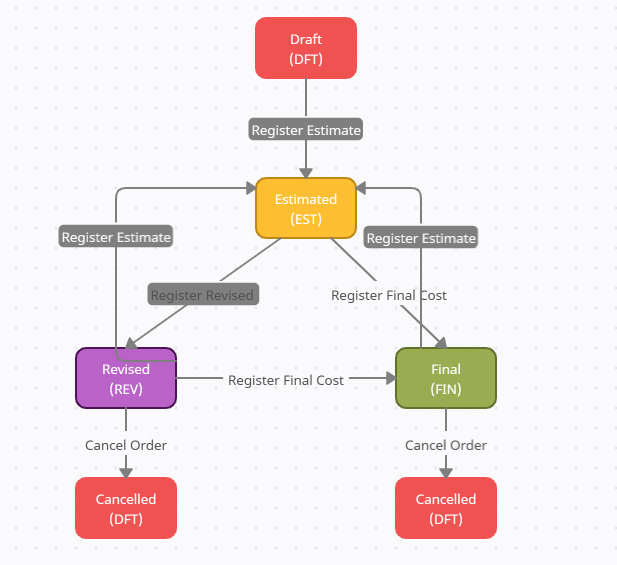
**Service Order statues**
* Draft, DFT
* Estimated, EST
* Revised, REV
* Final, FIN
* Cancel, CAN
**Service Order status transitions**
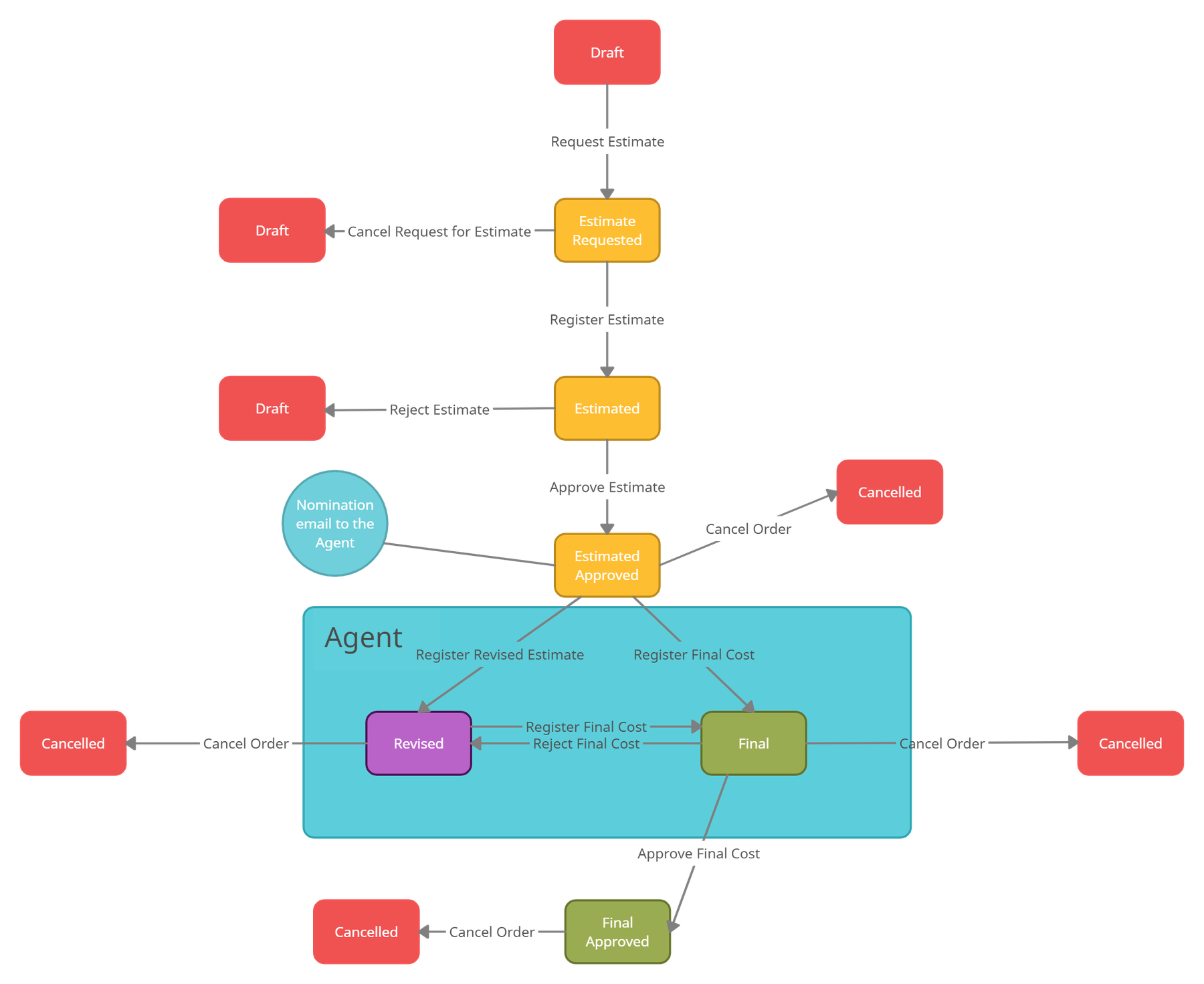
**Service Order status transitions when Agent nomination is enabled**
---
# Agent Instructions
This documentation is published with GitBook. GitBook is the documentation platform designed so that both humans and AI agents can read, navigate, and reason over technical content effectively. Learn more at gitbook.com.
## Querying This Documentation
If you need additional information that is not directly available in this page, you can query the documentation by asking a question.
Perform an HTTP GET request on the following URL with the `ask` and `goal` query parameters:
```
GET https://api.dataloy.com/api-release-8.18/user-guides/service-order-integration-api.md?ask=&goal=
```
`ask` is the immediate question: it should be specific, self-contained, and written in natural language.
`goal` is what the user is ultimately trying to achieve, the reason they need the answer. Sharing it helps GitBook give you a better, more relevant answer. A goal is most helpful when it describes the outcome the user wants rather than restating the question. For example, with `ask=how do I create an API token`, a goal like `automate deployments from our CI pipeline` lets GitBook tailor the answer to that use case.
The response will contain a direct answer to the question and relevant excerpts and sources from the documentation.
Use this mechanism when the answer is not explicitly present in the current page, you need clarification or additional context, or you want to retrieve related documentation sections.