> For the complete documentation index, see [llms.txt](https://api.dataloy.com/llms.txt). Markdown versions of documentation pages are available by appending `.md` to page URLs; this page is available as [Markdown](https://api.dataloy.com/release-8.27-coming-soon/voyage-management-system/step-by-step-guides/voyages/maintain-voyages/overview/vessel.md).
# Vessel
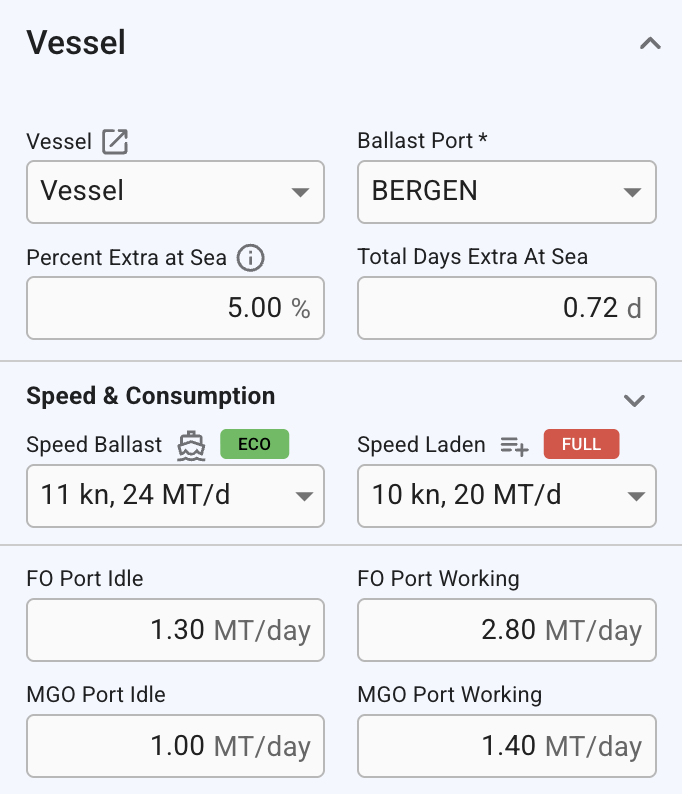
This page reveals the essential information of the Vessel section in the Voyage Overview tab.
(Figure 1) Vessel section in Voyage Overview
## Vessel
| Field | Description |
| ----------------------- | --------------------------------------------------------------------------------------------------------------------------------------- |
| Vessel | Changing this updates the voyage’s company and business unit, as well as those of all connected cargoes, to match the selected vessel. |
| Ballast Port | Changing this updates the voyage’s route. Editable when the voyage status is **"Estimate"** or when the voyage start date is unlocked. |
| Percent Extra at Sea | An additional percentage buffer applied to 'At Sea' calculations. Changes affect all Port Calls after the last arrival-fixed Port Call. |
| Total Days Extra At Sea | Additional time added to the voyage’s sea duration. Only editable when the voyage status is **"Estimate"**. |
## Speed & Consumption
### **Speed Ballast**
Displays the speed for ballast port calls when all port calls share the same value. If different speeds are set, the field is disabled and shows *“Multiple”*. Changing this value updates the speed for all ballast port calls.
### **Speed Laden**
Displays the speed for laden port calls when all port calls share the same value. If different speeds are set, the field is disabled and shows *“Multiple”*. Changing this value updates the speed for all laden port calls.
***
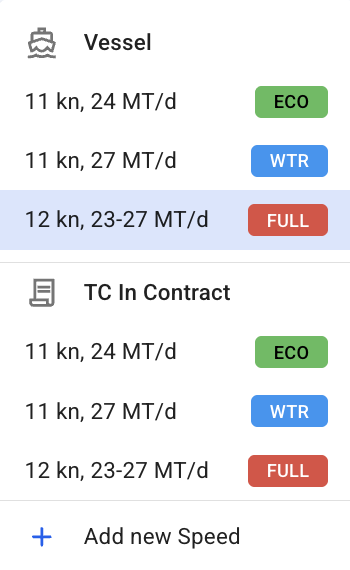
The dropdown initially includes speed options from the vessel and TC In contract configurations relevant to the selected passage. Speeds are grouped by source and labeled with a speed category chip (if applied).
You can also select *Add New Speed*, which applies to all Ballast or Laden port calls on the selected voyage. Newly added speeds can be edited directly, while speeds inherited from parent configurations must be edited at their source. This added speed also applies to the Main Engine Port Idle and Main Engine Port Working fields. For more information, see the [Speed and Consumption documentation](/release-8.27-coming-soon/voyage-management-system/step-by-step-guides/vessels/vessel-speed-and-consumption-data.md).
(Figure 2): Speed drop down menu
The selected speed’s source icon and speed category chip (if applicable) are displayed next to the field labels for easy reference.
The selected speed’s source icon and speed category chip (if applicable) are displayed next to the field labels for easy reference
{% hint style="info" %}
Speed categories are organisation-scoped custom tags used to categorise different speed and consumption profiles. They are used for classification and selection only and do not affect calculation logic.
Categories and their definitions are configured by your organisation’s administrator and can be managed in the **Master Data →** [**Speed Categories**](/release-8.27-coming-soon/voyage-management-system/step-by-step-guides/master-data/speed-categories.md) module.
{% endhint %}
#### **Speed source icons**
| Icon | Source | Description |
| -------------------------------------------------------------------------------------------------- | ------------------ | ----------------------------------- |
|  | **Vessel** | Speed defined at the vessel level |
|  | **TC In contract** | Speed defined in the TC In contract |
|  | **Voyage** | Speed added directly to the voyage |
---
# Agent Instructions
This documentation is published with GitBook. GitBook is the documentation platform designed so that both humans and AI agents can read, navigate, and reason over technical content effectively. Learn more at gitbook.com.
## Querying This Documentation
If you need additional information that is not directly available in this page, you can query the documentation dynamically by asking a question.
Perform an HTTP GET request on the current page URL with the `ask` query parameter, and the optional `goal` query parameter:
```
GET https://api.dataloy.com/release-8.27-coming-soon/voyage-management-system/step-by-step-guides/voyages/maintain-voyages/overview/vessel.md?ask=&goal=
```
`ask` is the immediate question: it should be specific, self-contained, and written in natural language.
`goal` is optional and describes the broader end goal you are ultimately trying to accomplish on behalf of the user. GitBook uses it to tailor the answer towards what is most useful for that goal.
The response will contain a direct answer to the question and relevant excerpts and sources from the documentation.
Use this mechanism when the answer is not explicitly present in the current page, you need clarification or additional context, or you want to retrieve related documentation sections.